

Software · Trading platform
Strategy Agent 策略代理
The risk guard that never logs off: a windowless program beside every trading engine Shuo runs. It carries out his commands, reports the engine’s own numbers second by second, and stops a losing strategy by itself, even with the connection down.
01System architecture
Hands, eyes and reflexes, placed right beside the engine.
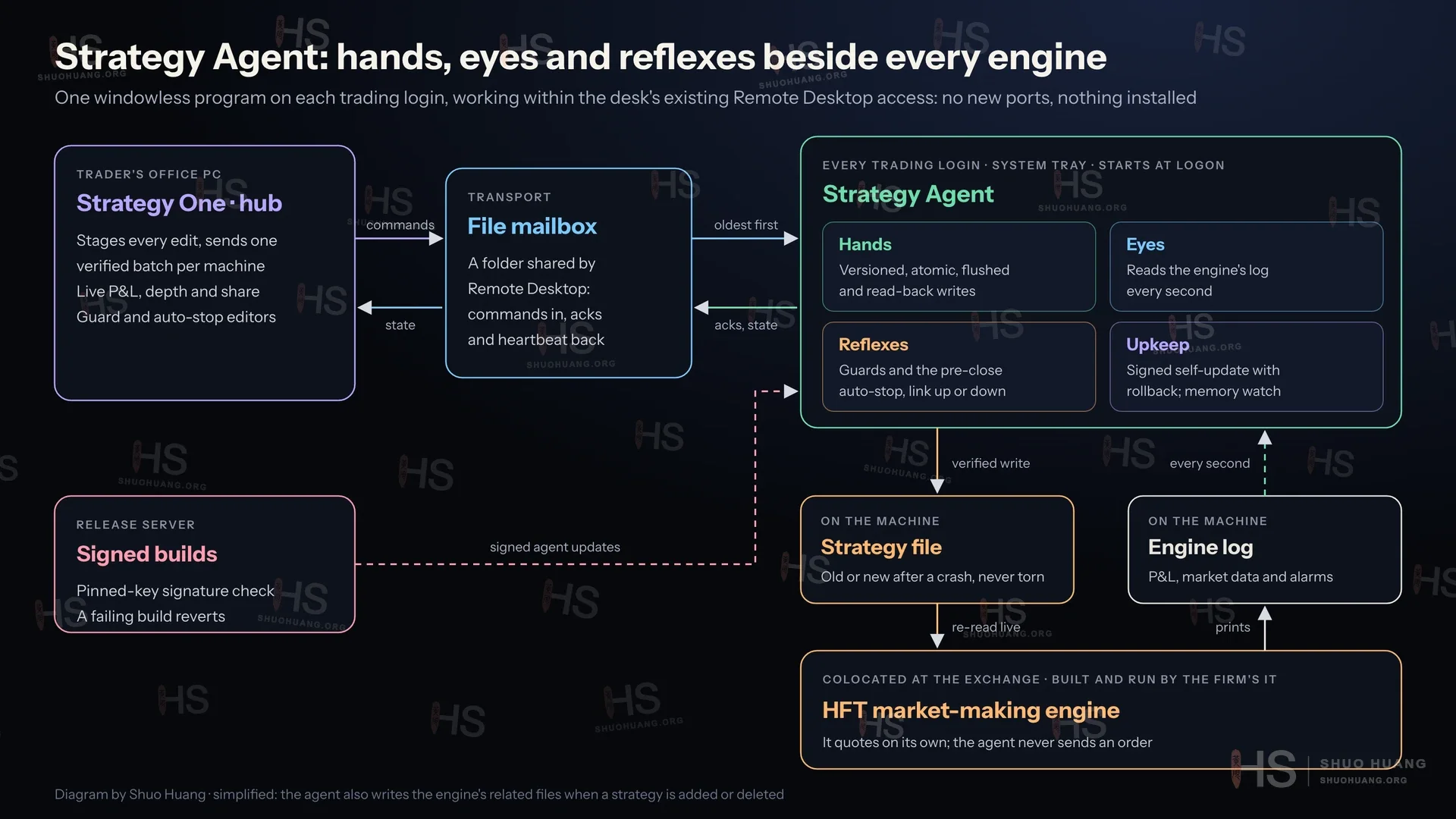
The trading machines are locked down by design: the office reaches them only through Remote Desktop, on standard-user logins. So the part that must never fail lives inside each trading session: one small tray program that makes every change the control screen sends to the engine’s strategy file, reads the engine’s log every second, and runs the risk rules on the spot.
Trader’s PC
 Strategy One
The control screen. Stages every edit and shows every machine.
Remote Desktop
File mailbox
A folder shared through Remote Desktop. One file operation costs about 0.2 s at the Shanghai site and up to 3.3 s at the Dalian site, so every one is counted.
Each trading machine · system tray
Strategy Agent
Command arm, log reader, guard engine and maintainer in one process. Starts at logon; no window.
Desk server
Signed releases
A build is applied only if its signature matches the pinned certificate; a failing build reverts.
On the machine
Strategy file
The engine’s live strategy file. Old or new after a crash, never half-written.
On the machine
Engine log
P&L per contract every second, every market snapshot, every alarm.
Colocated at the exchange
HFT market-making engine
Built and maintained by the firm’s IT. It quotes; the agent never sends an order.
Simplified: the agent also writes the engine’s related configuration files and the terminal’s position file when a strategy is added or deleted, and uploads a daily diagnostics bundle to the desk server. The engine, its file formats, the trading terminal and the Remote Desktop setup belong to the firm’s IT.
Why the guards live here, not in the hub
The hub sits on the trader’s PC. If he logs off, closes it, or the Remote Desktop link drops, a guard in the hub is blind. The agent sits next to the engine, reads its log every second and writes the status itself.
Why spreads park at cancel-only, never at stop
Stop tells the engine to flatten with fill-and-kill orders, and exchanges reject those for listed spread contracts. Cancel-only pulls the resting orders and keeps the position. So every guard and the pre-close routine default to cancel-only for spreads.
What it never does
It never sends an order, never needs admin rights and never opens a port to the network, and its automatic writes never override a status that the trader or the engine has already set.
The drawing
Open the agent’s architecture drawing redrawn for this page: hub, file mailbox, agent, strategy file, engine log, engine and release server on one sheet.
02The story
A risk guard beside every engine that keeps working with the connection down.
A market-making engine posts buy and sell prices all day from servers at the exchange, and a trader steers it from an office PC through a Remote Desktop window. When that window drops, the trader is blind and the engine keeps trading. On his own initiative, Shuo conceived, designed and built Strategy Agent: a small windowless program beside each engine that makes every change from his control screen safely, reports what the engine is actually doing, second by second, and enforces his risk rules on the spot, connected or not.
01
The problem
The engines Shuo runs quote from machines colocated at the Dalian and Shanghai exchanges, which the office reaches through Remote Desktop. Before the agent, steering a machine meant keeping an editor window open inside every remote session, and adding or deleting a strategy meant opening that machine’s own editor.
- A protective rule kept on the trader’s own screen goes blind the moment he logs off, the link drops or the night shift takes over
- The engine’s live strategy file has several writers: the trader, the engine itself, edits made by hand on the machine and, from September, CHRONOS. A writer working from an old copy silently undoes the others’ changes
- What the engine was actually earning, second by second, was visible only inside each remote window
02
What he built
Nobody assigned this, and the desk had no cross-machine tool to build on. Shuo conceived, designed and built from scratch a tray program that starts at logon on each trading machine and does four jobs. They work like a body:
- Hands. It is the only program that changes the engine’s strategy file for Strategy One. Every change is refused if it was prepared on an outdated copy, written so a crash cannot leave half a file, backed up, and read back to prove it landed.
- Eyes. It reads the engine’s own log every second: profit and loss, lots bought and sold, how much is resting at the best bid and ask, the market’s volume, every alarm. The numbers ride on a heartbeat the agent was already sending, so the feed costs no extra traffic on a slow link.1
- Reflexes. Loss limits, lot limits and a cap on the engine’s share of the day’s market volume are checked on the machine itself, every second. When one trips, the agent switches the strategy to the status the trader chose: pause, stop, or pull the orders and keep the position. It works with the control screen closed and the link cut.
- Upkeep. It updates itself from signed builds, rolls a broken one back, exports its own diagnostics every day, keeps a last good copy of the strategy file for a one-click restore after a server crash, and watches the machine’s memory.
Think of a co-pilot who stays in the cockpit when the radio to the tower goes quiet.
03
What changed
The editor window left his trading machines when the agent shipped, and every edit moved to one screen. Since then the agent has become the layer the rest of his platform stands on:
- Proven on a full trading day. A whole day of engine logs was replayed through the released agent; all 1,429 heartbeats matched an independent reference model.2 The same replay caught three defects that synthetic tests had passed, before release.
- Proven in trading. On its first live run the pre-close routine parked a running spread, a two-month pair quoted as one instrument, with a 40-millisecond write (orders pulled, position kept); the engine acknowledged a second later.3 Guards have fired in live trading.4
- Faster where it is slowest. On one Dalian-site machine the median confirmation fell from 3.6–4.1 seconds to 2.7; the Shanghai site confirms in about a second.5
- Run like production. Six fleet-wide updates in two weeks, five of them in a single week.6 Since October any machine’s agent updates from its card on the control screen, so nobody logs in to a trading machine to do it. A deliberately broken build, tested on a trading machine outside trading hours, was rolled back in 15 seconds.7 When a server crash left a strategy file as zeros, he diagnosed it and shipped a crash-proof save in the next release.
1,429/ 1,429
heartbeats of a full trading day’s replay matched an independent reference model2
1s
how often every risk guard is checked, on the trading machine itself8
40ms
to write the pre-close status that parks a running spread, on its first live run3
6updates
rolled out fleet-wide in two weeks, five of them in a single week6
15s
from a deliberately broken update failing to the previous build restored, tested on a trading machine outside trading hours7
2.7s
median confirmation of a change on one Dalian-site machine, down from 3.6–4.1 s5
03Evidence
Every measured confirmation got faster
When the trader changes a strategy’s status or size, the change travels to the trading machine as files over Remote Desktop, and the agent confirms it once it has landed. Release 4.0 (October 21, 2026) made the agent rest 0.3 seconds instead of 1.5 for a minute after each command and look for new commands again at once, and the control screen now asks for the answer more often.
Median time to confirm a change, before and after release 4.0
On one Dalian-site machine the median wait fell from 3.6 to 2.7 seconds; on the test rig it fell by about a third.
Show the dataHide the data
| Measurement | Before 4.0 | After 4.0 | Change |
|---|---|---|---|
| Rig: one change | 3.3 | 2.3 | −1.1 |
| Rig: second quick change | 6.3 | 4.1 | −2.2 |
| Desk: one Dalian-site machine | 3.6 | 2.7 | −0.9 |
04Functions
What it does, in the order a trader meets it
A
Always there, nothing to open
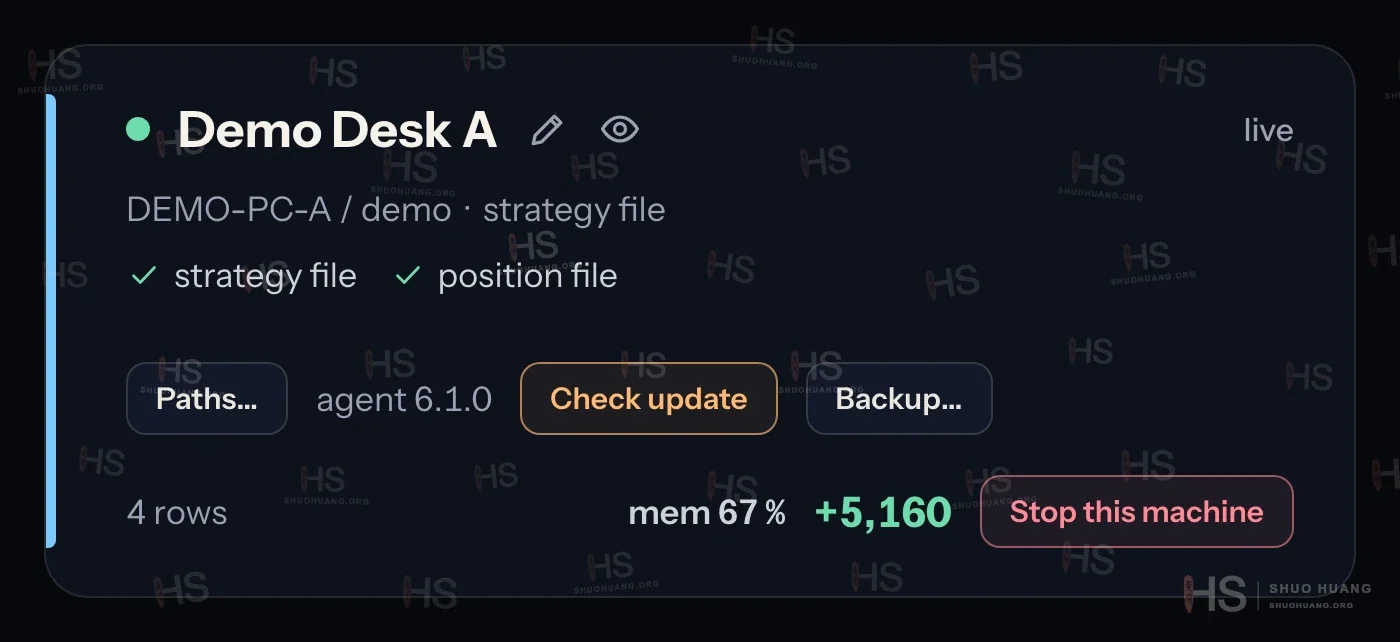
The agent starts at logon, finds the engine’s files by itself and shows up on the control screen as one card.
- Tray-only and autostarting, on the pattern of his own watchdog The Guardian: no window, no installer, no admin rights
- Finds the engine folder and the terminal’s position file from the logged-in account; a file picker opens on the trading machine only if discovery fails
- Stops only its own account’s programs on servers that several traders share
 Enlarge
- Marker 1: Paths…: shows where the agent found the engine’s files; the picker it opens runs on the trading machine, not on the trader’s PC.
- Marker 2: agent 6.1.0: the version that machine’s agent reports in its heartbeat.
- Marker 3: Check update: tells that agent to run its own signature-checked update check; applying a new build takes one more click, and nobody logs in to the trading machine.
- Marker 4: Two check marks: the agent has located the strategy file and the terminal’s position file it is allowed to write.
- Marker 5: mem 67 %: the whole machine’s memory commitment against its effective ceiling, sampled by the agent every 30 seconds.
B
The hands: one safe writer
Every change the trader sends is carried out by the agent, and only if the file is still the version he was looking at.
- Conditional on the file version, atomic, flushed to disk, read back and backed up; a multi-file change rolls back as a whole if any file fails
- A write allow-list: the strategy file, its sibling files and the terminal’s position file, nothing else on the machine
- Coexists with the engine’s own writes, hand edits on the machine and CHRONOS, without overwriting any of them
C
The eyes: the engine’s own numbers, every second
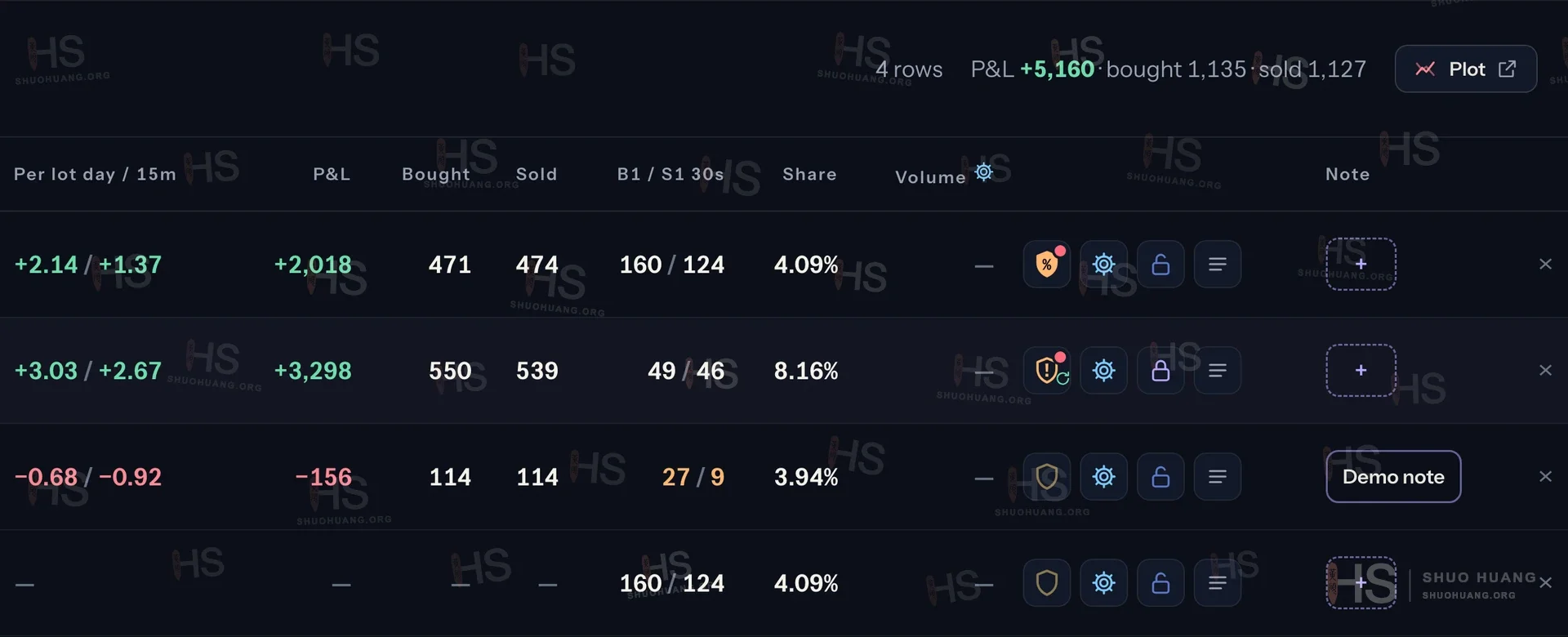
The agent tails the engine’s log and turns it into the live columns of the control screen.
- P&L and lots per contract for the current engine run, at one-second resolution, kept for the whole trading day
- Average size resting at the best bid and ask over 5 to 300 seconds, and this engine’s share of the day’s market volume
- Engine alarms with routine noise filtered out, and a warning when yesterday’s engine is still running beside today’s
 Enlarge
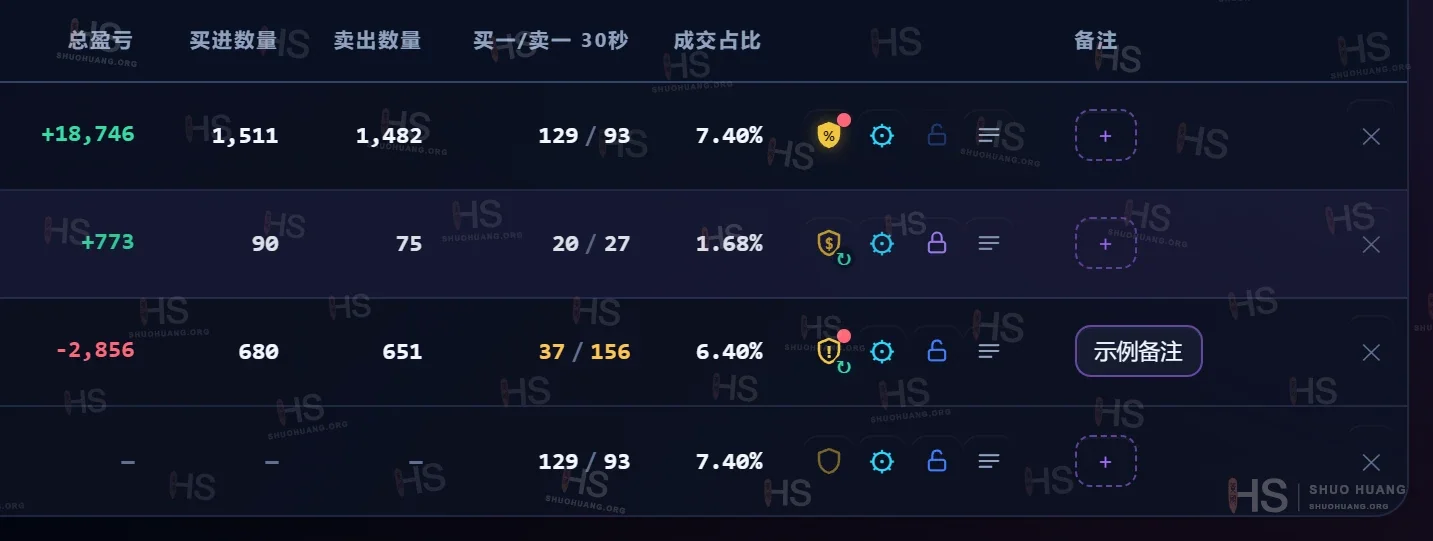
- Marker 1: P&L: the engine’s own running profit for this contract, read every second.
- Marker 2: Bought / Sold: lots traded in the current engine run; a restart begins again from zero, the way the engine counts.
- Marker 3: B1 / S1 30s: average size resting at the best bid and best ask over the last 30 seconds. It turns amber (third row) when the book is thinner than the quote size.
- Marker 4: Share: this engine’s buys plus sells as a share of the contract’s market volume today.
- Marker 5: Shield and gear (first row): the filled shield with a dot means a risk guard is armed, evaluated on the trading machine rather than on this screen; the gear beside it opens the strategy’s settings, including the automatic stop before each session close, which the agent also runs.
D
The reflexes: guards that hold with the link down
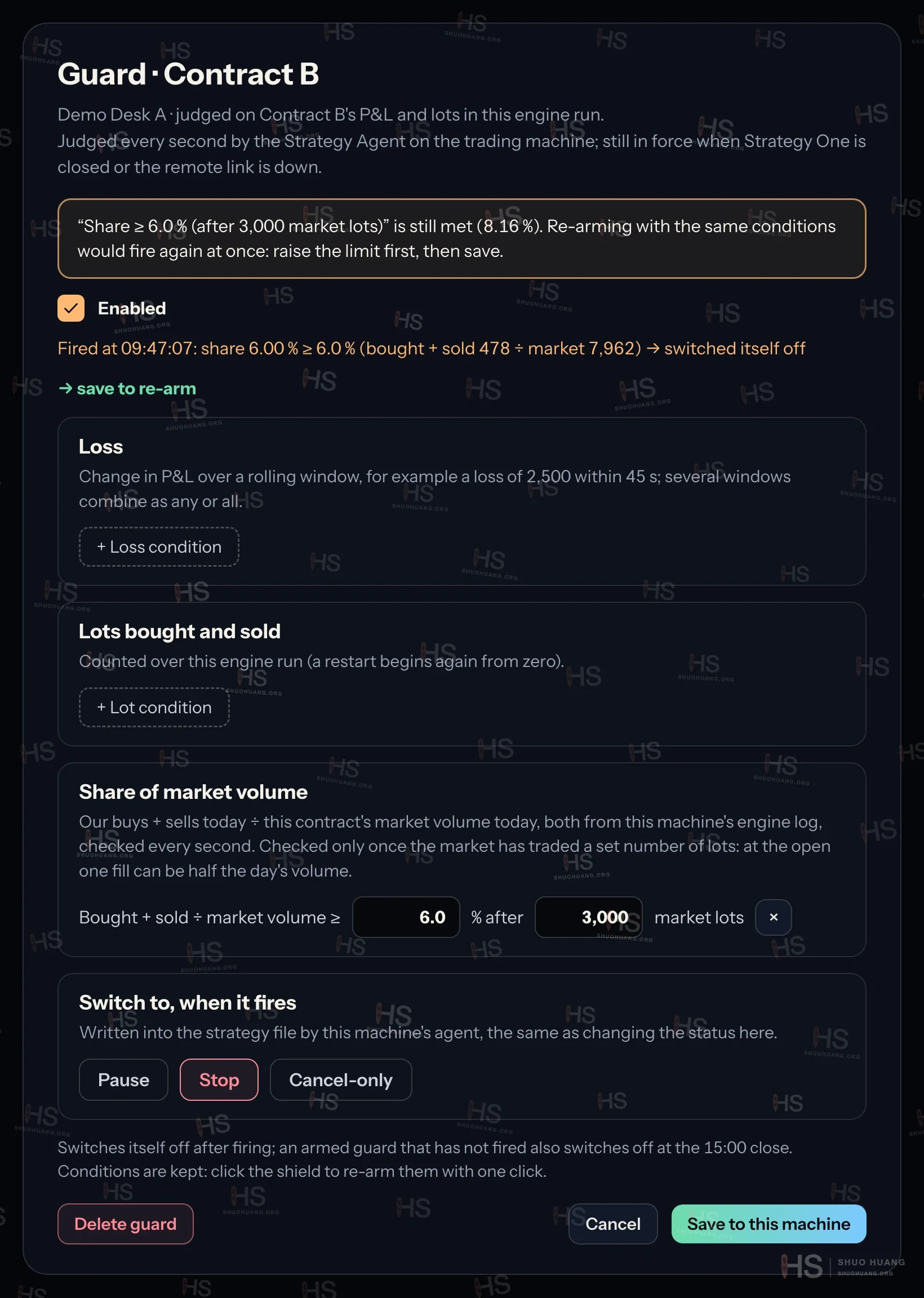
The trader sets a rule in seconds; the machine enforces it every second, whether or not anyone is connected.
- Rolling loss windows (a set loss within a set number of seconds), lot limits and a market-share cap, each switching the strategy to a chosen status
- One-shot and day-scoped: a guard switches off after firing and at the 15:00 close, so it never surprises the night shift; one click re-arms it
- Arms only after the machine confirms it can actually write the file; otherwise the trader is told and offered a fix
 Enlarge
- Marker 1: Subtitle: the rule is judged every second by the Strategy Agent on the trading machine and stays in force when Strategy One is closed or the remote link is down.
- Marker 2: Amber line: this guard already fired today on its share condition and switched itself off; saving the dialog re-arms it. The box above it warns that the share is still over the limit, so re-arming it unchanged would fire again at once.
- Marker 3: Loss: rolling windows, such as a set loss within a set number of seconds; several windows can be combined as any or all.
- Marker 4: Lots: a cap on lots bought, sold, either side or in total for the current engine run.
- Marker 5: Share: buys plus sells divided by the market’s volume today, checked only once the market has traded a minimum number of lots.
- Marker 6: Switch to: pause, stop or cancel-only. Outrights default to stop; spreads default to cancel-only and ask for confirmation on anything else.
 Enlarge
E
The routine before every close
A spread is one instrument that buys one delivery month and sells another. At each session end the engine stops running strategies with the status that is wrong for spreads; the agent gets there first.
- By default, parks every running spread in cancel-only 60 seconds before each session end, read from the machine’s own session table
- Per strategy: on or off, 5 to 3,600 seconds ahead, to pause, stop or cancel-only; acts only on a strategy that is still running
- When the engine changes a status on its own, the agent writes it into the file so the trader’s screen tells the truth
 Enlarge
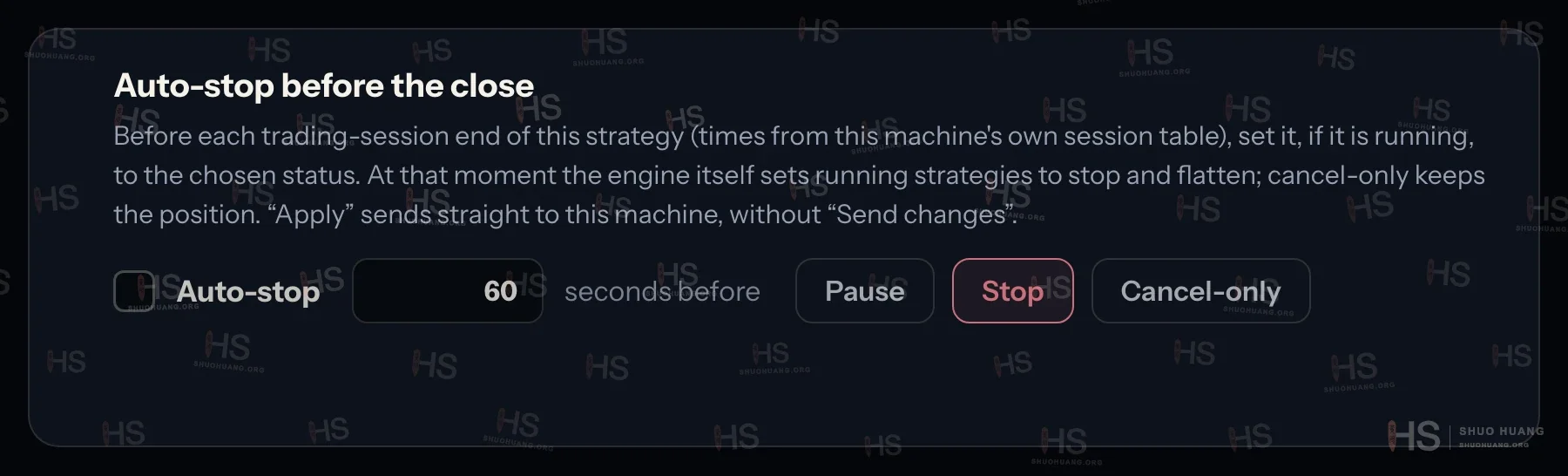
- Marker 1: The explanation on screen: before each session end of this strategy, using this machine’s own session times, the agent sets it, if still running, to the chosen status; at the end itself the engine would set running strategies to stop and flatten, while cancel-only keeps the position.
- Marker 2: Auto-stop checkbox: on or off for this one strategy.
- Marker 3: 60 seconds before: the lead time, from 5 to 3,600 seconds.
- Marker 4: Pause · Stop · Cancel-only: the status the agent writes. Spreads take cancel-only: orders pulled, position kept.
F
Upkeep: it looks after itself and the machine
Updates, diagnostics, crash recovery and a memory watch, with nobody logging in to a trading machine.
- Signature-pinned updates that stage during trading, apply at the next start and revert automatically if the new build fails
- A durable last-good copy of the strategy file, restored with one click if a crash ever leaves the live file damaged
- A daily diagnostics bundle, and a whole-machine memory watch that raises an alarm at 90 %
 Enlarge
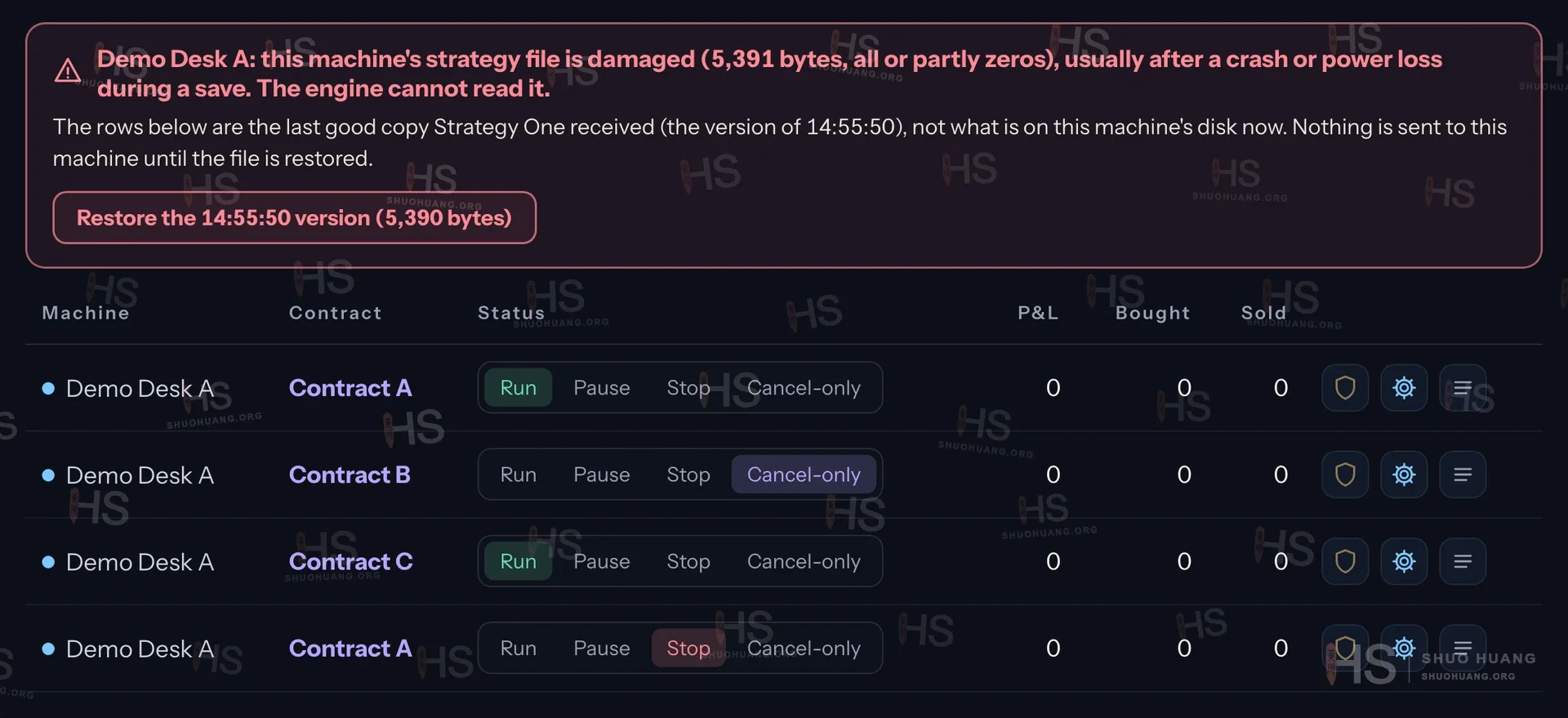
- Marker 1: Red notice: “This machine’s strategy file is damaged (5,391 bytes, all or partly zeros). The engine cannot read it.” Every send to this machine is blocked until it is repaired.
- Marker 2: Restore button: puts back the last healthy version the agent kept, byte for byte, and stores the damaged bytes as a backup.
- Marker 3: The rows below are that last good version, not what is on the machine’s disk now, and the notice says so.
05All screens
Seven views of the program.
Enlarge
Enlarge
 Enlarge
Enlarge
Enlarge
Enlarge
06Under the hood
For the technical reader: the protocols, the math and the pseudo-code.
Design constraints, the write protocol, the delivery contract, the guard math, the full-day replay against an independent reference model, and pseudo-code for the key routines.
Under the hoodWrite protocol, guard math, replay validation against a reference model, and pseudo-code, for the technical reader
This component holds no trained model; the modeling work is on the CHRONOS page. What it offers a technical reader is production systems engineering under hard constraints (one slow file channel, standard-user logins, several uncoordinated writers of one live file): optimistic concurrency control, crash-durable atomic writes, real-time log ingestion, and staged deployment with automatic rollback. The validation method is borrowed from research: differential testing against an independent reference model, value-by-value comparison on a replayed trading day, and rig results kept apart from desk results.
Constraints and process layout
One Windows PowerShell 5.1 script, hosted in-process by a signed C# launcher, running as a standard user on Windows Server machines that several traders share. Inside it:
- a loopback HTTP API with a token header, the only path to the files, which serializes every write, whether it comes from the hub, a guard or the auto-stop;
- the arm thread, which works the Remote Desktop mailbox: heartbeat first, then commands, then pushes;
- the reader thread, which tails the engine log;
- the tray icon in its own single-threaded apartment, background jobs for update checks and exports, and the memory-watch thread.
Shuo made each design decision against a concrete alternative.
| Decision | Alternative rejected | Why |
|---|---|---|
| Files through a Remote Desktop shared folder | A socket or an API between office and machine | That would need a new network port; a shared folder works within the Remote Desktop access the desk already has. |
| Guards inside the agent | Guards in the hub, next to the interface | The hub is blind the moment the trader logs off or the link drops. The agent sits beside the engine. |
| Read the engine’s log | Ask the engine for its state | The log already carries every number the screen needs, second by second. Tailing it is passive: shared read, size check first, a quiet file is never opened, so the engine is never disturbed. |
| Telemetry inside the existing heartbeat | A separate telemetry file each second | Each file operation over Remote Desktop costs from 0.2 s (Shanghai site) to 3.3 s (Dalian site, in the afternoon); extra files would slow the trader’s own commands. |
| The agent is the only writer of the mailbox copy | A “mirror” shortcut in which the hub writes the copy from the bytes it sent | Shuo built the shortcut first; it saved a write but let a copy’s content and its version label drift apart. He chose guaranteed consistency and gave the write back. |
| Trader-set guards beside the engine’s own limits | Rely on the engine’s built-in risk limits | Built-in limits are set per instrument in advance. These are intraday rules a trader arms and changes in seconds from one screen: rolling loss windows, lot caps, a share cap. |
| One-shot, day-scoped guards | Mute an agent whose control screen has been away for an hour | His first idea, dropped before anything was built. Switching off after firing and at the 15:00 close covers the shift handover directly, and the state shows on the shield. |
| Updates stage now and apply at the next start | Swap the program mid-session | A live session is never closed unasked: a swap restarts the agent, and its guards and auto-stop would pause while it does. |
The write path: optimistic concurrency on a file with several writers
The engine’s strategy file is written by the trader through the hub, by the engine itself, by hand edits on the machine, and by CHRONOS. Nobody can take a lock the others respect, so every write is conditional. A hub command carries the whole new file plus the version the trader was looking at; the agent compares it with the version on disk and refuses on any difference. The hub then re-plans on the fresh copy; it never replays an unsent edit over a field someone else has moved.
An accepted write runs in a fixed order:
- path check against the allow-list (the strategy file, its sibling files, the terminal’s position file);
- one backup set for the batch;
- the new bytes to a temp file with write-through and an explicit flush;
- an atomic replace of the live file;
- a read-back that must equal the bytes sent, then the acknowledgment.
A structural change (adding or deleting a strategy touches several of the engine’s files) is one batch: every file’s version is checked first, and any failure rolls the whole batch back. The agent’s own automatic writes (guards, auto-stop, engine-status sync) go through the same single loop, change nothing but the status of the strategies concerned (a whole session-end burst is one edit), and wait when the file was written less than 2 s ago.
Delivery contract over a slow link
Shuo profiled the agent’s own cycle log from the trading machines before changing anything: the slow cycles showed that nothing was CPU-bound and that one file operation over the shared folder cost 0.3 to 1 s, with a status change costing about 24 operations. The contract that came out of it:
- Heartbeat first, as a direct write of about 250 bytes, so “online” never waits behind slow work.
- Ack before push. The acknowledgment is written first, then the fresh copy of the file; the hub hides the stale copy in between, so a confirmed status never flashes back.
- Commands before pushes, with a 4-second push budget per cycle, so a command is read every few seconds even while a machine re-publishes everything after a reconnect.
- Hot mode. The cycle rests 1.5 s when idle and 0.3 s for 60 s after a user command; idle machines add no extra traffic.
- Never a half-written file: a file that does not end with its closing tag is read again 250 ms later.
- Loopback calls skip Windows proxy auto-detection, which had once cost seconds per call.
Rig numbers and desk numbers are reported separately because the link itself is the dominant cost.
| Measurement | Before | After | Where measured |
|---|---|---|---|
| Mailbox file operations per status change | 11 | 6 | Counted in the code, not timed |
| Single toggle, median (n = 15) | 3.33 s | 2.28 s | Test rig, fixed 0.6 s per file operation |
| Second of two quick toggles, median | 6.30 s | 4.14 s | Test rig, same link model |
| First cycle after a reconnect | 44.7 s | 5.8 s | Before: on the desk, about 0.9 s per file operation. After: simulated link at 0.9 s per file operation |
| First-attempt confirmation, one Dalian-site machine, median | 3.63 s and 4.14 s (two periods) | 2.7 s | Desk, control screen’s log; different days5 |
| First-attempt confirmation, Shanghai site, median | — | 0.90–1.0 s | Desk, control screen’s log, late October |
| Command round trip with the log reader running | 1,504 ms | 1,531 ms | Test rig; the per-second feed adds no file operations1 |
The log reader and its full-day validation
The reader follows the engine’s newest log file, checks its size before opening it, reads only the new bytes with sharing flags that let the engine keep writing, and decodes them as Latin-1 so byte offsets stay aligned. From the stream it keeps, per contract: the run’s cumulative P&L and lots; per-second samples of the size at the best bid and ask for 300 s, published as averages over 5, 10, 15, 30, 60, 120 and 300 s ending at the engine’s own clock; the day’s cumulative market volume; alarms; and status changes, telling the trader’s changes from the engine’s own.
Validation design. Shuo refused to release the reader on synthetic tests alone. One full trading day of engine logs, a day with hazards in it (two engines running at once, an engine restart, log rotations, a mid-day agent restart), was replayed line for line through the released agent, with only the timestamps shifted. Every heartbeat was compared, field by field and for equality, with a reference model written independently in Python from the rules, not from the agent’s code. Two implementations that share no code must agree on every value, so a shared misunderstanding is the only way to be wrong together.
The first build failed that test in three ways no synthetic rig had shown, and the per-heartbeat comparison then found a fourth:
- the engine’s start-up dump of thousands of instruments filled the market-data table, so depth and share would have been blank all day;
- a surviving engine from the previous day had its file chained to today’s run, so thousands of phantom lots would have been counted and a share guard would have fired falsely minutes after the open;
- the same surviving engine stamped its quotes with its own trading day, hiding the day’s market volume;
- the depth windows counted a quote one second ahead of the latest profit line; they are now capped at the engine’s own time.
All four were fixed before upload, and a two-engines warning was added. The standing rule since: any reader change is replayed on a full trading day with something odd in it, plus one mid-day agent start and one restart, on the built executable, with match counts reported per field.
| Compared with the reference model | Result |
|---|---|
| Heartbeats | 1,429 of 1,429 matched |
| Day market volume, per contract | Every value equal |
| Own lots bought plus sold, per contract | Every value equal |
| Best bid and ask size averages | Every value matched; under 1 % of them only to within ±1 from rounding |
| Share guard | Fired on the first check after the true crossing, and again right after the restart |
| Back-read of the day’s logs after a mid-day agent start | 480.7 MB in 25.8 s |
Guard evaluation
The engine prints only a cumulative P&L per contract, so a rolling loss rule needs the agent’s own per-second history . For a window of seconds and a guard armed at , the change is measured from the last sample at or before the window start, and never from before arming, so an old loss cannot fire a new guard. A loss rule with limit fires when the change is at or below ; several windows combine as any or all.
def window_change(times, pnl, w, t_arm):
    """Change in cumulative P&L over the last w seconds, never from before arming."""
    if len(times) < 2:
        return None
    start = max(times[-1] - w, t_arm)
    i = bisect_right(times, start) - 1     # last sample at or before the window start
    if i < 0 or times[i] < t_arm:          # that sample predates arming:
        i = bisect_left(times, t_arm)      #   use the first sample after it instead
    if i >= len(times):
        return None
    return pnl[-1] - pnl[i]


def loss_rule_fires(times, pnl, w, t_arm, limit):
    change = window_change(times, pnl, w, t_arm)
return change is not None and change <= -limitShare guard, and how a guard writes
The share condition divides this engine’s lots bought plus sold today by the contract’s market volume today, and is checked only once the market has traded a floor , because at the open one fill can be half the day’s volume. The market volume comes from the engine’s last market-data line rather than from the desk database, whose daily table is written before the close and so under-reads the day’s volume, which would overstate the share.10
Lot and share conditions count a whole engine run or a whole day, so they are one-shot by nature: once reached they would fire again at once. A one-click re-arm of such a rule opens the dialog with a note instead.
When a guard fires, the agent edits the strategy file itself, through the same single write loop as hub commands:
- a comment-aware, single-value edit: one status value in the one block whose id matches, with comments read the same way the engine’s parser reads them;
- only when the file says the strategy is running, so a guard can never override a status the trader or the engine has already set;
- a file written less than 2 s ago is retried, because someone else may still be writing it;
- a backup set first, then a verified save.
A guard is evaluated only while the engine is live and the strategy is quoting. The check runs every second and the write is local; how quickly quoting stops also depends on the engine re-reading the file.8
Status semantics: why spreads park at cancel-only
The first question a market maker asks is what “stop” does to the position. The strategy statuses differ precisely there, and the agent’s defaults follow the difference.
At every session end the engine itself sets any strategy that is still running to stop, and leaves paused, stopped and cancel-only strategies alone. For a spread, stop is the wrong place to be parked. So the agent’s pre-close routine sets each running spread to cancel-only sixty seconds before every session end in the machine’s own session table, once per strategy per session end, no later than 3 s before the end, and the engine’s own stop then has nothing to do. On its first live run it parked a running spread with a 40 ms write; the engine acknowledged one second later and the spread was untouched by the engine’s session stop a minute after that.3
| Status | What it means | Used for |
|---|---|---|
| Run | The strategy quotes normally. | The state from which a guard or the auto-stop acts. |
| Pause | Quoting stops and the orders are canceled; the position stays as it is. | Rarely used; available as a guard target. |
| Stop | Quoting stops and the engine tries to flatten the position with fill-and-kill orders. | Default guard target for outrights. Wrong for exchange-listed spreads: exchanges reject those orders for spread contracts. |
| Cancel-only | The resting orders are pulled and the position is kept. | Default guard and pre-close target for spreads. Setting a spread to pause or stop asks the trader to confirm. |
Durable writes and crash damage
After a server crash, a strategy file came back with the right size and none of its content, all zero bytes: the agent’s last save had never been flushed to disk, and the engine could not start on it. Shuo diagnosed before fixing: the machine’s crash record showed a kernel-level stop on healthy disks, which overturned the first hypothesis of a storage stall, and rebuilding the file from the last backup set plus every later change proved which save had been lost, to the byte.
The fix shipped in the next release:
- temp files and backups are written with write-through and an explicit flush, so after a crash the file is the old version or the new one, never zeros;
- the agent never publishes an empty file or one containing a zero byte, keeps a durable last-good copy, and restores that very copy on one click, keeping the damaged bytes as a backup;
- the hub blocks every send to a damaged machine.
One refinement followed from the engine’s own log rather than from theory. The engine had logged no read failure in the preceding weeks of confirmed saves; on one of the first two saves after this release, it logged one (it re-read moments later and nothing was lost). The only change to the live-file swap had been a write-through flag on the rename, so the swap went back to a plain atomic replace the same day. The rule since: no write-through rename and no delete-access handle on a file the engine watches. The stated cost: a crash within a second or two of a save can bring back the previous valid version, never zeros.
def damage(data: bytes) -> str:
    if len(data) == 0:
        return "empty"
    if 0 in data:            # configuration text never holds a zero byte
        return "zero byte"
return "" # healthy: safe to publishSigned self-update and the memory watch
Update. An auto-updater is a powerful channel, so its only trust anchor is one pinned signing key. The agent checks the desk’s release server, downloads a higher version, and refuses anything not Authenticode-signed with the pinned certificate; the launcher checks the signature again before executing it. A build is staged, never swapped mid-session, and applied at the next start or on request. If the new build fails inside a 30-second health window, the launcher restores the previous executable and blocklists the failed version. Since October the hub can trigger the check and the apply on any machine from its card.
The pipeline was proven on a trading machine outside trading hours with a deliberately broken signed build: it failed one second after the swap, the previous version was back 15 seconds later, and the broken version was blocklisted.7
Memory watch. Built after Shuo diagnosed a failure mode of shared servers: the machine’s commit limit, not its RAM, ran out, exhausted by page-file-backed shared memory that belonged to no process’s private memory, while much of the RAM was still free. Every 30 seconds, without opening any process, the watch records commit against the machine’s effective ceiling, RAM, kernel pools and every account’s processes, and logs which programs started or ended whenever the commit that belongs to no program moves by 0.5 GB or more. Levels are 85, 90 and 97 % of the ceiling.
The ceiling is the current commit limit plus the page file’s remaining growth : a system-managed page file grows by itself each time commit crosses 90 % of the current limit, so a percentage of the current limit alone would sit at amber for nothing.
Testing, and the failure modes engineered out
Every agent change is exercised through a running agent. That rule came from a miss: a new file was added in three places in the agent and not in the fourth, its write allow-list, and neither the editor’s tests nor the hub’s tests executed one line of agent code. The allow-list and the push loop now derive from one table.
The harness: isolated rigs with a hub and two agents on test ports, a directory junction that emulates a Remote Desktop drop, generated engine logs, a stand-in for the file-transfer client in update tests, whole-day replays of trading-day engine logs against an independent Python reference model, and headless-browser checks of the hub’s interface.
| Failure mode | What prevents it | Evidence |
|---|---|---|
| A change built on an outdated copy overwrites someone else’s edit | Every hub write carries the file version the trader saw; a stale write is refused and the hub replans | With a byte-exact simulator of a second automated writer at 60 times its normal write rate, 5 of 5 sends landed on the first attempt (isolated rig) |
| A crash leaves a live file as zeros | Flushed temp files and backups, damage test on raw bytes, durable last-good copy | Crash-safety suite 30 / 30 |
| A guard is armed but could never write | Arming pre-check on the machine; an armed guard that later cannot write turns red with a one-click fix | Comment-handling suite 199 / 199, on the configuration formats the engine reads |
| A day-shift guard fires on the night shift | One-shot guards; all guards switch off at 15:00 on the machine’s own clock | Guard scenario suite 17 / 17 |
| Telemetry counts the wrong engine run | Run identity across rotations, restarts and the day boundary; two-engines warning | Full-day replay, 1,429 / 1,429 heartbeats2 |
| A bad update strands a trading machine | Pinned signature, staging, health window, automatic revert, blocklist | Broken-build test on a trading machine outside trading hours; built-executable smoke suite 41 / 41 |
| A backlog of chart requests takes a machine offline | User commands first, at most four chart questions per cycle, anything older than two minutes dropped | Found in use; fixed in the next release |
Built with
- PowerShell 5.1 (multi-threaded runspaces)
- C# launcher
- Win32 P/Invoke
- Authenticode code signing (pinned certificate)
- Loopback HTTP API
- Optimistic concurrency control (versioned writes)
- Atomic, crash-durable file I/O
- Real-time log tailing
- Risk controls
- Market microstructure (depth, market share)
- Self-update with automatic rollback
- Differential testing against an independent Python reference model
- Full-day log replay testing
- Headless-browser UI tests
- Windows Server · Remote Desktop
07Releases
Shipped in versions, like a product.
- 2.b.0 · The stand-alone tray agentDesigned and built in a single night. The editor window leaves his trading machines; every edit moves to Strategy One.
- 3.0 · Signed executable with self-updateSignature-pinned updates with a health window and automatic revert, proven on a trading machine outside trading hours with a deliberately broken build.
- 3.1 · The engine-log reader and the guardsLive P&L and lots in the heartbeat; loss and lot guards, engine alarms and engine-status sync, all on the trading machine.
- 3.2 · Automatic stop before each session closeRunning spreads are parked in cancel-only before every session end. On its first live run: one write, 40 ms.
- 3.5 · Remote update from the control screenAny machine’s agent checks for and applies an update from its card in Strategy One.
- 4.0 · Depth, market share and the full-day replayBest bid and ask size averages, the share guard, hot mode for faster confirmations; released only after a full trading day replayed with every heartbeat matching.
- 4.2 · One-shot, day-scoped guardsA guard switches off after firing and at the 15:00 close, so it never surprises the next shift.
- 4.4 · Crash-proof savesFlushed writes, damage detection and one-click restore of the last good copy.
- 4.4.2 · Arming pre-checkA guard arms only after the machine confirms it can write; comments are read the way the engine reads them.
- 5.0 · Machine-to-machine migrationRebuilds a machine’s whole set of configuration files from another machine or a backup, as one rolled-back-on-failure batch.
- 6.0 · Market-volume recorderPer-minute market volume for every followed contract, kept for 90 days.
- 6.1 · Memory watchWhole-machine memory commitment against its effective ceiling, with alarms on the control screen.
08Related
Programs that work with this one.
-
Strategy One
Fleet command for a live futures desk: every strategy on every exchange-colocated machine, controlled from one screen.
-
 Strategy Console
One-click, transactional editing of the file a live trading engine is reading. 0 torn files in 239,000 concurrent reads.
-
 CHRONOS
Self-retraining machine-learning controller that sizes and safeguards the desk’s live-hog market making, wired straight into the trading engine. Its central finding changed how the desk sizes.
- The Guardian Built in 70 minutes and deployed on the trading servers: freezes an accidental second launch of the desk’s HFT engine within a fifth of a second, then asks keep or close.
- 1The feed travels inside the heartbeat file the agent already writes, so it adds no file operations on the Remote Desktop link. On an isolated test rig, command round trips with the reader running took 1,531 ms against 1,504 ms on the previous agent, with none lost.
- 2One full trading day of engine logs, replayed through the released agent and compared heartbeat by heartbeat with a reference model written independently from the rules: 1,429 of 1,429 heartbeats matched. Market volume and own lots matched on every per-contract value, and the depth averages on every value, under 1 % of them only to within ±1 from rounding. Depth windows that span a log-file switch were left out of the comparison.
- 3First live run of the pre-close routine: a running spread was set from run to cancel-only 60 seconds before the session end; the file write took 40 ms and the engine acknowledged it one second later. A single measured event.
- 4Guards have fired in live trading. One firing whose write was refused, because of the way comments were nested in the file, led to the comment-aware edit and the arming pre-check.
- 5Median first-attempt confirmation of a status or size change on one machine at the Dalian site, from the control screen’s own log: 3.63 s and 4.14 s in two periods before release 4.0 (October 21, 2026), and 2.7 s in late October after it. The periods differ in day and link conditions, so the gain is attributed to the release by inference; on a test rig with a fixed 0.6 s per file operation the same change moved the median from 3.33 s to 2.28 s (n = 15). Across the Dalian site’s machines, late-October medians were 2.7–3.2 s; Shanghai-site medians were 0.90–1.0 s. The gap between the sites is the Remote Desktop link, not the software.
- 6Fleet-wide agent updates on the trading machines Shuo runs at the Dalian and Shanghai sites: 4.2.0 (October 30, 2026), 4.4.0 (November 6), 5.0.0 (November 10), 5.2.0 (November 11), 5.3.1 and 6.0.0 (both November 12), from his own release messages.
- 7Test on a trading machine outside trading hours, with a deliberately broken signed build. The launcher’s health window is 30 seconds; in this test the broken build failed one second after the swap and the previous version was restored 15 seconds after the failure, with the broken version blocklisted.
- 8Guards are evaluated once a second on the trading machine against the engine’s per-second P&L print, and the status is written locally. The time until quoting actually stops also depends on the engine re-reading its file; no exchange-side reaction time is claimed.
- 9The screens on this page are English redraws with generated values, or the project’s own demo rig, and are labeled as synthetic; no product is named on them. The timing chart and the tables measure Shuo’s own software. Methods and outcomes are described as they happened; the desk’s own figures are confidential and do not appear here.