

Software · Trading platform
Strategy One 策略总控台
Every strategy on every trading machine beside the exchanges, switched, sized or stopped from one screen and confirmed in seconds.
01System architecture
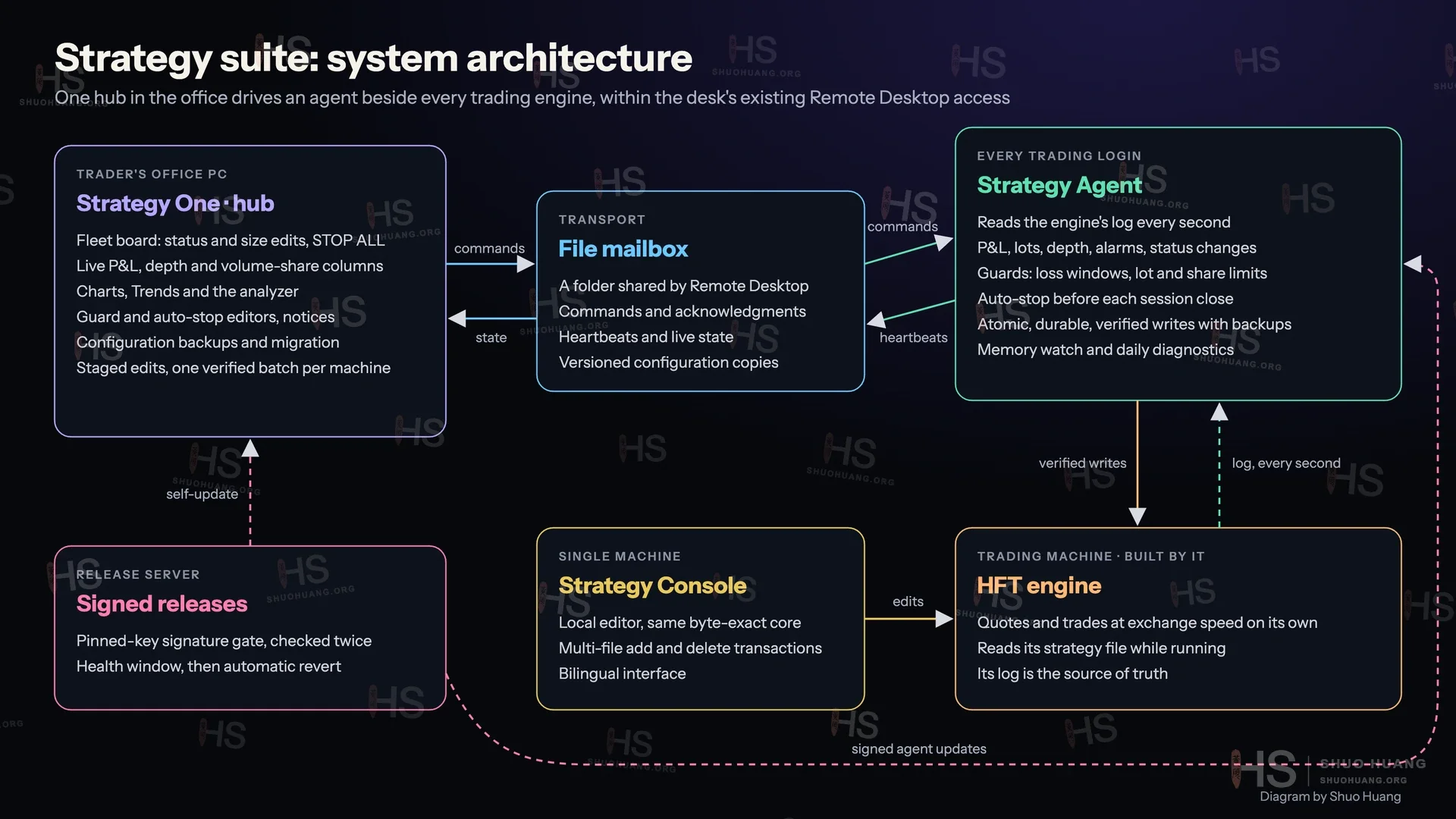
One hub in the office. An agent beside every engine. The desk’s existing Remote Desktop access in between.
The trading engines run on machines in server rooms next to the exchanges; the trader sits in an office in another city. The trading machines are locked down by design: the only access from the office is Remote Desktop, with no admin rights. Strategy One works entirely within that access. Every command, every acknowledgment and every live reading travels as a small file through Remote Desktop’s own shared-folder feature, with no new ports and nothing installed.
Trader’s office PC
Strategy One
The hub. Shows every strategy on every machine, stages edits, sends one batch per machine and retries until each machine’s file matches.
Remote Desktop shared folder
File mailbox
A folder on the office PC that each remote session can see. Commands in, acknowledgments and state out. No new ports, nothing installed.
Every trading login
 Strategy Agent
The only writer on Strategy One’s behalf. Refuses stale commands, runs the risk guards itself every second, reports the true state.
Colocated at the exchange · built by IT
HFT engine
Quotes and trades at exchange speed on its own. Re-reads its configuration while running; its log is the source of truth.
Release server
Signed releases
Hub and agents check daily, accept only a build signed with one pinned key, apply it at the next launch and revert by themselves if it fails within 30 seconds.
On the trading machine
Strategy file
The engine’s live strategy file. Written to a flushed temp file, swapped in atomically, read back byte for byte.
Simplified: one trading login is drawn; the fleet has several, at the Dalian (DCE) and Shanghai (SHFE) sites, each with its own agent, file and engine. Agents fetch their signed builds from the same release server as the hub. The engine, its file format, the Remote Desktop setup and the server that hosts the releases belong to the desk and its IT team; everything else on this diagram, the signed release channel included, is Shuo’s.
Why a mailbox?
Because it needs nothing new. Remote Desktop already lets a session see a folder on the office PC, so small files can carry commands one way and state the other. Strategy One uses exactly that: no new ports, nothing installed, and a channel that exists only while the trader is connected.
Control plane, not order path
The engines keep quoting at exchange speed on their own machines. What crosses the slow link is a human decision (run, stop, size, a parameter), confirmed in about 1 to 3 seconds2 instead of the tens of seconds a window hunt took.3 What cannot wait for a human runs on the machine itself.
One change, round trip
The hub drops a command file carrying the version it edited. The agent refuses it if the machine’s file has moved on; otherwise it writes, verifies, acknowledges first and then returns the fresh file. No acknowledgment means the hub re-reads the machine’s own file and retries.
Suite diagram
Open the suite’s architecture drawing the three programs of the suite, including the single-machine editor.
02The story
A row of Remote Desktop windows became one screen, live on the fleet two hours after the idea.
A market maker keeps buy and sell orders in the market all day and earns the small gap between them. Shuo’s desk does this with automated trading engines on machines next to the exchanges in Dalian and Shanghai, and each machine used to be a separate Remote Desktop window with its own settings file. On his own initiative, Shuo conceived, designed and built Strategy One from scratch: one screen on his office PC that shows every strategy on every machine, lets him switch, resize or stop any of them in a click, and lets him edit, add or delete them without leaving it. Think of air-traffic control: the aircraft fly themselves; one tower sees them all and tells each what to do.
01
The problem
The desk’s high-frequency engine runs on trading machines in server rooms beside the exchanges: Dalian for DCE products, Shanghai for SHFE. Each engine reads its own strategy file, and turning a strategy off or changing its size means editing that file on that machine.
- A price jump was a window hunt. With a Remote Desktop window open per machine, reacting to one contract meant finding the right window, opening the editor there, changing the value and saving. One machine at a time, while the market moved.
- Every session close was a tour. Each machine had to be stopped or parked separately, several times a day.
- Hand edits were a live risk. The engine reads the file while it runs: a half-written save, a stale copy saved over someone else’s change or a typo in a contract code could stop quoting.
- Nothing could see two machines at once. The desk had no cross-machine tool and no vendor product for one.
02
What he built
On the morning of July 31, 2026, Shuo conceived the program, named it and built the first version. Strategy One works within the desk’s existing Remote Desktop access, exchanging small command files through Remote Desktop’s own shared-folder feature, with no new ports and nothing installed. Under two hours after the first idea, it was running on the live machines.4
Today it is a fleet command center with three parts, all his: the hub on the office PC, a windowless Strategy Agent on each trading login it controls, and the single-machine Strategy Console it grew out of.
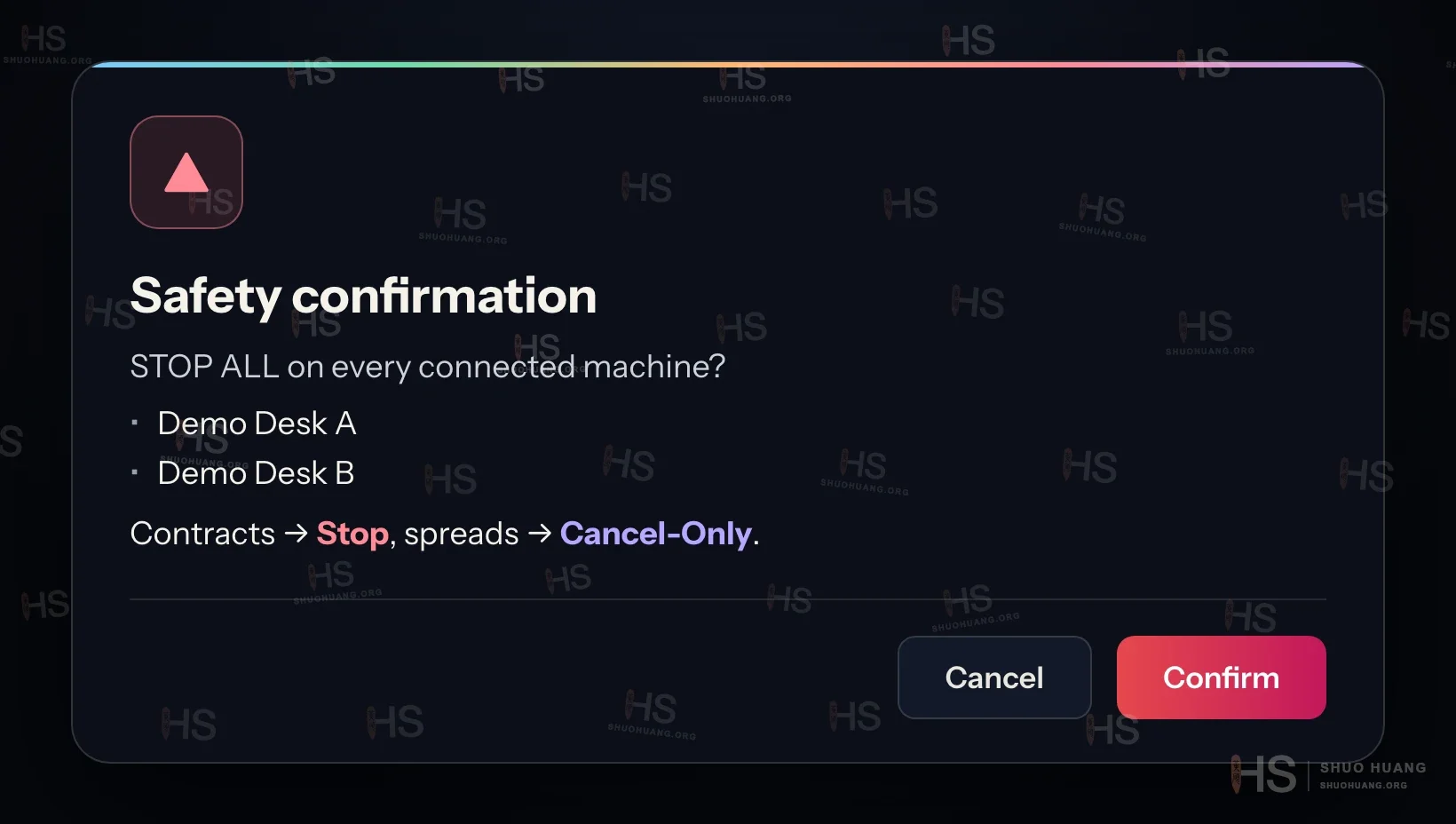
- One board, every machine. Status, size and every parameter of every strategy; add and delete strategies on any machine; a STOP ALL that parks every machine after one confirmation, spreads safely.
- Changes that prove themselves. Edits are staged, sent as one batch per machine, verified against the machine’s own file and retried until they match. A change someone else made is never silently overwritten.
- Protection that does not depend on the link. Loss, lot and market-share guards and the pre-close auto-stop run on each trading machine, checked every second.5
- Live telemetry and charts. Profit and loss, lots, order-book depth and share of market volume, read from each engine’s own log.
- Software that maintains itself. Signed executables that update themselves across the fleet and roll a bad release back on their own.
03
What changed
A decision that took a window hunt now takes one click and confirms in about one second at the Shanghai site and about three at the Dalian site.2 In its first weeks of live use the hub carried dozens of change batches a day, every one confirmed, none failed.1
Since September 10 the per-machine editors are gone from Shuo’s trading machines: Strategy One is the only place he edits, creates or deletes a strategy. When the engine team released a new strategy type that afternoon, the hub supported it within three hours, without touching a single trading machine.
It has gone through about 68 builds in three and a half months,6 and since September 21 new versions reach the machines as signed self-updates instead of manual installs: five fleet-wide updates in one week, the largest going from Shuo’s specification to every machine in under two hours.7 Lessons from daily use became fixes or standing rules, usually the same day, and the hub now runs for weeks without a restart. Its launcher and signing design carries three more desk applications, including the machine-learning trading system CHRONOS and Position Atlas.
0
failed change batches logged in its first weeks of live use (dozens a day, every one confirmed by a read-back)1
1–3s
from one click in the office to a verified write beside the exchange2
<2h
from first idea to a working run on the live trading machines4
≈68
builds in its first three and a half months6
5
fleet-wide signed updates in one week, none needing a visit to a trading machine7
≈37k
lines of code across the three-part suite, with zero third-party libraries8
03Evidence
Every change confirmed, at the speed the distance allows.
The first chart illustrates daily use with synthetic counts; the second shows the software’s own confirmation timings.
Dozens of change batches a day, every one confirmed
A batch is one send of a trader’s staged edits to one machine, and it counts as confirmed only when the hub has read the change back from the machine’s own file. In its first logged weeks of live use every batch was confirmed and none failed; the chart shows what that looks like with illustrative daily counts.9
Change batches confirmed per trading day (illustrative)
Every one of 773 illustrative batches confirmed: 76 to 120 on each of eight trading days, and none failed.
Show the dataHide the data
| Trading day | Batches confirmed · 0 failed on every day |
|---|---|
| Day 1 | 98 |
| Day 2 | 76 |
| Day 3 | 118 |
| Day 4 | 101 |
| Day 5 | 76 |
| Day 6 | 100 |
| Day 7 | 120 |
| Day 8 | 84 |
One to three seconds, set by distance
The median time from Send in the office to a verified write on a trading machine, for changes confirmed on the first attempt: the fastest and the slowest machine at each site.
Time to a verified write, by site, late October 2026
A change confirms in about a second at the Shanghai site and about three at the Dalian site: the gap is the distance from the office, not the software.
Show the dataHide the data
| Site | Fastest machine | Slowest machine |
|---|---|---|
| Shanghai site | 0.9 s | 1.0 s |
| Dalian site | 2.7 s | 3.2 s |
04Functions
Everything it does, in the order a trader uses it.
A
See the whole fleet
Every trading login is a card; every strategy on every machine is a row on one board.
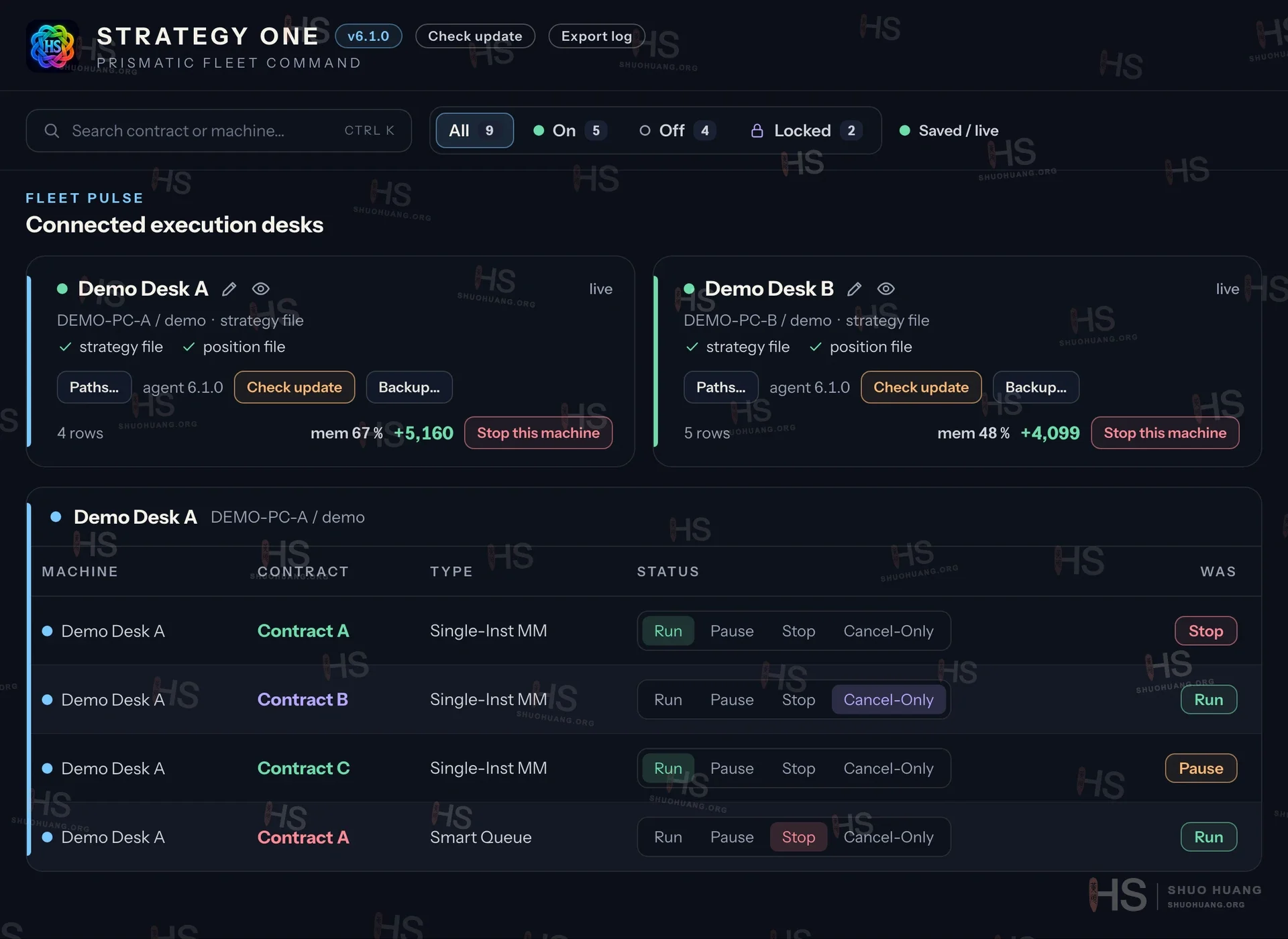
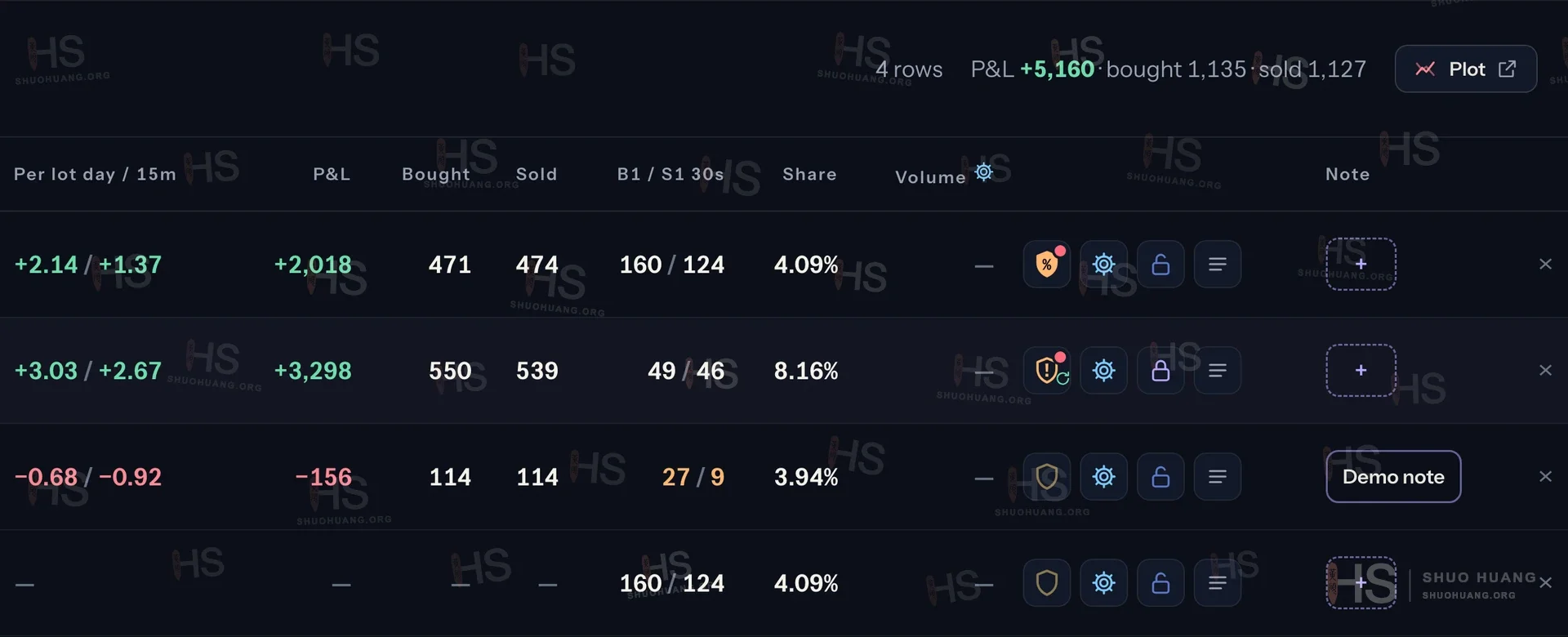
- Machine cards show live, slow or offline, the agent’s version, memory and a P&L subtotal; rows carry status, size, a lock, a note and a gear for every parameter.
- Live columns come from each engine’s own log every second and ride the existing heartbeat, so they add no traffic to the link.
- Depth (the lots waiting at the best bid and ask) turns amber when it is thinner than the strategy’s own order size; share of the day’s market volume turns amber, then red, as it nears the desk’s volume-share limit.
 Enlarge
- Marker 1: Filters. All, On, Off and Locked, with live counts, across every machine.
- Marker 2: Machine card. One per trading login: nickname, the strategy and position files its agent found, live or offline, and its own controls.
- Marker 3: Agent version and Check update. Updates the agent on that machine from here, with no Remote Desktop visit.
- Marker 4: Stop this machine. Parks every strategy on one machine; STOP ALL at the top right of the full window does every machine at once.
- Marker 5: Status control. Run, Pause, Stop and Cancel-Only are the engine’s own states. A click stages the change; nothing is sent until Send.
- Marker 6: One row per strategy. The same contract can carry two strategies of different types.
 Enlarge
B
Change anything, send once
Click through as many changes as the moment needs, then send them as one verified batch per machine.
- Every write is conditional on the machine’s file being exactly the version the hub edited; the hub then checks the machine’s own file and retries until it matches.
- If another program moved the same field in the meantime, for example CHRONOS’s loss brake, the edit is held in red for the trader to decide. A risk action is never silently overwritten.
- STOP ALL is spread-safe. Single contracts stop; calendar spreads (one contract on the price gap between two delivery months) go to cancel-only, which pulls their orders and keeps the position, because the engine’s stop would try to close them with orders the exchange rejects for spreads.
 Enlarge
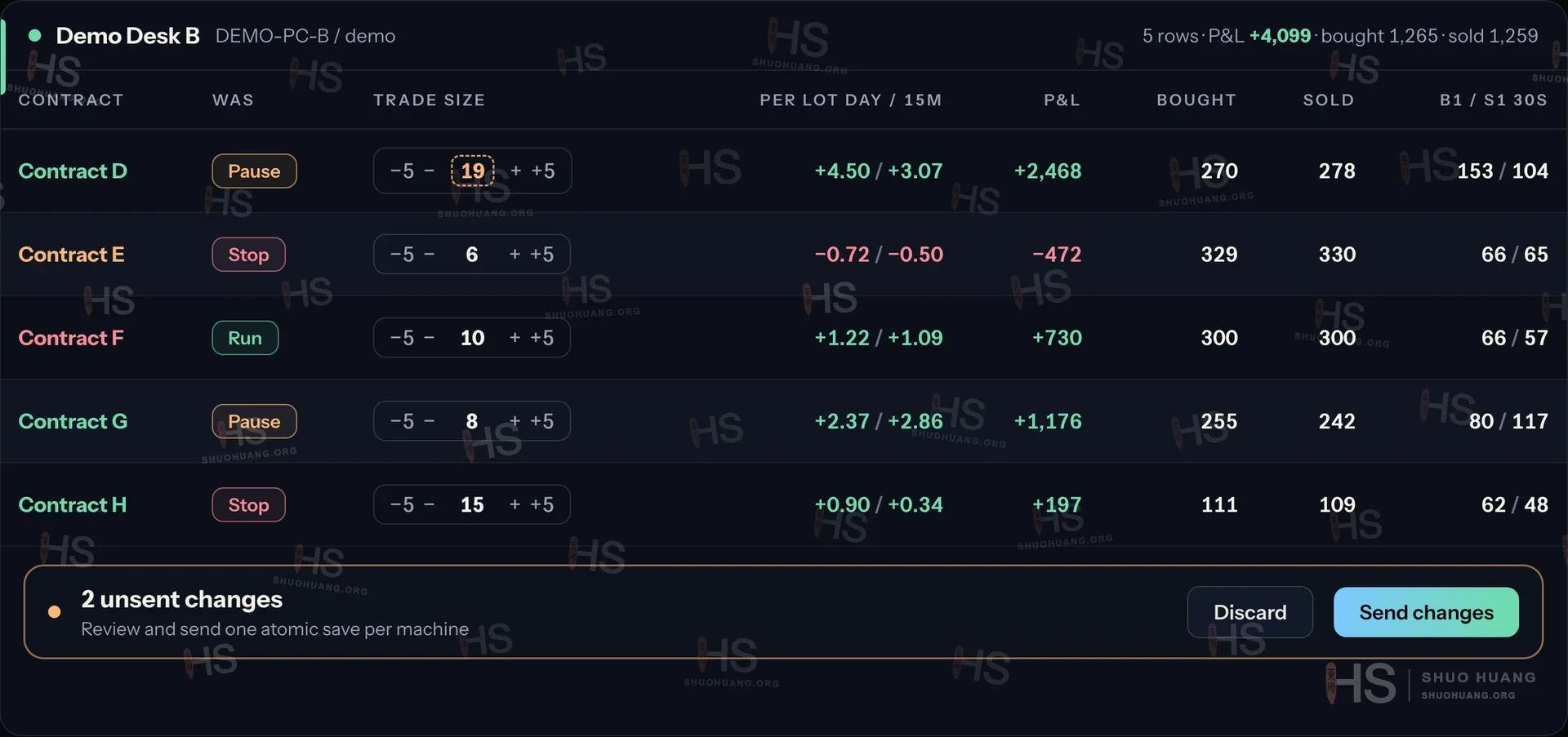
- Marker 1: Staged size. An amber value has been chosen but not sent (here 14 → 19); white values are what the machine’s file holds.
- Marker 2: 2 unsent changes. One per machine; the small print says each machine will perform exactly one atomic save.
- Marker 3: Discard. Drops the staged edits.
- Marker 4: Send changes. One command per machine, verified and retried until the machine’s file matches.
C
Create and delete anywhere
A new strategy goes onto any machine from the same screen, with every file it needs written in one transaction.
- One Add writes the strategy file plus every engine and terminal file that strategy type needs, as one backed-up batch that rolls back if any write fails.
- A grammar check on contract codes blocks the typo that could keep an engine from starting; a delete removes entries from the other files only when no remaining strategy uses them.
- Built-in templates cover strategy types no machine has carried yet, and a per-machine audit flags contracts missing from any engine file and fixes them in one click.
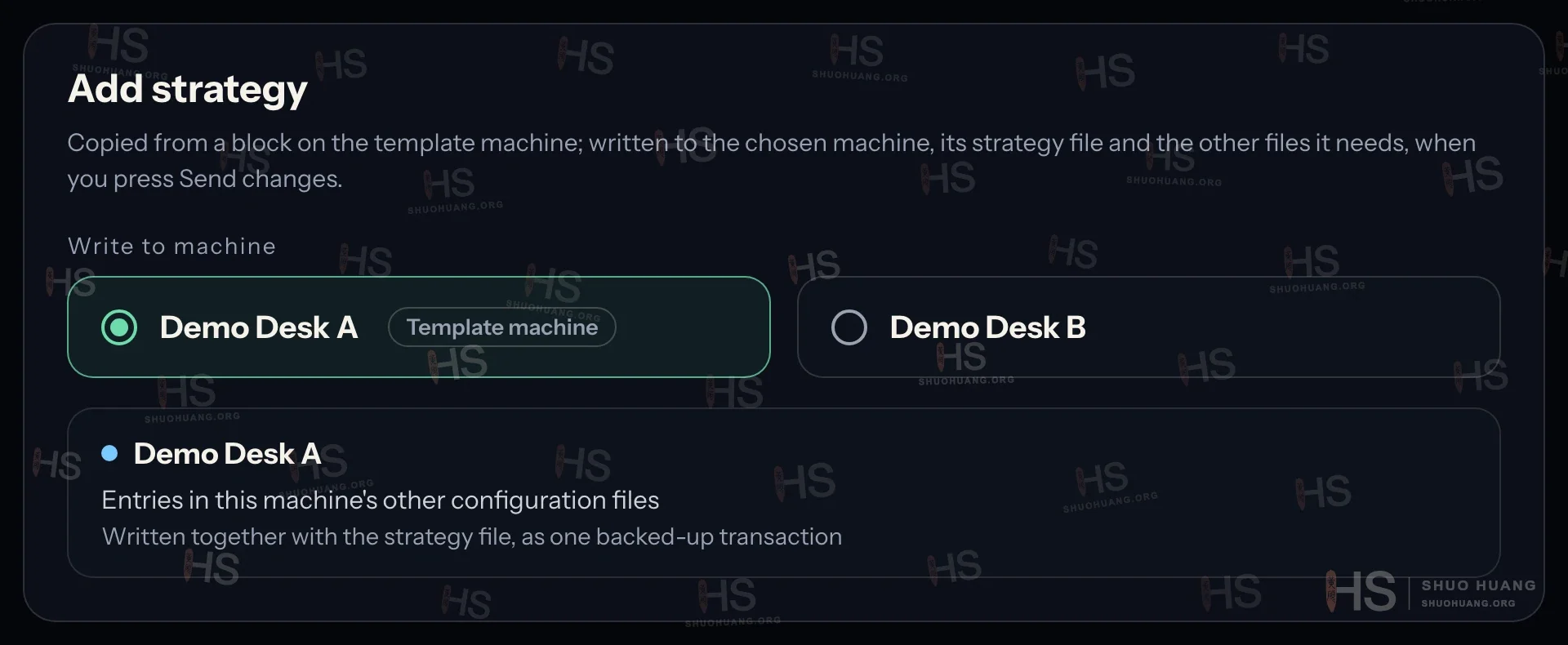 Enlarge
- Marker 1: Exactly one destination. A strategy lives on one machine; the Template machine tag marks the machine the template block was copied from, which may be any machine.
- Marker 2: Entries in this machine’s other configuration files. What the new strategy needs in that machine’s other files; Send writes them with the strategy file as one backed-up transaction that rolls back if any write fails.
D
Guards that live on the machine
Protection that cannot wait for a human, or for a link, runs beside the engine and is checked every second.
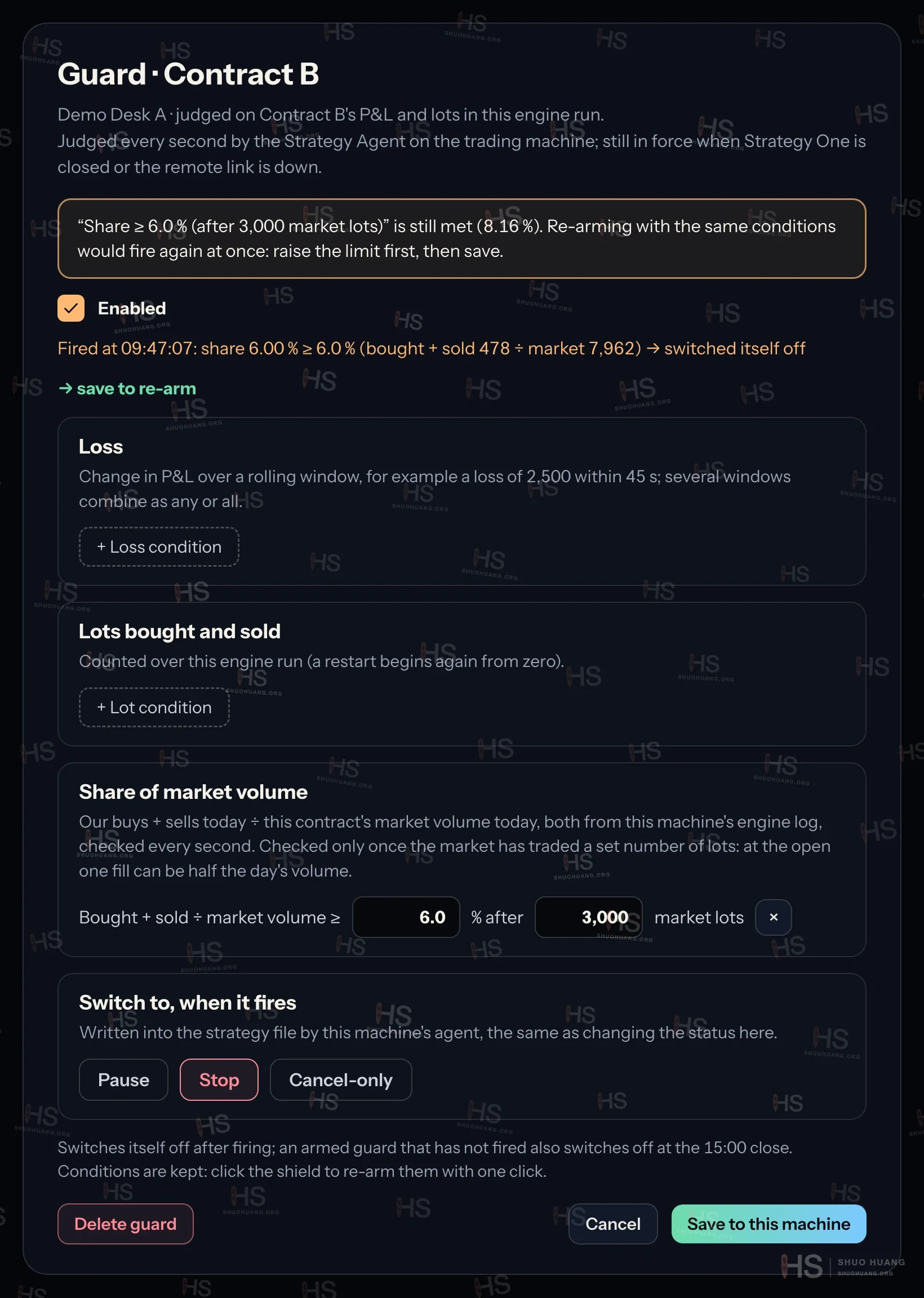
- Per strategy: loss over rolling windows, lots traded, and share of market volume, each switching the strategy to a state the trader chose.5
- One-shot and day-scoped by design, so a guard never outlives the shift that set it: it switches off after firing and at the close, and re-arms in one click.
- A guard is armed only after the machine confirms it can actually write; spreads park themselves in cancel-only 60 seconds before each session close.
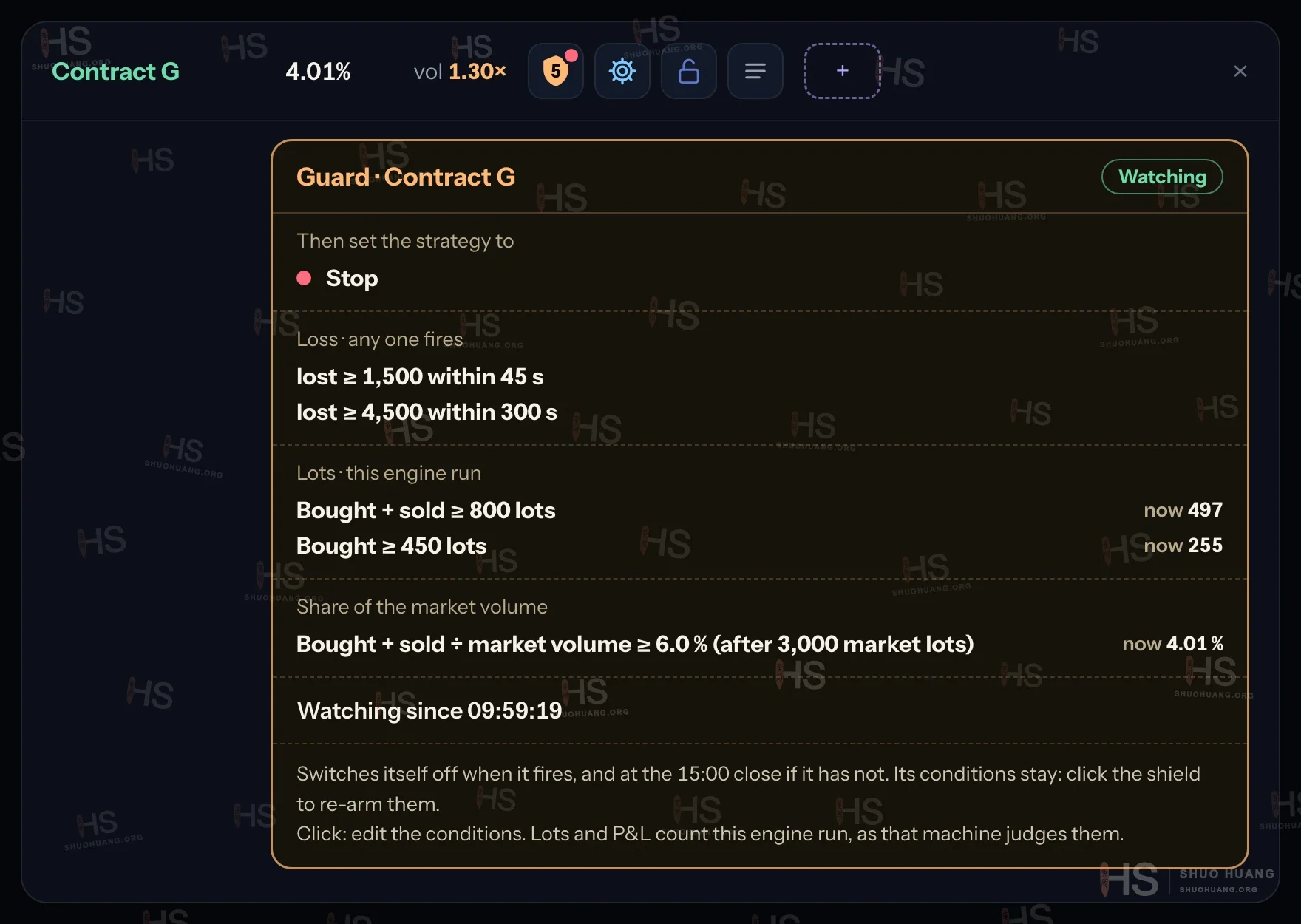 Enlarge
- Marker 1: The shield. Filled gold means armed; the number counts its conditions, and the red dot is the color of the state it will write.
- Marker 2: Then set the strategy to Stop. On firing, the agent switches the strategy to stop; spreads default to cancel-only.
- Marker 3: Loss windows. Any one fires: a loss inside either of two rolling windows, measured on the engine’s own per-second P&L.
- Marker 4: Lot caps. Bought plus sold, or one side, against this engine run’s totals, with the current count beside each cap.
- Marker 5: Share of volume. Checked only once the market has traded a minimum number of lots, because early in a session one fill can be half the day’s volume.
- Marker 6: One-shot, day-scoped. It switches off after firing, and at the close if it never fired; one click on the shield re-arms the same conditions.
E
Read the day at a glance
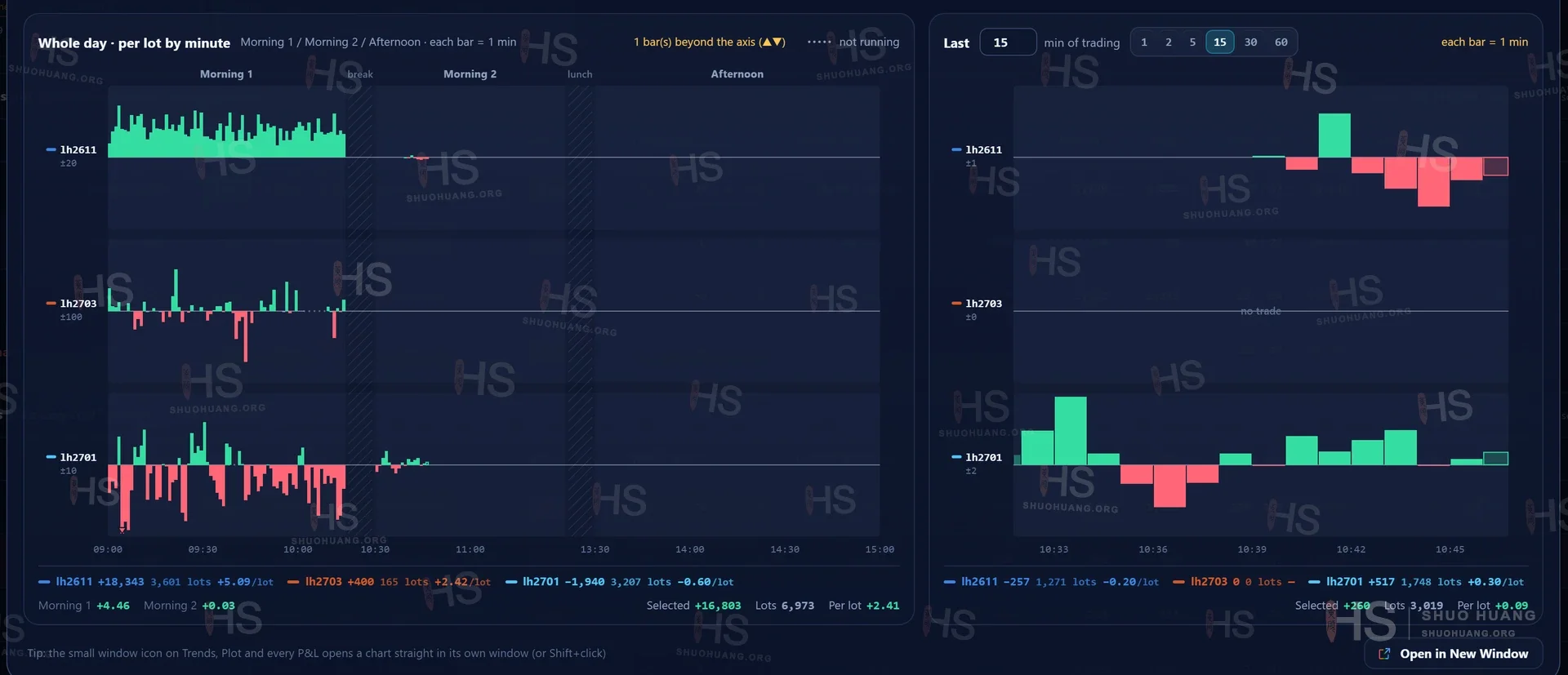
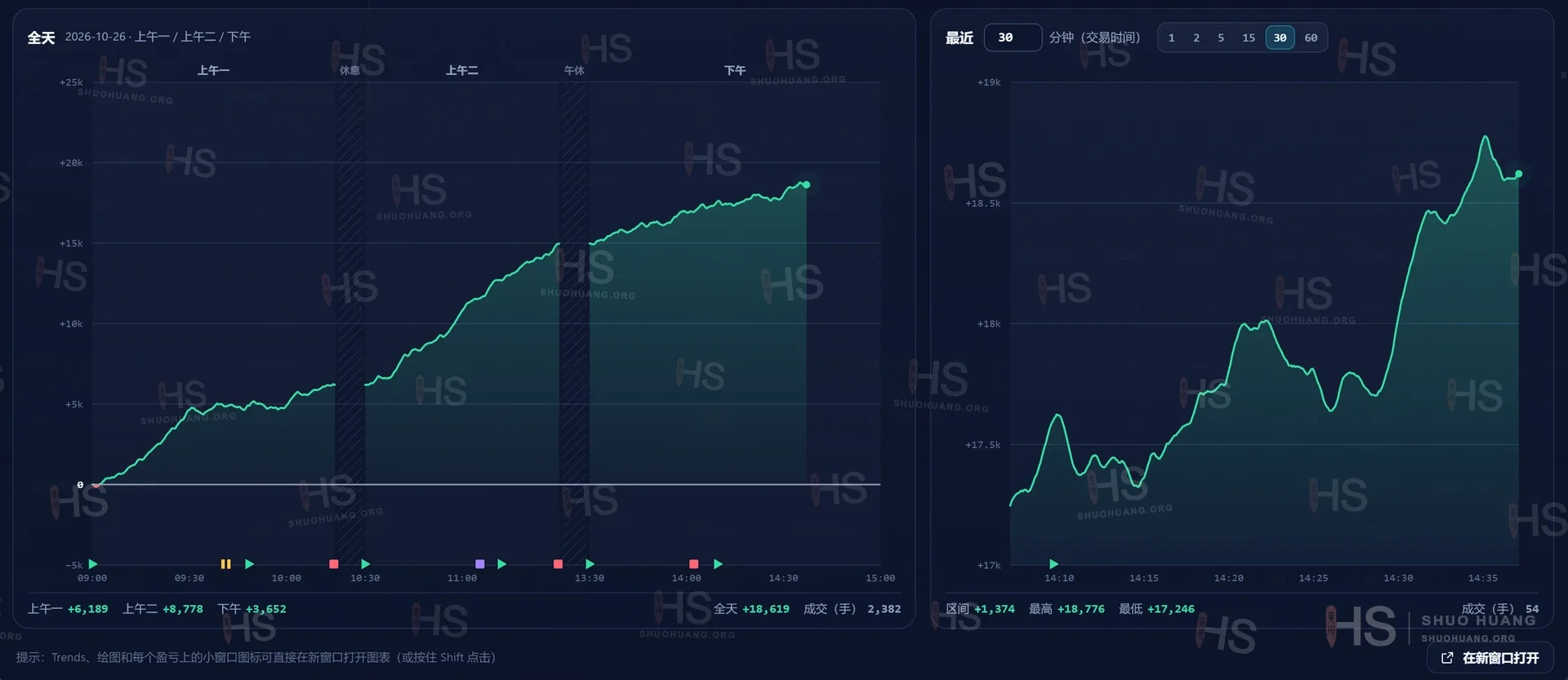
Click any P&L and the whole trading day opens beside the last few minutes, on an axis that knows the exchange’s sessions.
- A compressed trading-time axis built from each machine’s own session table: breaks and lunch are hatched gaps, and the line runs on across sessions and engine restarts.
- Trends compares up to seven contracts from any machines; per-lot mode draws one bar per minute, that minute’s P&L divided by its lots.
- Volume bands mark the historically busiest and quietest periods and project how today’s volume is running against them.
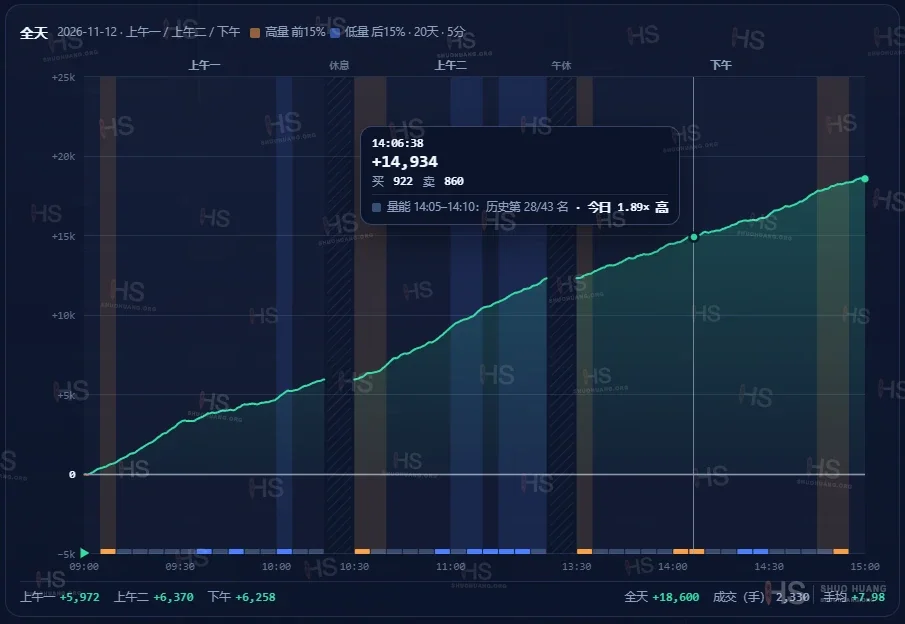 Enlarge
- Marker 1: 高量 前15% · 低量 后15% · 20天 · 5分. The band settings: top and bottom 15%, over the past 20 days, in 5-minute periods.
- Marker 2: Orange band. Historically a high-volume period (top 15%).
- Marker 3: Blue band. Historically a quiet period (bottom 15%).
- Marker 4: Hatched gap. A break in trading; the axis compresses it so sessions sit side by side.
- Marker 5: Tooltip. P&L and lots at that second, the period’s historical rank and today’s volume against the average.
- Marker 6: Verdict strip. Each of today’s periods, colored by how it ranks against today’s projected volume.
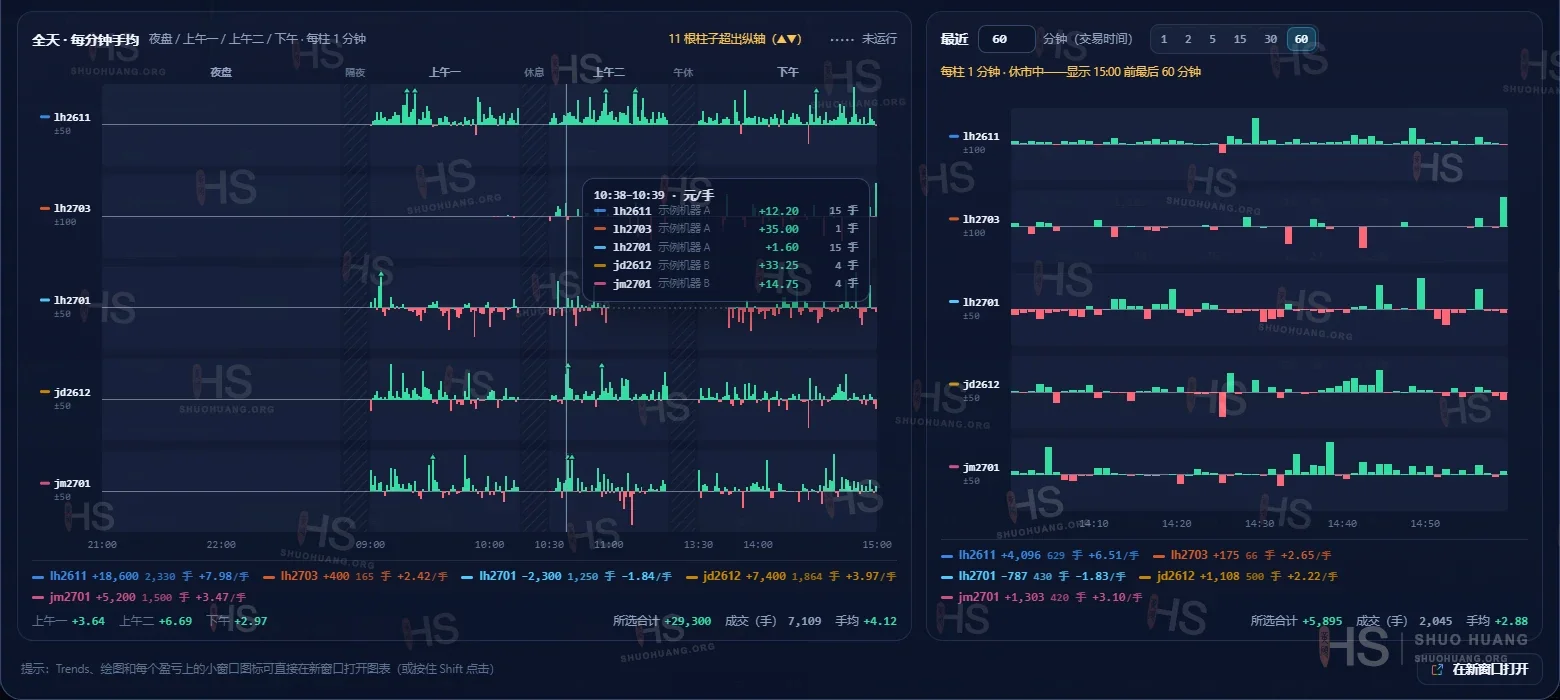 Enlarge
F
Recover in one click
Hard lessons became features, usually the same day.
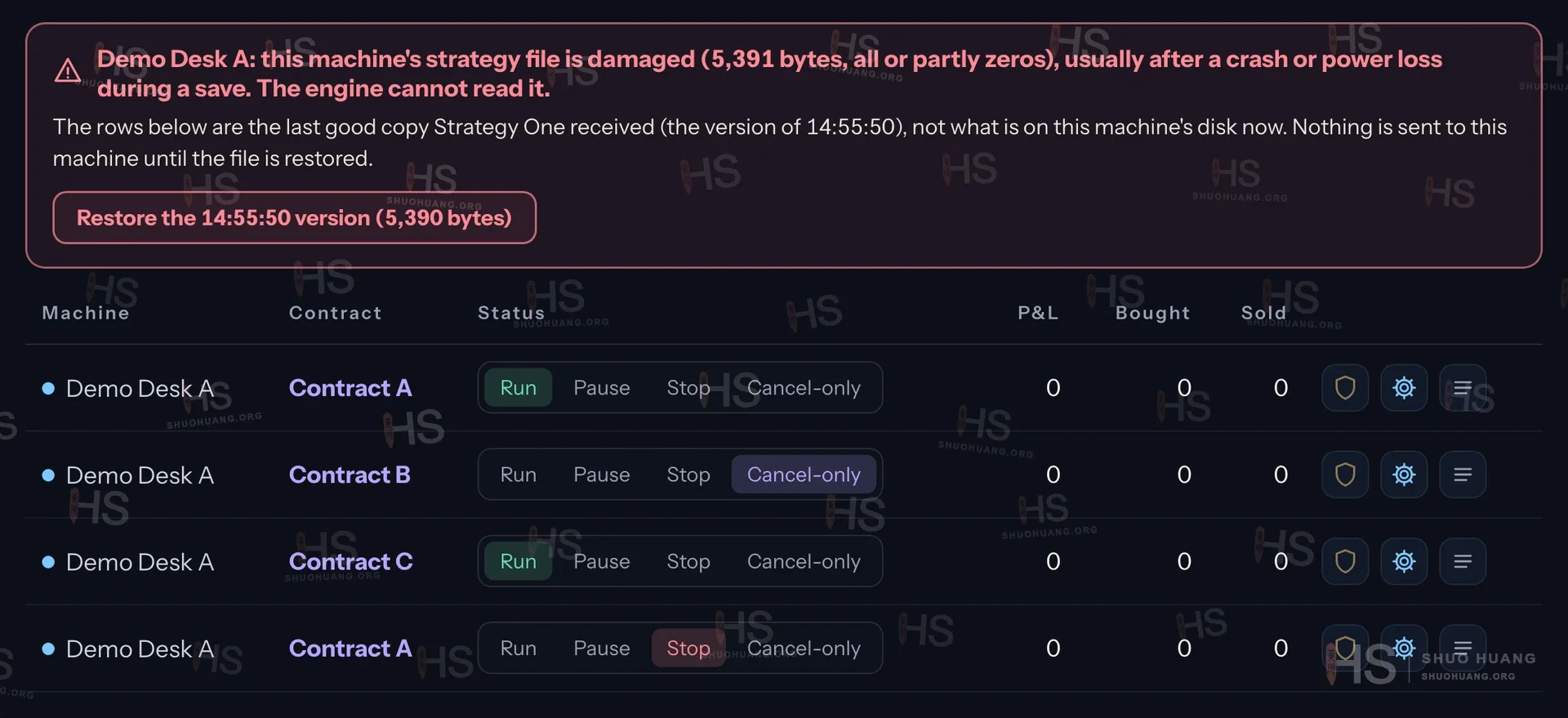
- A crash on a trading machine once left a just-saved file as zeros; since then every temporary file is written through and flushed, and the last good copy restores in one click.
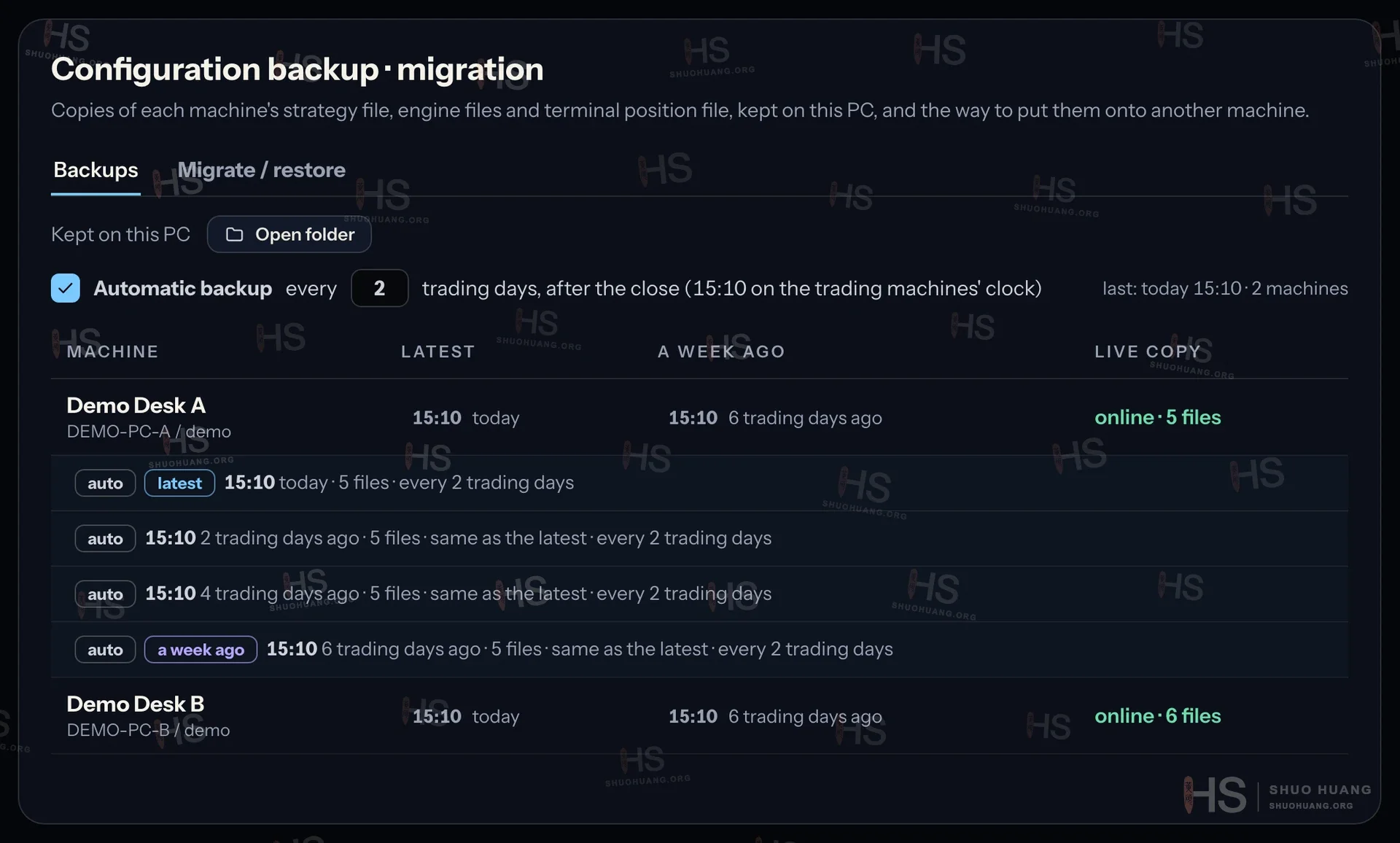
- The hub keeps byte copies of every machine’s configuration files and can append or replace them onto another machine in one roll-back-on-failure batch, so one machine’s strategies can trade elsewhere.
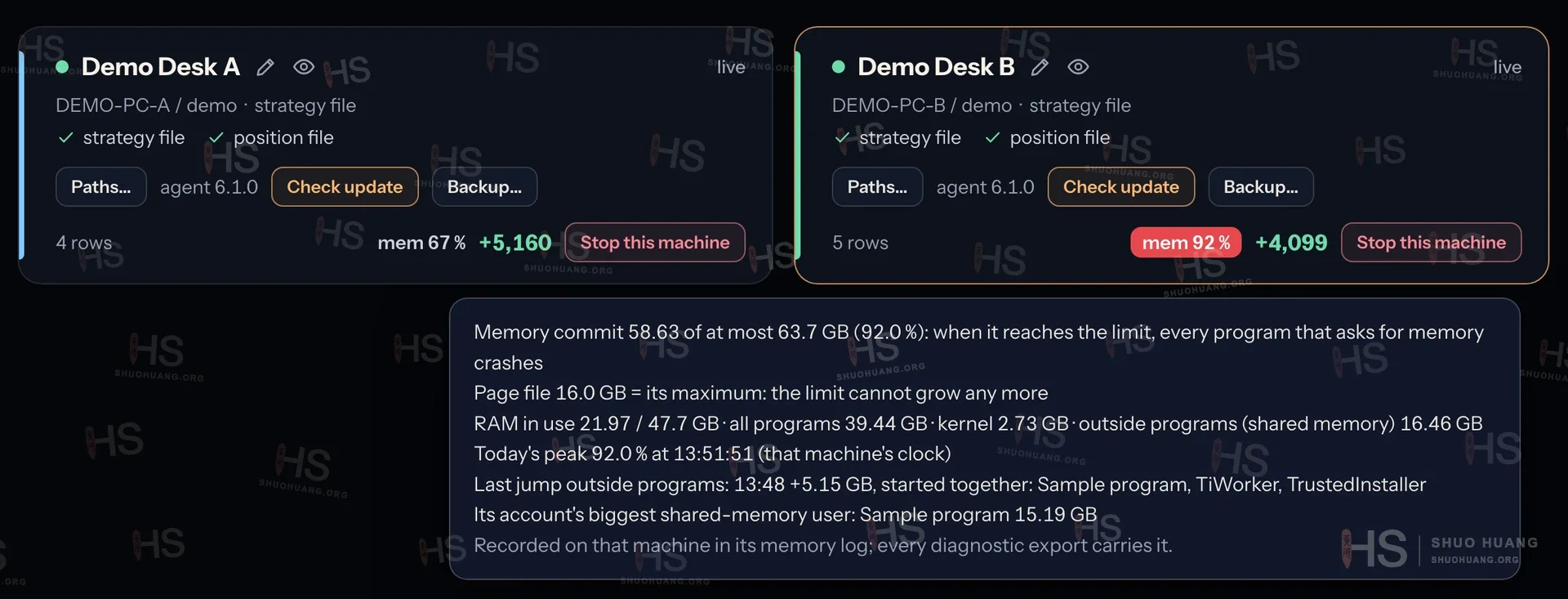
- Every machine card carries a memory watch on commit memory, the limit that fails programs when it runs out even with most of the RAM free.
 Enlarge
- Marker 1: Migrate / restore. Append or replace any set onto another machine, with the target snapshotted first so the migration can be undone.
- Marker 2: Automatic backup. Every 2 trading days, after the close on the trading machines’ clock.
- Marker 3: Live copy. The machine is online, with the number of files in its live copy.
- Marker 4: Latest. The newest set, backed up today.
- Marker 5: A week ago. A set at least five trading days old, kept as the second version.
G
A fleet that updates itself
Three programs on many locked-down machines stay current without a single machine visit.
- Each product is one code-signed executable. Every machine checks for a new build daily, accepts it only if it is signed with one pinned key and intact, and applies it at the next launch, never in the middle of a session unless the trader asks; since October the hub can trigger each agent’s update from its machine card.
- A new build runs a 30-second health window; if it fails, the launcher blocklists it and hands back to the previous version. Proven on a trading machine outside trading hours with a deliberately broken build: reverted in about 15 seconds.10
- Diagnostic exports never carry credentials: files are picked by explicit name, scrubbed and scanned before they leave the machine. One fleet export gathers every machine’s bundle, so a problem anywhere can be diagnosed from one file.
05All screens
Sixteen views of the program.
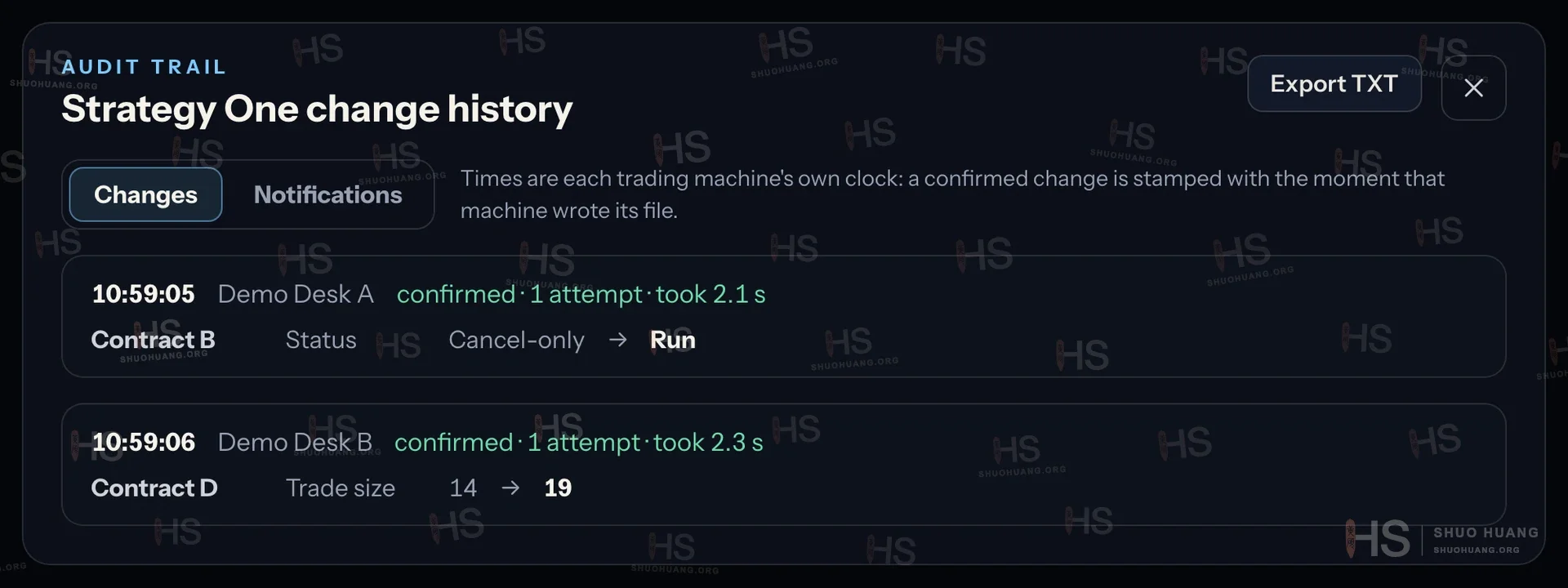
Every screen shows generated data, never desk data: the control screens are redrawn in English from generated values, and the charts come from the project’s demo rig, with generated machines and engine logs.11
Enlarge
Enlarge
Enlarge
 Enlarge
 Enlarge
Enlarge
 Enlarge
 Enlarge
 Enlarge
 Enlarge
Enlarge
 Enlarge
 Enlarge
06Under the hood
For the technical reader: the protocol, the math and the code.
Transport protocol, write path, the market rules it encodes, a latency profile, the design trade-offs, the signature gate and verification, with pseudo-code for each key step.
Under the hoodTransport, market rules, latency profile, design trade-offs, signed updates and tests, with pseudo-code
Strategy One is a distributed control system built within firm constraints: standard-user logins, nothing installed, no new network paths, and a configuration file that several programs rewrite while a high-frequency engine is reading it. It holds no trained model: Shuo’s machine learning for the desk lives in CHRONOS, which writes its sizes into the same file and ships through a launcher ported from this one. What this page offers an engineer is a transport protocol, a write path, a set of invariants and a verification discipline, each traceable to code and to a test. Timings measured on an isolated test rig are labeled as such and kept apart from timings in live use.
System model: a control plane beside an HFT engine
The first question an expert asks is how a file mailbox with one-second latency can control high-frequency trading. It does not. Quotes, cancels and hedges are generated by IT’s engine on the colocated machine; nothing in Strategy One sits between the engine and the exchange. The link carries only human decisions (status, size, parameters, which strategies exist), which used to take tens of seconds of window-hunting.3 Decisions that cannot wait for a human or a link are evaluated every second by the agent on the machine itself.
The stack is deliberately plain so that it runs anywhere on the desk with one double-click: a Windows PowerShell 5.1 HttpListener on loopback, token-authenticated, serving one vanilla-JavaScript single-page app of about 15,500 lines with no build step and no libraries; small C# pieces compiled in-process; and a C# launcher that hosts the script in-process inside a signed executable.
| Layer | Where it runs | What it owns | Cadence |
|---|---|---|---|
| Hub and board | Trader’s office PC | Intent: staged edits, batches, retries, history, charts, backups | Board redraw every 2 s; acknowledgment poll every 250 ms |
| File mailbox | A folder on the office PC, seen inside each remote session | Transport: command files, acknowledgments, heartbeat, configuration copies | One file operation: about 0.2 s to the Shanghai site, about 0.9 s to the Dalian site |
| Strategy Agent | Every trading login | The write path, the guards, the pre-close auto-stop, the engine-log reader | Loop rests 1.5 s, or 0.3 s for 60 s after a user command; guards every second |
| HFT engine (IT’s) | Trading machine | Quoting, hedging and the order path | Exchange speed; hot-reloads its file |
Market rules the software encodes
Three market-making rules shape almost every control on the board.
- Spreads are parked, not stopped. A calendar spread is one exchange-listed contract on the price gap between two delivery months. Stopping a strategy tries to flatten its position with fill-and-kill orders, which exchanges reject for spread contracts. So STOP ALL, the guards’ spread default and the pre-close auto-stop all use cancel-only, which pulls the orders and keeps the position for the next run.
- Size is the everyday lever; off is a deliberate act. A designated market maker must keep a minimum size on both sides, within a maximum spread, for a minimum share of each month’s trading time; the engine tops resting quotes up to that minimum. A size change therefore moves the risk taken at the front of the book while the obligation stays met; switching off removes the quotes altogether.
- Whatever is running stops at the session end. For a spread, stop is the wrong state, so the agent parks spreads at cancel-only sixty seconds before each close.
| State | What it means | How the suite uses it |
|---|---|---|
| Run | The strategy quotes | The normal state. A guard acts only on a running strategy, so it never overrides a decision already made |
| Pause | Quoting stops; the position stays as it is | Asks for confirmation on spreads |
| Stop | Quoting stops and the position is flattened with fill-and-kill orders, which exchanges reject for spread contracts | STOP ALL target for single contracts and options; the guards’ default for outrights; asks for confirmation on spreads |
| Cancel-only | Resting orders are pulled and the position is kept for the next run | STOP ALL target for spreads, the guards’ spread default and the pre-close auto-stop |
Transport: a file mailbox through Remote Desktop’s shared folder
Strategy One works within the desk’s existing Remote Desktop access. Remote Desktop can show a folder of the office PC inside each remote session, and that shared folder is the whole transport: no new ports and nothing installed.
The mailbox is one folder per trading login on the office PC. It holds the agent’s heartbeat, a copy of the machine’s configuration with its identity (path, modification time, byte-order-mark flag), copies of the engine’s related files, notes, locks, guards, chart answers, and a command and an acknowledgment folder. Commands are small JSON files: a save (the fast path: the whole new file plus the version it was edited from), a multi-file save (structural changes, with an allow-list of exactly the files it may write), and maintenance verbs for paths, guards, auto-stop, export, agent update, restore and migration. Each agent finds its mailbox by the hub’s marker file, so no drive mapping is assumed. The channel exists exactly while the trader’s Remote Desktop windows are connected, by design.
def send(machine, edit):
    command = {
        "id": sortable_timestamp() + random_suffix(),
        "kind": edit.kind,              # a save, or a maintenance verb
        "new_file": edit.new_file,      # the complete new strategy file
        "edited_from": edit.version,    # the version the page edited
    }
    final = mailbox(machine) / "commands" / (command["id"] + ".json")
    partial = temporary_name(final)
    write_text(partial, to_json(command))
rename(partial, final) # the agent never reads half a commandThe round trip of one change
- Stage. Clicks change nothing on any machine. Send produces one command per machine carrying the complete new file and the version the page edited.
- Refuse if stale. The agent compares the file’s current modification time with that version and refuses the command if they differ by more than 2 ms. This is optimistic concurrency on a file: a writer holding an old copy can never silently revert someone else’s change.
- Write, verify, acknowledge first. On success the agent writes the acknowledgment before it pushes the fresh configuration copy, and the page hides the stale copy in between, which removed a frightening “confirmed, then flashes back” artifact.
- Retry until aligned. If no acknowledgment arrives in the window, the page re-reads the machine’s own file: already matching means confirmed (acknowledgment lost, save landed); otherwise it re-plans on the fresh copy and resends. The attempt budget grows only when another writer wins a race.
- Hold, never silently overwrite. If another writer moved the same field in the meantime, the edit is held in red showing both values (yours and the machine’s) with apply-anyway and discard. Other writers exist: the engine rewrites its own file, someone may edit it by hand, and CHRONOS, on the contracts it controls, writes sizes into it every ten minutes and within a second of its loss brake.
- Log. Each confirmed batch is appended to a change log with its duration and attempt count; a confirmed change is stamped with the file’s own modification time on the trading machine.
Share of batches by the attempt that confirmed them
About five in six batches confirmed on the first attempt; the rest retried by themselves until the machine’s file matched, and none needed more than four.
Show the dataHide the data
| Confirmed on attempt | Share of batches |
|---|---|
| First | 84% |
| Second | 11% |
| Third or fourth | 4% |
def save(request):
    current = modified_time(request.file)
    if abs(current - request.edited_from) > TOLERANCE:    # someone else wrote first
        return refuse("stale", current_version=current)   # the hub re-plans on the fresh file
    new_version = atomic_save(request.file, request.new_file)
return ok(verified=True, version=new_version)Latency: profiled first, then engineered
The link, not the software, sets the floor: every confirmation is a handful of file operations through the shared folder, each costing 0.2 to 1 second, so the protocol is engineered around the number of operations per change and their cost .
- Profile first. On slow cycles, the agent’s own field log put one file operation over the link at 0.3 to 1 s. A status change cost about 24 operations, with the acknowledgment arriving after about 10, so a second change within about 15 s queued behind the rest.
- Fewer operations. The agent writes its heartbeat first, reads commands before republishing copies, and acknowledges before it pushes the fresh file; a code count put mailbox operations per change at 11 before the rework of September 10 and 6 after. One write was given back the next day for consistency (see the invariants below).
- A floor removed. For three days in August every send took 14 to 18 s. The cause was Windows proxy auto-detection on every loopback call, plus the acknowledgment queued behind the configuration push; both were fixed in one release.
- Hot mode. For 60 s after a trader’s command the agent’s loop rests 0.3 s instead of 1.5 s and the page polls acknowledgments every 250 ms, so idle machines add no traffic.
- What is left is distance. The Dalian floor is about three file operations after the agent sees a send, at about 0.9 s each; the office in Hangzhou is close to Shanghai.
Median time to confirm at the Dalian site
The median change took 7.6 seconds to confirm in early August and 2.7 by late October; the August spike was a regression, found and removed in three days.
Show the dataHide the data
| Period, 2026 | Median seconds, first attempt |
|---|---|
| Early August | 7.6 s |
| August regression | 15.0 s |
| After the rework | 3.6 s |
| Late October | 2.7 s |
| Measurement | Value | Source |
|---|---|---|
| One file operation over the link | ≈0.2 s to the Shanghai site; ≈0.9 s to the Dalian site at night | Hub log |
| Heartbeat write (3 operations) on slow cycles | min 0.85 s · median 2.2 s · p90 3.5 s | Agent log |
| Mailbox operations per status change | 11 → 6 | Code count |
| Every send during the August regression | 14 to 18 s, then removed | Hub log |
| First-attempt median, Dalian site | 3.6 s after the rework → 2.7 s in late October | Hub log; cause inferred |
| First-attempt median, late October | 0.9 to 1.0 s Shanghai site; 2.7 to 3.2 s Dalian site | Hub log |
Atomic, durable, verified writes
The engine hot-reloads its file, so a half-written or empty file is a live trading risk. The write path gives three guarantees.
- Atomic. The new bytes go to a temporary file in the same directory and are swapped in with a single
MoveFileExreplace. A reader sees the old complete file or the new complete file. - Durable. A crash on a trading machine once left a just-saved file as zeros: the swap had survived the crash; the bytes, still in the file cache, had not. Since then the temporary file is opened write-through and flushed to disk before the swap. A crash at any moment now leaves the old file or the new one, never zeros: the same flush-then-replace order Shuo’s CHRONOS writer already used.
- Verified. The file is read back and compared byte for byte with what was sent; the returned modification time becomes the version the next edit must match.
One alternative was tried and rejected on evidence: a write-through flag on the rename itself. With it, the engine’s immediate re-read of the file failed once, which had not happened with a plain replace, so the swap went back to a plain replace in the next build. Durability does not need the flag, because the bytes are already on disk before the swap. The atomic-save design itself dates from the first Strategy Console, where its concurrent-read stress test is documented.
def atomic_save(path, new_bytes):
    temp = sibling_temp_name(path)            # same directory as the target
    with open_write_through(temp) as f:       # bypass the file cache
        f.write(new_bytes)
        f.flush_to_disk()                     # on disk before the swap
    for attempt in range(RETRIES):
        if replace(temp, path):               # one atomic replace: old file or new file
            break
        wait_briefly()
    else:
        delete(temp)
        raise SaveRefused("file unchanged: it still holds the previous complete version")
    if read_bytes(path) != new_bytes:         # read back, byte for byte
        raise VerificationFailed()
return modified_time(path) # the version the next edit must matchMoveFileEx call in replace-existing mode.Strategy-file handling rules
The file belongs to IT’s engine, and the engine’s reading of it is the only one that matters. The suite never reformats it.
- Byte-identical round trip. An edit changes only the values it names. The byte-order mark is recorded and restored; everything else is written back as it was read.
- Raw ampersands. Exchange spread contracts are named like
SP y2609&y2611, and the file carries that&unescaped. The suite escapes it only to parse and writes the raw bytes back. - Comments end where the engine says. The engine’s parser ends a comment at the first
-->, so commented-out blocks can nest in ways strict XML forbids. The board reads every file the engine’s way, shows such blocks as inert rows, never writes a nested comment, and offers a one-click repair that changes comment text only. A matching bug that would have re-enabled disabled blocks on a save that changed nothing was found and fixed before it did any harm. The comment view passes 199 of 199 unit tests on the desk’s configuration formats. - Empty is not invalid, zeros are damage. A valid file with no strategies gets a quiet “no strategies” card. A file that is empty or contains a NUL byte is judged damaged on its raw bytes; the agent never publishes it, the hub keeps showing the last good copy and says so.
- Torn reads are expected. Other programs rewrite the file while it is being read. Readers retry, and an alarm counts consecutive failed reads rather than repeats of one error text, because a torn read reports a different line and column almost every time.
- Structure is a transaction. Adding a strategy writes the strategy file plus the engine and terminal files that strategy type needs as one backed-up batch with full rollback. A grammar check on contract codes blocks the typo that could keep an engine from starting. Added or deleted blocks take effect at the next engine start; status and parameter edits apply live.
- Credentials never travel. Diagnostic exports never carry credentials: files are picked by explicit name, scrubbed and scanned before they leave the machine, and a bundle is discarded if the scan finds anything.
def damage(file_bytes):
    if len(file_bytes) == 0:
        return "empty"
    if 0 in file_bytes:          # text never holds a zero byte
        return "zeros"
return None # healthyThree invariants the transport is tested against
The day after the agent architecture shipped, three failure cases in Shuo’s own software (a stale copy, an unparseable file and a false alarm) became three standing rules, and every later change to the transport is tested against them.
| What happened | Root cause | Invariant since |
|---|---|---|
| The board showed a size the machine no longer had; every send was refused as stale | A speed shortcut took the file’s identity from the heartbeat, so content and version label could disagree after another writer changed the file | A configuration’s identity travels with its bytes. Whoever writes the copy writes its path, modification time and BOM flag in the same step |
| A give-up branch froze that machine’s view on the outdated copy | Failed edits were re-applied as unsent edits on top of the stale file | The screen never hides the machine’s own file. On any refusal the page rebuilds from the fresh file and replays unsent edits on it |
| A file the page could not parse showed zero rows and no message | An unparseable file was treated as an empty one | Never fail silently. An unreadable file gets a red card quoting the parser’s own line and column; an alarm is withdrawn by the state, not by a timer (measured: 307 ms after the file reads again) |
Signed self-update with automatic rollback
An auto-updater is a powerful channel, so its only trust anchor is one pinned signing key. “Signed” alone is not enough, since anyone can obtain a certificate; what protects the machines is “signed by this exact key”, checked against a thumbprint compiled into the launcher and the updater.
- Build. The compiler that ships with Windows, fully offline: one generic C# launcher plus a generated product file, with the script, page and icons embedded as resources. The launcher hosts PowerShell in-process, so the process is the product’s own executable. Every launch re-checks each unpacked file against its embedded SHA-256 and rewrites any that differ.
- Gate. A build is accepted only if its Authenticode signer’s thumbprint equals the pinned constant and its hash is intact. The check runs twice: before staging and again before executing. Unsigned, foreign-signed, tampered and truncated builds are refused, deleted and logged.
- Stage, then apply. Daily check, download to a partial file, size check, gate, stage. The staged build is applied at the next launch or on request; a running session is never closed unasked, because a trading tool must not restart mid-session.
- Health window. On its first start a new build is on probation for 30 seconds. A throw or error inside the window adds the version to a blocklist and hands off to the kept previous executable, so a bad push costs one restart. In the test on a trading machine, outside trading hours, the deliberately broken build failed 0.2 s after starting and was rolled back about 15 seconds later.
- Key management. A dedicated code-signing certificate (RSA 2048, SHA-256); the key is backed up AES-256-encrypted, with a rehearsed restore that must accept a signed copy and reject it after one flipped byte.
Since September 21, 36 signed versions have been built and staged for the channel in under eight weeks.12 The goal is that a build cannot be changed silently and refuses to run if changed.
def accept(build):
    signature = read_code_signature(build)
    if signature is None:
        return False
    ours = signature.signer_thumbprint == PINNED_THUMBPRINT
    intact = signature.status not in ("hash mismatch", "not signed")
return ours and intact # checked before staging and again before runningTelemetry and chart math
Each agent parses the engine’s own log lines every second: the engine’s P&L and lots per contract, the best bid and ask sizes, the day’s market volume, alarms and status changes. Values are run-scoped like the engine’s; if no profit line arrives for 15 seconds the engine is treated as closed and the cells clear.
- P&L per lot over the last minutes is : the change in the engine’s cumulative P&L over the change in cumulative lots bought plus sold across those minutes. One statistics function feeds the board column, the chart footers and the analyzer, so the three always agree, and per-minute bars sum exactly to the footers.
- Bar axis. Per-lot bars are scaled to their 97th percentile, so a few extreme minutes are clipped and flagged instead of flattening the rest.
- Share of volume is the desk’s lots bought plus sold divided by the day’s market volume, computed on the trading machine.
- Volume profile. Only past days with at least 90% of their minutes covered count. Each minute’s share of its day’s volume is averaged over those days and renormalized; a period’s rate is the mean share of its minutes, and the top and bottom of the periods become the bands. Today’s projected volume divides the volume so far by the profile’s cumulative share so far, once that share reaches 2%; the board’s volume column also shows today’s volume against the n-day average to the same minute. A day without its night session switches to a day-only profile.
- Data. Agents record each followed contract’s cumulative market volume every minute and keep 90 days; a one-click backfill fills older days.
usable = [day for day in past_days
          if day.coverage(window) >= MIN_COVERAGE and day.volume > 0][:n]

profile = {}
for minute in window:
    shares = [day.volume_in(minute) / day.volume for day in usable if day.covers(minute)]
    profile[minute] = mean(shares)
profile = normalize(profile)                      # shares sum to one over the window

rate = {period: mean(profile[m] for m in period) for period in periods}
ranked = sorted(periods, key=lambda period: -rate[period])
K = max(1, round(len(periods) * band_percent / 100))
high, low = ranked[:K], ranked[-K:]               # the bands

share_so_far = sum(profile[m] for m in window if m <= now)
projected = volume_today / share_so_far if share_so_far >= MIN_SHARE else NoneDesign decisions: what was rejected, and why
Each choice below was made against a concrete alternative, and most were settled by a measurement or a test rather than by preference.
| Rejected | Chosen | Why |
|---|---|---|
| A design that needs its own network channel or an installed service | Small files through the Remote Desktop access the desk already has | It needs no new ports and nothing installed, and it exists only while the trader is connected |
| Send each click as it happens | Stage, then one batch per machine, retried until the machine’s file matches | The remote link drops messages; a whole-file write that is conditional on the version edited can be retried safely |
| Guards evaluated in the hub | Guards and the pre-close auto-stop on each trading machine | A hub-side guard is blind when the hub is closed or the link is down |
| An agent that understands the engine’s file format | The hub builds every trader edit; the agent writes, verifies and reports | Engine updates ship in the hub alone: a new strategy type was supported within three hours, with no trading machine touched |
| The hub writing its own mailbox copy after a save | The agent stays the only writer of every copy | The shortcut split a file’s identity from its bytes and froze one machine’s view; reliability was worth one extra write (≈0.3 to 1 s) |
| A write-through flag on the live-file rename | Flush the temporary file to disk, then a plain atomic replace | With the flag, the engine’s immediate re-read of the file failed once; durability does not need it |
| Trusting any valid signature, or a machine’s certificate store | Accept only builds signed by one pinned key, checked twice | Anyone can obtain a certificate, so trust is one pinned thumbprint |
| Applying an update as soon as it arrives | Stage it, apply it at the next launch, revert inside a 30-second health window | A trading tool must never restart mid-session, and a bad build should cost one restart, not a trading day |
| Scripts in zip folders, installed by hand | One signed, self-updating executable per product | Every release meant a Remote Desktop tour of every machine, and a forgotten machine kept its old behavior |
Verification: rigs, replays and live use
Rig results and results in live use are different kinds of evidence and are kept apart.
- Isolated rigs. The hub and agents themselves on non-production ports with a separate mailbox, generated engine logs and a browser. A Remote Desktop drop is emulated with a directory junction the agent reaches the mailbox through.
- Rendered-state checks. A headless-browser harness drives the page over the DevTools protocol; every overlay is verified both open and closed, at the desk’s window widths, in both themes.
- Independent reference models. The page’s math is re-implemented separately in Python and compared at fixed moments.
- Full-day replay. Before a telemetry release reached the desk, a full trading day’s engine logs were fed through the agent. It caught three failures the generated rig could not show (blank depth and share columns, a previous run counted as today’s, and a hidden day volume), and the per-heartbeat comparison against the reference model found a fourth. All were fixed before release.13
- Tests on the shipped artifact. Smoke suites run on the built, signed executables, not on the scripts.
- Past the first success. Dialog and asynchronous flows are tested with a second dialog after success, a dialog closed mid-request, a failure after switching dialogs, and the hub process frozen for 75 seconds mid-send.
| Evidence | Result | Kind |
|---|---|---|
| Change batches in the hub’s change log, first weeks of live use | Every batch confirmed, none failed | Live use |
| First-attempt median confirmation, late October | 0.9 to 1.0 s (Shanghai site); 2.7 to 3.2 s (Dalian site) | Live use |
| Rollback of a deliberately broken signed build, on a trading machine outside trading hours | All three products reverted and blocklisted it | Trading machine, after hours |
| Fleet-wide signed updates, Nov 6 to Nov 12 | 5 in one week | Live use |
| First live pre-close auto-stop | A running spread parked at cancel-only in a 40 ms write on its first live run | Live use |
| A full trading day’s engine logs replayed | 1,429 of 1,429 heartbeats equal to an independent model | Replay |
| Contention test: a byte-exact simulator of CHRONOS’s writer at 60 times its normal write rate | 5 of 5 sends confirmed on the first attempt; at about 240 times, most batches took 2 to 5 attempts and any failure was reported with its reason; the file stayed byte-clean | Rig |
| Update pipeline test battery | 209 checks on the built executables, after 150 in the first pass | Rig |
| Live P&L reader on recorded log formats | 237 of 237 and 42 of 42 values equal | Rig |
| Comment-view unit tests | 199 of 199 | Rig |
| Guard scenarios; built-executable smoke suite | 17 of 17; 41 of 41 | Rig |
| Status change on the isolated test stack | Confirmed in 0.3 s; other round trips 0.3 to 2 s | Rig, not a timing in live use |
Failure modes engineered out
- A crash during a save leaves the old file or the new one, never zeros; a damaged file is detected on raw bytes, never published, and restored in one click.
- A lost acknowledgment is resolved by reading the machine’s own file, not by assuming.
- A stale writer is refused; a concurrent risk action is held for the trader, never silently overwritten.
- A link drop disables no protection: guards and the pre-close auto-stop run on the machine.
- A guard that could not write cannot be armed: arming first asks the machine to confirm it can act.
- A request that never returns is bounded: every request has a time limit, and every periodic request has an offline gate, a backoff and a bounded queue on both ends.
- A bad release that fails inside its 30-second health window rolls itself back and is blocklisted.
- Clock differences between machines cannot mislabel events: every time shown is the trading machine’s own clock, and logs are matched by command id.
- Remote-session rendering never meets blur or decorative motion: removing them turned a hover lag of up to a second into 100 frames per second.
- An acknowledged notice stays acknowledged for as long as the notice is held, because the hub is left running for weeks.
Built with
- PowerShell 5.1 (HttpListener, runspaces)
- Vanilla JavaScript single-page app
- C# launcher, in-process PowerShell hosting
- Win32 P/Invoke (MoveFileEx, write-through I/O)
- Remote Desktop shared-folder transport
- Optimistic concurrency, atomic file writes
- Authenticode code signing, pinned thumbprint
- Self-updating executables with auto-rollback
- SHA-256 self-healing payloads
- Signed release channel
- XML configuration tooling
- SQL backfill
- Python reference models
- Headless-browser test rigs (DevTools protocol)
- Full-day log replay testing
07Releases
Shipped in versions, like a product.
- v1.5 · First run on the live machinesConceived at 09:46, running on the live machines by 11:33. Batch send with retry-until-aligned followed the same afternoon.
- v1.7.2 · Fast confirmationsA 14 to 18 second floor on every send traced to Windows proxy auto-detection on loopback calls and removed; acknowledgments now written first.
- v2.b · The tray agent; every edit moves into the hubA windowless agent replaces the per-machine editor on Shuo’s trading machines; the hub adds, deletes and edits strategies anywhere. Eight builds in one day, and the engine team’s new strategy type of that afternoon supported hub-only within three hours.
- v2.b.3 to 2.b.8 · Three invariantsThree standing rules for the transport: identity travels with bytes, the screen never hides the machine’s own file, never fail silently.
- v3.0 · Signed, self-updating executablesAll three products become single code-signed executables with a pinned-key update gate, a 30-second health window and automatic rollback, proven outside trading hours with a deliberately broken build.
- v3.1 · Live engine P&L, guards and alarmsPer-second P&L and lots from each engine’s log; loss and lot guards evaluated on the trading machine; an engine alarm center.
- v3.2 · P&L charts and the pre-close auto-stopWhole-day charts on a trading-time axis; spreads park themselves before each session close.
- v3.5 · Remote agent updatesEach machine card can tell that machine’s agent to check for and apply a signed update, so no one logs in to a trading machine to update it.
- v4.0 · Depth, market share and the share guardOrder-book depth and share of market volume on the board, released after a full trading day’s engine logs were replayed through the agent.
- v4.2 · One-shot, day-scoped guardsGuards switch off after firing and at the close, so a guard never outlives the shift that set it; one click re-arms. On every machine the same evening.
- v4.4 · Crash-proof saves and one-click restoreWrite-through, flushed saves and a one-click restore of the last good copy, built and rolled out in one afternoon.
- v5.0 · Per-lot analytics, backup and migrationP&L per lot, a chart analyzer, scheduled configuration backups and cross-machine migration. Specified at 14:26, on every machine at 16:18.
- v6.0 · Volume bandsHistorical high- and low-volume periods and a projection of today’s volume on every P&L chart.
- v6.1 · Memory watchA commit-memory watch on every machine card.
08Related
Programs that work with this one.
-
Strategy Agent
Risk guards that hold with the link down, a verified writer for every change sent to the live strategy file, and a per-second feed from every engine it guards.
-
 Strategy Console
One-click, transactional editing of the file a live trading engine is reading. 0 torn files in 239,000 concurrent reads.
-
 CHRONOS
Self-retraining machine-learning controller that sizes and safeguards the desk’s live-hog market making, wired straight into the trading engine. Its central finding changed how the desk sizes.
-
 Position Atlas
A market-making obligation tracker built by one trader: 2,410 of 2,410 contract-days matched the exchanges’ own obligation reports.
- 1From the hub’s own change log over its first logged weeks of live use: every batch in the log was confirmed by a read-back of the machine’s file, and none failed. About five in six (84%) confirmed on the first attempt, the rest after automatic retries, and none needed more than four attempts. The desk’s daily counts are confidential; the chart on this page uses synthetic counts.
- 2First-attempt median confirmation times from the hub’s change log in late October 2026: 0.9 to 1.0 s to the Shanghai site, 2.7 to 3.2 s to the Dalian site; the gap is distance. A confirmation means the trading machine wrote the file and read it back. Early-August versions took 3 to 13 s.
- 3Tens of seconds per change is Shuo’s estimate of the old window hunt, from his August 2026 presentation to the desk; it was not timed.
- 4Jul 31, 2026: the idea first written down at 09:46, the first successful run on the live machines by 11:33.
- 5Guards are checked every second by the agent on the trading machine and written to the engine’s file locally in tens of milliseconds; the engine then re-reads its file. No exchange-side reaction time is claimed.
- 6About 68 builds of the hub from v1.5 (Jul 31, 2026) to v6.1.0 (Nov 13, 2026); a few were superseded before upload.
- 7Nov 6 to Nov 12, 2026, each recorded in Shuo’s rollout notes once every machine had it: versions 4.4.0, 5.0.0, 5.2.0, 5.3.1 and 6.0.0, two of them on Nov 12. Version 5.0.0 on Nov 10: specification at 14:26, on every machine at 16:18. Since Oct 20 each agent can be updated from its machine card in the hub.
- 8About 36,900 lines at v6.1.0 across Strategy One, Strategy Agent, Strategy Console and their shared updater, bundler, memory watch, launcher and build scripts, each shared file counted once. No third-party libraries.
- 9Charts, figure data and screenshots on this page are synthetic, illustrative or measurements of Shuo’s own software. Methods and outcomes are described as they happened; the desk’s own figures are confidential and do not appear here.
- 10On the day the signed update channel shipped, outside trading hours, a deliberately broken signed build was published. The hub, an agent and the single-machine editor each downloaded, verified, staged and applied it, failed inside the health window, reverted to the previous build and blocklisted the bad version, as each program’s own logs show.
- 11The control screens are English redraws with generated values, and the machine and contract names on them are placeholders. The charts are captured on the project’s demo rig, which runs Strategy One itself on generated machines and generated engine logs. Numbers, sizes, thresholds and timings in all of them are illustrative, not desk data.
- 1236 numbered versions built, code-signed and staged for the update channel between Sep 21 and Nov 13, 2026 (53 days). Not every version went to every machine; at least one was superseded before it was uploaded.
- 13One full trading day’s engine logs replayed through the agent: 1,429 heartbeats, every one equal to an independent reference model.