

Software · Trading platform
Strategy Console 策略控制台
One week into the job, Shuo replaced hand-editing a live trading engine’s settings file with a one-click editor. It cannot tear the file, cannot overwrite a colleague’s change, and cannot save a mistyped contract code.
01System architecture
A local editor that treats one live file like a database.
The engine re-reads its configuration while it trades, and other people and programs rewrite the same file. So every save is a transaction: checked against the version the trader saw, written whole, swapped in one step and read back byte for byte.
Logged in to the trading machine
Trader
Switches a strategy, changes its size, edits a parameter, adds a contract.
App window · one HTML file
Strategy Console
Edits only the exact fields touched. Validates ids and engine rules before anything is written.
Same machine · loopback only
Local helper
PowerShell, token-protected. Finds the files, saves atomically, verifies, backs up, rolls back.
Same file, other hands
Other writers
A colleague’s text editor, an automated sizing controller, the fleet agent. Each rewrites the whole file.
The engine’s config folder
Strategy file
One block per strategy: status, size, quoting parameters. Never torn, never reformatted.
Colocated at the exchange
HFT engine
Hot-reloads status and parameters while it quotes. Built by the desk’s IT team.
Same save, same transaction
Four sibling files
Instrument rules, trading sessions, risk limits and the terminal’s position file. The engine will not start if an entry it needs is missing.
Update server
Signed releases
Checked daily, applied on the next launch, reverted automatically if a build fails.
Simplified: the sibling files are three or four engine files plus the trading terminal’s position file, depending on the strategy type. The engine reads them when it starts.
Why not simply lock the file?
The engine watches the file and re-reads it the moment it changes. Holding a lock, or even a delete-access handle, on a file the engine watches makes its read fail. So the Console never holds the live file: it prepares a complete new copy beside it and swaps it in with one atomic rename.
Why a helper process?
The helper does what a browser page cannot: it calls Windows directly to flush the new file to disk and swap it in, and it brings a native file picker to the front. PowerShell ships with every Windows machine, so nothing is installed and no admin rights are needed. The page also opens on its own in Chrome or Edge and saves through the browser’s file-access API.
Part of the Strategy platform
The Console edits one machine from inside it. Strategy One controls every machine from the office through a Strategy Agent on each one. All three share the same save core, the two editors share the same engine rules, and the local-only Console is built to run beside the agent without either disturbing the other.
02The story
A live settings file that one typo could stop, made safe to edit in one click.
A market-making engine, a program that posts buy and sell prices on the exchange all day, reads one settings file while it trades. Traders changed that file by hand in a text editor, where a half-written save, an out-of-date copy or a single wrong letter could stop quoting or stop the engine. One week into the job, on his own initiative and with no IT time, Shuo shipped the first version of the editor that now makes those changes safe: one click per change, every save checked and verified, nothing ever fails silently.1
01
The problem
The desk’s high-frequency market-making engine, the program that continuously posts the desk’s buy and sell prices (its quotes) on the exchange, takes its instructions from a settings file on each trading machine. Switching a strategy on or off, changing how much it quotes, tuning a parameter: all of it meant opening that file in a text editor and typing, while the engine was reading it. It is like repainting the lines on a runway while planes are landing.
- A half-written save. An ordinary editor empties the file before it rewrites it. In Shuo’s test a reader caught the file empty 418 times.2
- A stale copy. Every writer rewrites the whole file, so an editor left open quietly undoes a colleague’s change, including one that had just switched quoting on.
- One wrong letter. A new spread contract (one delivery month traded against another) has to be copied by hand into the five files it needs, and one dropped letter in its code once kept the engine from starting.
02
What Shuo built
On his own initiative Shuo conceived, designed and built Strategy Console from scratch: a zero-install editor that a trader opens on the trading machine, with nothing bought and no IT time used. Every strategy sits on one board: run, pause, stop or cancel-only in one click, size with a stepper, every parameter in a dialog, a red STOP ALL that parks everything.
Underneath, it treats the file the way a bank treats a ledger. A save goes to a complete new copy, is forced onto the disk, replaces the live file in a single step and is read back byte for byte. It carries the version the trader was looking at, so it can never overwrite a change it has not seen. Comments, spacing and line endings are untouched: a save that changes nothing leaves the file identical to the last byte.
It also knows the rules. It applies the desk’s trading rules (a spread parks in cancel-only, a status that pulls its orders but keeps its position), checks every new contract code against the exchanges’ naming grammar, and refuses values the engine itself would reject. Adding a strategy writes every config file it needs, up to five, in one save that rolls back completely if any file fails.3
03
What changed
A mistyped contract code can no longer be saved: it is refused before it reaches a file. In 239,000 concurrent reads during saves, a reader never once saw a missing, empty or half-written file.2 A save made against an outdated copy is refused, merged with the newest file and retried, so one writer can no longer silently undo another’s change.
The Console runs in production on colleagues’ trading machines and updates itself through code-signed builds that revert on their own if a release fails. It is also where the whole platform began: the same save core now sits inside Strategy One, which controls every machine from one screen, and the Strategy Agent on each of them.
It also turns problems into tooling. When a new strategy stopped quoting one side because two of its bounds were missing from the file, Shuo traced it tick by tick and shipped tooling that shows every setting the engine silently defaults. Seventy-four minutes after the diagnosis, a signed release that lists every such hidden default, and lets a trader fill it in with one line, was built, tested and staged.4
0
missing, empty or torn files in 239,000 concurrent reads while the Console saved; a plain text-editor save produced 4182
7days
from Shuo’s first day on the desk to v1.0 in release, built on his own initiative5
5files
at most, written by one validated save that rolls back completely if any file fails3
74min
from a finished diagnosis to a signed, staged release that makes the engine’s hidden defaults visible4
03Evidence
Two missing settings, one side held back
The new strategy carries a standard guard against joining a queue that looks too thin: its threshold grows with the order size and is meant to sit between a floor and a cap. Both bounds were missing from its block in the file, so at a large order size the threshold climbed above ordinary depth and the strategy stopped quoting one side. The chart replays one set of generated ticks with and without the two bounds. A tick is one update of the market.
Ticks on which the guard held back each side, with and without its two bounds
With both bounds missing, the guard held back the buy side on 71% of the ticks and the sell side on 14%; with the floor and cap in place, on 28% and 5%, almost all of them in genuinely thin moments.
Show the dataHide the data
| Category | Bounds missing | Floor and cap in place |
|---|---|---|
| Buy side | 71% | 28% |
| Sell side | 14% | 5% |
04Functions
Everything it does, in the order a user meets it.
A
Trading board
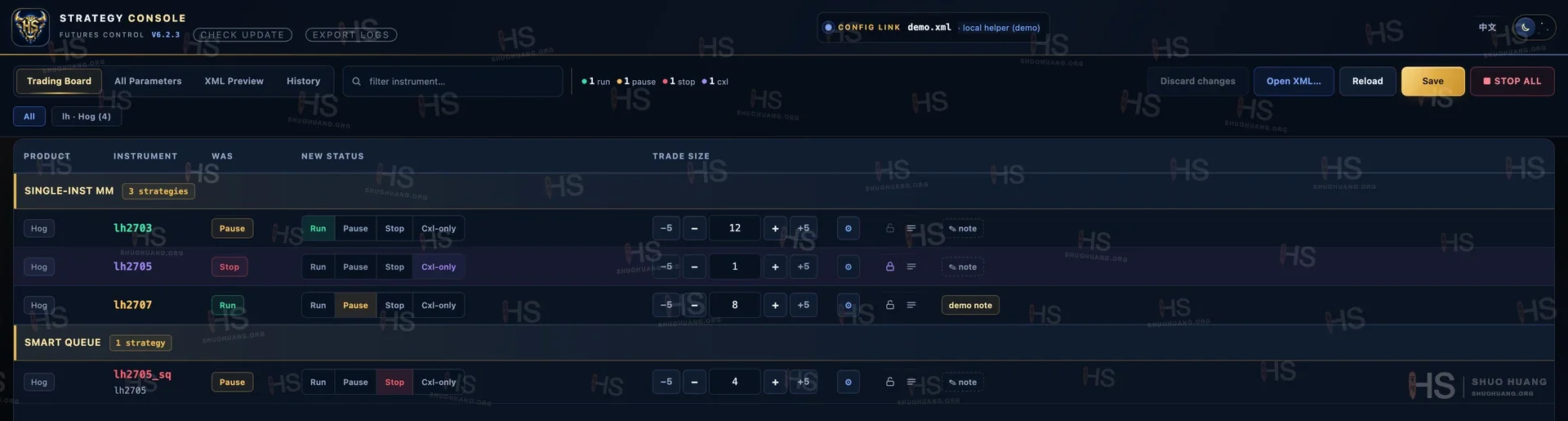
Every strategy on the machine on one screen, with the two things a trader changes all day, status (is it quoting?) and size (how many lots per quote?), one click away.
- Run, pause, stop or cancel-only per strategy; spreads park in cancel-only so they keep their position, with a confirmation before a status that would not
- Size by stepper or typing; a two-module strategy gets two steppers that move together by default
- Per-contract lock and notes that never enter the engine’s file and survive restarts and upgrades
 Enlarge
- Marker 1: Config link (top center): the file this Console is bound to, here the demo file; on a trading machine it is found automatically from the logged-in account.
- Marker 2: New status. One click sets run, pause, stop or cancel-only; the contract name takes the color of the status saved in the file.
- Marker 3: Was. The block’s separate previous-status field, which traders occasionally set by hand; its own picker changes it without touching the live status.
- Marker 4: Trade size. Step by 1 or 5, or type; the floor is 1, so a slip can never write zero.
- Marker 5: Gear, lock, note. The gear opens every parameter of the block; the lock blocks switching a parked contract on by mistake and can always be undone; the note is the trader’s own label and never enters the file.
- Marker 6: Save and STOP ALL (top right): STOP ALL sets spreads to cancel-only and everything else to stop, ignoring locks; Save writes it atomically and verifies it on disk.
 Enlarge
B
Rules built in
The desk’s trading rules and the engine’s own validity rules live in the editor, so the safe action is also the easy one.
- STOP ALL sets every strategy to its parking status in one step, after one confirmation; outside changes to other fields never hold up its save
- Optional statuses appear only in files that declare them
- A file that is already invalid can still be saved, so a stop always gets through
C
Every parameter, including the hidden ones
A grid of every parameter of every strategy, an edit dialog that writes back only the fields actually changed, and a list of the settings the engine reads but the block leaves out.
- Shows the value the engine silently uses for any setting a block leaves out
- Inserts a typed value as exactly one line; nothing else in the file changes
- Refuses values the engine would reject, and says what the engine would have done
D
Add a strategy: one save, up to five files
A new strategy needs matching entries in up to five files, and the engine will not start if one of its entries is missing or misspelled. The Console writes them all in one validated save.
- Copy from an existing block or a built-in template; a preview shows, and lets the trader edit, the exact text each file will receive
- Contract codes are checked against each exchange’s naming grammar before anything is written
- Every file’s version is checked first, originals are backed up (the newest 40 sets are kept), and any failure rolls every file back
E
Never fail silently
The file has other writers, so the Console assumes it will be interrupted, and it always says so.
- A save against a stale version is refused, merged with the newest file and retried; it asks only on a true two-sided conflict
- Any outside change to a quoting status raises an alert bar that stays until read; History groups every change by save, outside changes included
- A file it cannot read gets a red card with the exact line and column, never an empty board
F
Runs on any machine on the desk
Built for shared, locked-down Windows servers, some with older browsers or software-only rendering: nothing to install and no admin rights.
- One code-signed executable that checks for updates daily, accepts only builds signed with the pinned key, and reverts on its own if a release fails
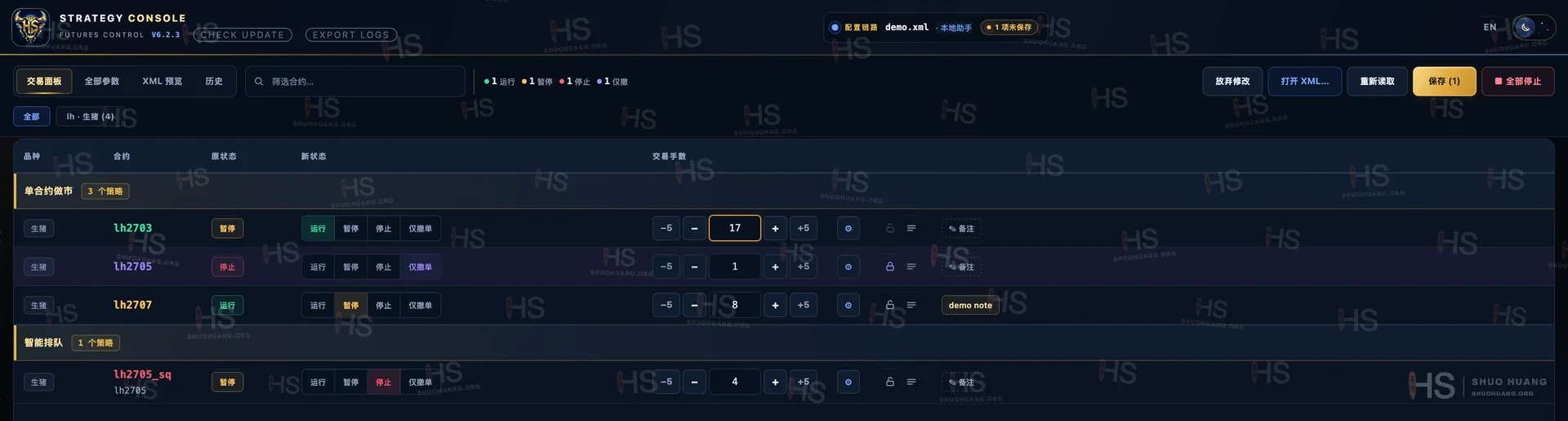
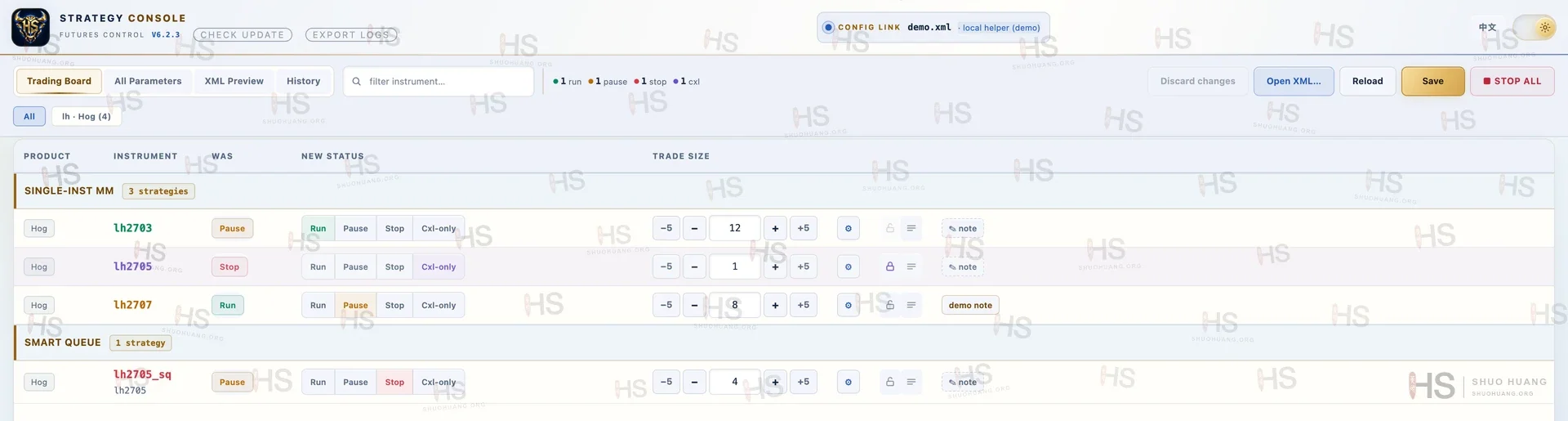
- English and Chinese, dark and light; a fallback edition for older browsers
- No blur and no decorative motion, so the window stays light where every frame is drawn in software; a memory watch warns in the title bar
 Enlarge
05All screens
Three views of the program.
06Under the hood
For the technical reader: the model, the math and the code.
Under the hoodByte-exact serialization, crash-durable atomic saves, optimistic concurrency, a multi-file transaction, engine-rule validation, pseudo-code and test results
This is a production systems project: the hard part is correctness on a file that a trading engine, several people and other programs all touch at once. The Console is one 6,981-line HTML file of plain JavaScript and CSS with no libraries and no build step, a 2,158-line PowerShell 5.1 helper exposing a token-protected HTTP API on the loopback address, and a 1,747-line fallback edition for older browsers. Shuo designed and built it alone and has shipped it continuously since July 2026. Four invariants govern the main Console7: a save that changes nothing changes no byte; a reader sees the old complete file or the new complete file, never anything else; a save never overwrites a change the trader has not seen; and nothing fails silently.
Design choices: the obvious approach, and why it fails here
For each problem: the approach most tools take, why it fails on a file a live engine is reading, and what ships instead. Several rows come from a measurement or from production use.
| Obvious approach | Why it fails here | What ships instead |
|---|---|---|
| Regenerate the XML from parsed values | a fresh write loses what the desk relies on: hand-written comments, spacing, raw & in spread ids, CRLF line endings, the byte-order mark | keep the parsed tree, change only the text of edited fields, serialize that same tree and restore raw &, CRLF and the BOM; a no-op save is byte-identical |
| Save the way a text editor does | truncate-then-write exposes an empty file: 418 empty reads in the stress test | complete temp file, flush, one atomic rename, byte-for-byte read-back: 0 of 239,000 |
| Lock the file while saving | the engine re-reads the file the moment it changes, and a held handle makes that read fail | never hold the live file; optimistic concurrency on the version the trader saw |
| Write-through rename on the live file | can make the engine’s immediate re-read of the file fail | flush the temp file and backups; plain atomic replace for the swap |
| Last writer wins | a stale whole-file copy silently undoes another writer’s change, a status switch included | conditional save, HTTP 409, replay of this trader’s changed fields only |
| Parse the engine’s sibling files | they are not well-formed XML (raw & in attributes) | text edits that copy the most similar existing entry byte for byte |
| Type contract codes by hand into each file | one dropped letter in a spread code keeps the engine from starting | a grammar per exchange (product, month length, month range, leg order), and every file written from the one checked code |
| Warn about settings a block leaves out | a warning names the gap but does not close it | show the engine’s implicit value in the dialog and insert the typed value as one line |
| Let the Console keep its remote link beside the fleet agent | two command listeners on one mailbox both answered the hub | a local-only edition with the link removed, separated on four axes and proven not to collide |
Byte-exact round trip
Writing the file fresh from parsed values would reformat it: spacing, the hand-written comments traders rely on, the raw & in spread ids, CRLF line endings and the byte-order mark would all change, and a diff of a reformatted file is unreadable, which matters when the file controls live quoting.
So the parsed document itself stays the source of truth. The browser’s DOMParser keeps every whitespace and comment node, and a save changes only the text of field nodes:
- Fields are bound by full path, so the size of a market-making module and the size of a hedge module in the same block can never be confused.
- Serialization runs from a working copy of that same tree; CRLF line endings and the BOM are restored afterward.
- Spread ids contain a raw
&, which is not well-formed XML. It is escaped for parsing only and written back raw, as the engine expects. - The sibling files are not well-formed XML at all, so they are never parsed: they are edited as text (see below).
Since mid-September 2026 the regression gate requires every fixture to come back byte-identical from a save that changes nothing, through both products’ serializers (the Console’s and the fleet hub’s).
| Regression set | Files | Requirement |
|---|---|---|
| Sample configurations | 5 | byte-identical after a no-op save |
| Desk configurations | 4 | byte-identical after a no-op save |
| Hand-commented file with nested comments | 1 | byte-identical after a no-op save |
| Wider set used for the engine-aware release (3.0.5) | 20 | byte-identical through both of the hub’s serializers; 18 of 18 through the Console’s |
Atomic, verified, durable save
A text editor truncates the file and then writes it, so a concurrent reader can catch it empty or half-written. The Console writes a complete temporary file beside the live one, forces it onto the disk, replaces the live file with one atomic rename (MoveFileEx), then reads the result back and compares every byte.
Two refinements came from production use:
- Durability. A rename can survive a crash or a power loss while the new bytes, still in the operating system’s cache, do not, which leaves a file of zeros. The temporary file and every backup are therefore opened write-through and flushed (
FlushFileBuffers) before the rename, so a crash at any instant leaves the old file or the new one. Shuo had already used the same flush-then-rename pattern in his CHRONOS writer. - Do not over-harden the live swap. A write-through rename on the live file can make the engine’s immediate re-read fail. The bytes are already on disk by then, so the swap stays a plain replace. The rule recorded: never hold a delete-access handle or a write-through rename on a file the engine watches.
def save_atomic(path, new_bytes):
    tmp = temp_name_beside(path)
    write_durably(tmp, new_bytes)        # write-through, then flush to disk before anything points at it
    for attempt in range(RETRIES):       # the engine may be reading: retry briefly, never wait on it
        if atomic_replace(tmp, path):    # one rename: a reader sees the old file or the new one
            break
        pause_briefly()
    else:
        delete(tmp)
        raise SaveRefused("the file still holds the previous complete version")
    if read_bytes(path) != new_bytes:    # byte-for-byte read-back
raise SaveFailed("post-save verification failed")| Save method | Result for a concurrent reader |
|---|---|
| Strategy Console (temp file, atomic swap) | 239,000 reads: 0 missing, 0 empty, 0 torn |
| Plain text-editor save, same test | 418 empty reads |
Optimistic concurrency on a file
The engine, colleagues’ Consoles, text editors, an automated sizing controller and the fleet agent all rewrite this file whole, so a writer holding an outdated copy can silently undo a change made since, a switch of quoting status included.
File locking was not an option (the engine must always be able to read), so the fix is the scheme databases use when they cannot lock:
- Every save carries the version it was made against: the file’s modification time in milliseconds, as read at load.
- If the file has moved on by more than 2 ms, the helper refuses with HTTP 409
staleand changes nothing. A multi-file save checks every file first and refuses the whole batch if any one has drifted. - The page reloads the newest file, replays only the fields this trader actually changed, and saves again. It asks the trader only when both sides changed the same field to different values, so an emergency STOP ALL is never held up by a prompt over someone else’s unrelated edits.
- An edit dialog writes back only the fields changed in it, not the whole block.
- Any outside change to a quoting status raises a persistent alert, and the file is polled every 3 seconds so the board follows outside changes when nothing is unsaved.
Regression testing then caught one further hole of the same class in the fix itself, and it was closed the same day.
One Add, up to five files, one transaction
A strategy block references instruments that must also exist in the engine’s sibling files; if one is missing, the engine does not start. That is how one misspelled spread leg once kept it from starting. The rules for which entries are needed depend on the strategy type, and Shuo collected them from the desk and from the files themselves (table below).
The sibling files contain raw & in attributes, so they are edited as text. A new entry is a byte copy of the most similar existing entry with the id and edited values swapped, inserted after the last entry with that entry’s own whitespace. The preview and the write call the same function, so what is shown is what is written, and the template each new entry copies is pinned when the preview is built (re-picking it at save time once let one new contract copy another’s entry; the test suite caught it before release).
The save itself is a transaction: check every file’s version, back up the originals (the newest 40 sets are kept), write, and on any failure restore every file already written. Deleting a strategy removes a sibling entry only if no remaining strategy still uses it.
One engine rule shapes the workflow: status and parameter edits are hot-reloaded while the engine quotes, but an added or deleted block takes effect at the engine’s next start. The Console says so beside its Add button, which is why every referenced entry has to be right before that start.
def save_batch(files):
    # 1. every file must still be the version the trader saw; any drift refuses the whole batch
    stale = [f for f in files if abs(version_of(f.path) - f.version_seen) > TOLERANCE]
    if stale:
        return conflict(stale)                   # HTTP 409: nothing is written
    # 2. keep the original bytes of every file, durably, as one backup set
    originals = {f.path: read_bytes(f.path) for f in files}
    write_backup_set(originals)
    prune_backup_sets(keep=40)
    # 3. write in order with the same atomic swap and read-back; on any failure restore what was written
    written = []
    try:
        for f in files:
            save_atomic(f.path, f.content)
            written.append(f.path)
    except SaveError as err:
        for path in written:
            save_atomic(path, originals[path])
        return failure(err, rolled_back=written)
return ok(verified=True)| Strategy type | Entries written to the engine’s sibling files | Terminal position file |
|---|---|---|
| Single-contract market making | the traded contract (for a spread: the spread entry only) | if a position requirement is ticked |
| Smart queue | same rule as single-contract | if a position requirement is ticked |
| Spread with leg help | the spread and both of its legs | if a position requirement is ticked |
| Options quoted from a model price | the traded option only, in four engine files; the underlying appears in none | never |
Instrument-id grammar
The safeguard that makes the engine-stopping typo unsaveable is a grammar, not a spell-check: product letters, month length by exchange, month range; calendar-spread legs must be the same product with the near month first; hedge and market-making legs must belong to the traded spread.
The first options grammar was built from the one sample available and refused another exchange’s ids outright. Fixing it the same day exposed an older bug: month length had been inferred from letter case, but one exchange genuinely uses three-digit months and the engine writes that product in lower case. The length now follows the exchange. The rule Shuo kept: one sample defines an example, not a format. Strict rules apply only to new or changed ids, so an existing file always stays saveable.
| Convention | Example option id | Month digits |
|---|---|---|
| Hyphenated | jd2611-C-3800 | 4 |
| Concatenated | ag2610C13000 | 4 |
| Concatenated, short month | ma611P3000 | 3 |
Making the engine’s silent defaults visible
A new quoting strategy carries a standard adverse-selection guard: it will not join the best price when the queue there looks too thin for the order size, because a thin queue is where a market maker is filled just before the price moves away. Its threshold grows with the order size and is meant to sit between a floor and a cap. When the strategy stopped quoting one side, Shuo traced it tick by tick: both bounds were missing from its block in the file, so at a large order size the threshold rose above ordinary depth. The guard is right to exist; the question is how high its threshold may go.
With both bounds missing, the engine applied its defaults: no floor and no cap.6 The evidence chart above shows the effect on generated ticks. The floor-and-cap form itself came from Shuo’s own study of the desk’s fills (see the Smart Queue Review): the best multiple falls as the order size grows, so a flat multiple would have switched off far more quoting time at large sizes.
The general problem is that a configuration file cannot show what it does not contain. The release that followed does three things in the Console and in Strategy One’s parameter dialog:
- A table of what the engine reads. Per strategy type, each optional setting with the default the engine applies when it is absent, entered only once confirmed, never guessed.
- Insert, do not rewrite. The dialog lists the settings a block lacks with the engine’s implicit value as placeholder text. A typed value is written as one line before the block’s closing tag, indented like its neighbors; nothing else in the file changes, and the engine picks the value up by hot reload, without a restart.
- The engine’s validity rules, enforced before the save. The editor refuses a value the engine would reject when those fields are touched, and leaves an already-invalid file saveable so that a stop always gets through.
The built-in templates now carry both bounds, and the same mechanism later carried new engine settings without a redesign.
| Check | Result |
|---|---|
| No-op save over 20 desk and sample configurations | byte-identical through both of the hub’s serializers; 18 of 18 through the Console’s |
| Insertion and edge cases (order, CRLF and LF, tabs and spaces, trailing comments, commented blocks) | 43 of 43 |
| Through a running Strategy Agent on a desk configuration | original plus exactly 2 lines; confirmed on the first attempt |
| Another writer adds the same setting with a different value | held and flagged, never overwritten |
| Fallback edition for older browsers, self-test | 47 of 47 |
| Repeated on the built, signed executables | hub and Console output byte-identical |
| Diagnosis to signed, staged release | about 74 minutes |
Comments are data too
Traders disable a strategy by commenting its block out by hand, often over lines that already contain comments. Nested comments are invalid XML, and until mid-September such a file produced an empty board with no explanation. Since then:
- Comments are scanned the way the engine’s own parser reads them, where a comment ends at the first closing marker, so the Console and the engine always agree on what the file means.
- A commented-out block appears as an inert, editable row and is written back byte for byte if untouched. The Console itself only ever writes single well-formed comments.
- A file that cannot be read gets a red card with the parser’s line and column.
Adding options support exposed a latent fault in this code: consecutive commented-out blocks were matched longest-first, so a save that changed nothing would have written two of three disabled blocks back uncommented, re-enabling quoting the desk had switched off. It was found in testing, before any harm, and blocks are now matched shortest-first.
Living on shared, locked-down servers
The trading servers are shared, locked-down Windows machines, some with older browsers, so the Console is built to coexist and to explain itself:
- The newest version always quits its predecessor and never locks its own folder; a Console running under another login is never touched.
- The local-only edition. Once the fleet agent existed, opening the old Console beside it put two command listeners on one mailbox. Shuo kept them as two separate products: he removed the Console’s remote arm entirely and separated the two on four axes (port range, state folder, script name, taskbar identity). The proof was direct: each side’s process-matching rule, evaluated against the other’s command line, came out false.
- Signed self-update. Since v3.0 the Console is one code-signed executable. It checks for a newer build daily, accepts only builds signed with the pinned key, applies them on the next launch, never mid-session, and reverts on its own if the new build fails its health window.
- Software rendering. Where a server draws every frame in software, a blurred, animated background can cost a large share of a CPU core. Every blur and decorative animation is gone, and the log keeps a visibility diary that records any frame not painted within 3 seconds, so a blank window can be diagnosed from the log alone.
| Failure mode | How it is engineered out |
|---|---|
| Engine reads a half-written file | complete temp file, atomic swap; 0 of 239,000 reads affected |
| Crash leaves zeros in the file | write-through and flush before the swap |
| Stale copy undoes a colleague’s change | version-conditional save, 409, replay of changed fields only |
| One wrong letter stops the engine | instrument-id grammar; every sibling entry written in the same transaction |
| One file of a multi-file save fails | version pre-check, backup set, full rollback |
| Engine rejects an invalid value | the engine’s validity rules checked before the save; files already invalid stay saveable |
| Disabled strategies re-enabled by a save | comment scan matches the engine’s parser; shortest-first block matching |
| Empty board with no explanation | red card with line and column; every notice logged |
| Bad release reaches a trading machine | pinned signature, staged apply, automatic revert |
Built with
- PowerShell 5.1
- JavaScript (no framework)
- HTML / CSS
- Win32 API (MoveFileEx, FlushFileBuffers)
- Atomic file transactions
- Crash-consistent I/O
- Optimistic concurrency (HTTP 409)
- Local HTTP API (loopback, token-protected)
- Byte-exact XML editing
- Grammar-based validation
- Engine-rule validation
- C# launcher
- Authenticode code signing
- Signed self-updating executables
- File System Access API
- HTA / ES5
- Regression testing
- Production deployment
07Releases
Shipped in versions, like a product.
- 1.0First release, one week into the job: trading board, all parameters, XML preview, atomic byte-verified saves, STOP ALL.
- 1.3Spread rules: spreads park in cancel-only and keep their position.
- 1.4Optional statuses, per-contract notes, a previous-status picker, safe coexistence on shared servers.
- 1.7.3Conditional saves with automatic merge: a save made against an outdated copy is refused and replayed.
- 2.0Adding a strategy writes every config file it needs, up to five, in one transaction rolled back on any failure; instrument-id grammar; automatic discovery of the files.
- 2.1The local-only edition, built to run beside the Strategy Agent; smart-queue strategy and built-in templates.
- 2.1.4Options strategies and option ids in three exchange conventions.
- 3.0One code-signed executable with signature-gated self-update and automatic revert.
- 3.0.5Engine-aware parameters: shows the engine’s implicit defaults, inserts a missing setting as one line, enforces the engine’s validity rule.
- 4.2.1No blur or decorative motion, for servers that draw every frame in software; a visibility diary in the log.
- 4.4.0Crash-durable saves: every write flushed to disk before the swap.
- 6.1.0Memory watch with a title-bar warning.
08Related
Programs that work with this one.
-
 Strategy One
Fleet command for a live futures desk: every strategy on every exchange-colocated machine, controlled from one screen.
-
 Strategy Agent
Risk guards that hold with the link down, a verified writer for every change sent to the live strategy file, and a per-second feed from every engine it guards.
-
 CHRONOS
Self-retraining machine-learning controller that sizes and safeguards the desk’s live-hog market making, wired straight into the trading engine. Its central finding changed how the desk sizes.
- Smart Queue Review Audited a new quoting strategy, traced its first live day order by order, designed the guard now in production.
- 1Charts, figure data and screenshots on this page are synthetic, illustrative or measurements of Shuo’s own software. Methods and outcomes are described as they happened; the desk’s own figures are confidential and do not appear here.
- 2Stress test from the v1.0 release, measured on the development PC on July 8, 2026: 239,000 concurrent reads while the Console saved repeatedly, with 0 missing, 0 empty and 0 torn files. An ordinary text-editor save in the same test produced 418 empty reads.
- 3One Add writes the strategy file plus what that strategy type needs: for a futures strategy, three engine files and, when a position requirement is set, the trading terminal’s position file; for an options strategy, four engine files and no position file. That is up to five of the six files the suite manages.
- 4About 74 minutes passed from the finished diagnosis to the release being built, signed and staged for the desk’s one-click upload. The release ships the fix in the Console and in Strategy One; entering the two values on a live strategy block is the desk’s step.
- 5Joined Nanhua Futures on July 1, 2026; Strategy Console v1.0 carries the release date July 8, 2026.
- 6With both settings absent, the engine applies its defaults: no floor and no cap. The study behind the floor-and-cap form is told on the Smart Queue Review page. Sizes, bounds, multiples and thresholds are the desk’s settings and are not published; the chart’s values are generated.
- 7The fallback edition for older browsers also saves through a temporary file and a single swap and reads the result back, but without the version check or the crash-durable flush.