
Software · Desk tool
QWIN Task Guide QWIN任务指南
Less than two weeks into the job, Shuo turned an experienced trader’s walkthrough into the field manual every new trader needs on day one: every job on the market-making terminal, window by window, every lesson traced to its source.
01System architecture
Three sources of truth, one offline manual, a citation on everything.
The desk’s trading desktops are standard-user machines with nothing extra installed, so the guide is three static files that open by double-click.
Vendor PDFs
Two manuals
70 + 62 pages. Older than the software on the desk.
At the desk
Live terminal
QWIN / Delta One, market-maker build. Opened and compared; never changed.
Onboarding sessions
Session notes
Shuo’s notes from desk onboarding sessions, 21 in all.
Automated, in parallel
21 structured digests
One per note. Every point keeps a pointer to its passage; doubtful items are listed, not smoothed over.
Knowledge base
342-item knowledge list
Digests merged into 11 themes. 860 citations back to the notes. 30 conflicts flagged.
Static files
Two data files
A tasks file: 58 tasks, 232 steps, 12 emergency cards. A reference file: 23 map regions, 130 parameters, 52 terms. Every entry carries a badge for its source: manual page, screen capture, live check or session note.
Any browser, offline
One HTML page
QWIN Task Guide. Hash router, global search, six views. Opens by double-click.
At the desk
The new trader
Finds the task, follows the steps, reports what was unclear.
Simplified: July 2026 screen captures of the settings window were a fourth, smaller source.
Why three static files?
A page that opens from disk has nothing to install, nothing to update and nothing to break in the middle of a session.
Why a citation on every lesson?
A lesson that cannot be traced cannot be checked. Each of the 342 items points back to the note and the passage it came from, 860 citations in all, so any line in the guide can be audited down to its source.1
Why hold numbers back?
Informal notes contradict themselves. Thirty figures on which the notes disagreed were ranked by what a mistake would cost and kept out of the guide, under one written rule: no unverified number is published.2
02The story
The field manual Shuo needed on day one: 58 tasks and 342 cited lessons.
A market-making terminal is one dense settings window with 23 sections and about 130 parameters, and the two vendor manuals that describe it were older than the software on the desk. An experienced trader walked Shuo through it. Less than two weeks into the job, on his own initiative, he turned that walkthrough into a manual, with two aims: to master every function and every small label on the screen fast, and to let every trader who joins after him learn the layout far more easily. It is organized by what a trader has to do, built from the vendor manuals and his notes from desk onboarding sessions, and checked against the live terminal. His notes were distilled into 342 lessons that each point back to the note they came from.1 Think of a pilot’s quick-reference handbook: sorted by situation, not by cockpit panel.
01
The problem
In July 2026 Shuo joined a futures market-making desk and had to learn its trading terminal fast. A market maker keeps buy and sell prices in the market all day; the terminal runs that quoting, contract by contract, from one settings window with 23 sections and about 130 parameters.
- The two vendor manuals, 132 pages together, described an older version of the software. Buttons had moved, windows had been added, and one button in the manual no longer existed.
- Manuals are organized by screen. A trader thinks in jobs: start quoting, widen the spread, stop everything now.
- The knowledge that matters most was not written anywhere. It is passed on in person, in onboarding sessions at the desk.
02
What he built
A manual organized by job, conceived and built from scratch by one new trader: first to learn the terminal fast himself, then to hand the same knowledge to every new trader after him. Each of 58 tasks gives the full path, window, then section, then button, with what to type, what to watch for and what can go wrong. Around the tasks sit a clickable map of the settings window, a 130-parameter reference, a 52-term glossary of desk vocabulary and 12 emergency cards for the moments when there is no time to read.3
Then he checked it. Every menu and dialog of the live terminal was opened and compared with the manual, under written rules that forbade changing anything. Where the manual and the live software disagreed, the live software won, and the guide says so.
Then he added what no manual had: his notes from desk onboarding sessions. He built a notes-to-knowledge pipeline for them: an automated summarization pass condensed the 21 notes into structured digests, and a merge produced a knowledge list of 342 lessons, each one citing the note and the passage it came from.4,1 Thirty figures on which the notes disagreed were held back.2
03
The rules it teaches, in plain words
An exchange grants market-maker status in return for obligations: it scores market makers on size near the best prices, spread width, time in the market and open interest. The guide spells out what that means at the keyboard.5
- Show size where it counts. Only size resting near the best prices counts. In an illustration, where the three best levels count and 12 lots are required, 4 + 4 + 4 passes and 3 + 3 + 3 + 3 fails, because the fourth level is invisible to the score.
- Keep the gap tight. The narrower the gap between your buy and sell price, the more each second of quoting scores.
- Be there most of the day. Quotes must be live for a minimum share of trading time.
- Hold positions, not just orders. Open interest held at the close is what is assessed; a spike during the day counts for nothing.
- Mind the assigned list. Trading outside the assigned contracts is limited relative to trading in them.
These are the same constraints that shape Shuo’s later quantitative work, including the reason CHRONOS never sizes a quote to zero.
04
What changed
Four releases shipped in two days. The last one, session notes in and a cited update out, took a single working day.6 A newcomer’s question, how do I do this, now has an answer that names the window, the button and the source.
It shows how Shuo works. He learned a 130-parameter terminal in days by writing down, organizing and checking everything an experienced trader showed him. Then he generalized it: what one mentor explained to one newcomer is now a manual the next new trader can open on day one, so the same onboarding hours do not have to be spent again.
The guide did not stay a learning aid. Its task list became the vocabulary of the Desk Reference Cards, the daily brief Shuo went on to build, and its knowledge base was used again in a later trading review.7 When one entry was later questioned, Shuo checked it with the trading engine’s developer; the answer confirmed the lesson, and the entry was marked confirmed.
4
releases in two days, less than two weeks into the job6
58
tasks in 10 categories, written as 232 window-by-window steps3
1day
from session notes in to a cited knowledge base and a released update4
130
parameters explained, beside a clickable map of the settings window’s 23 sections3
342
lessons carrying 860 citations back to their source notes1
30
conflicting figures held back under one rule: no unverified number is published2
03Evidence
What the onboarding sessions taught
The knowledge list behind the guide, counted lesson by lesson. Every lesson cites the session note it came from; the last theme holds the contradictions kept out of the guide.
Lessons in the knowledge list, by theme
342 lessons in 11 themes, led by the daily routine; 30 contradictions were held back, not guessed.
Show the dataHide the data
| Theme | Lessons |
|---|---|
| Daily routines | 60 |
| Settings and what they do | 47 |
| Exchange obligations | 39 |
| Strategy and pricing | 33 |
| Tools outside the terminal | 32 |
| Hedging | 25 |
| Per-product traits | 23 |
| Lessons from past incidents | 22 |
| Risk limits | 16 |
| Slang and standard terms | 15 |
| Contradictions held back | 30 |
04Functions
Everything it does, in the order a trader meets it.
A
Find the job
Start from what you need to do, not from where the button might be.
- Global search across tasks, map sections, parameters and terms; press / to focus it
- Ten categories, from logging in and starting a strategy to hedging, risk stops and system settings
- English subtitles on a toggle, remembered between visits
 Enlarge
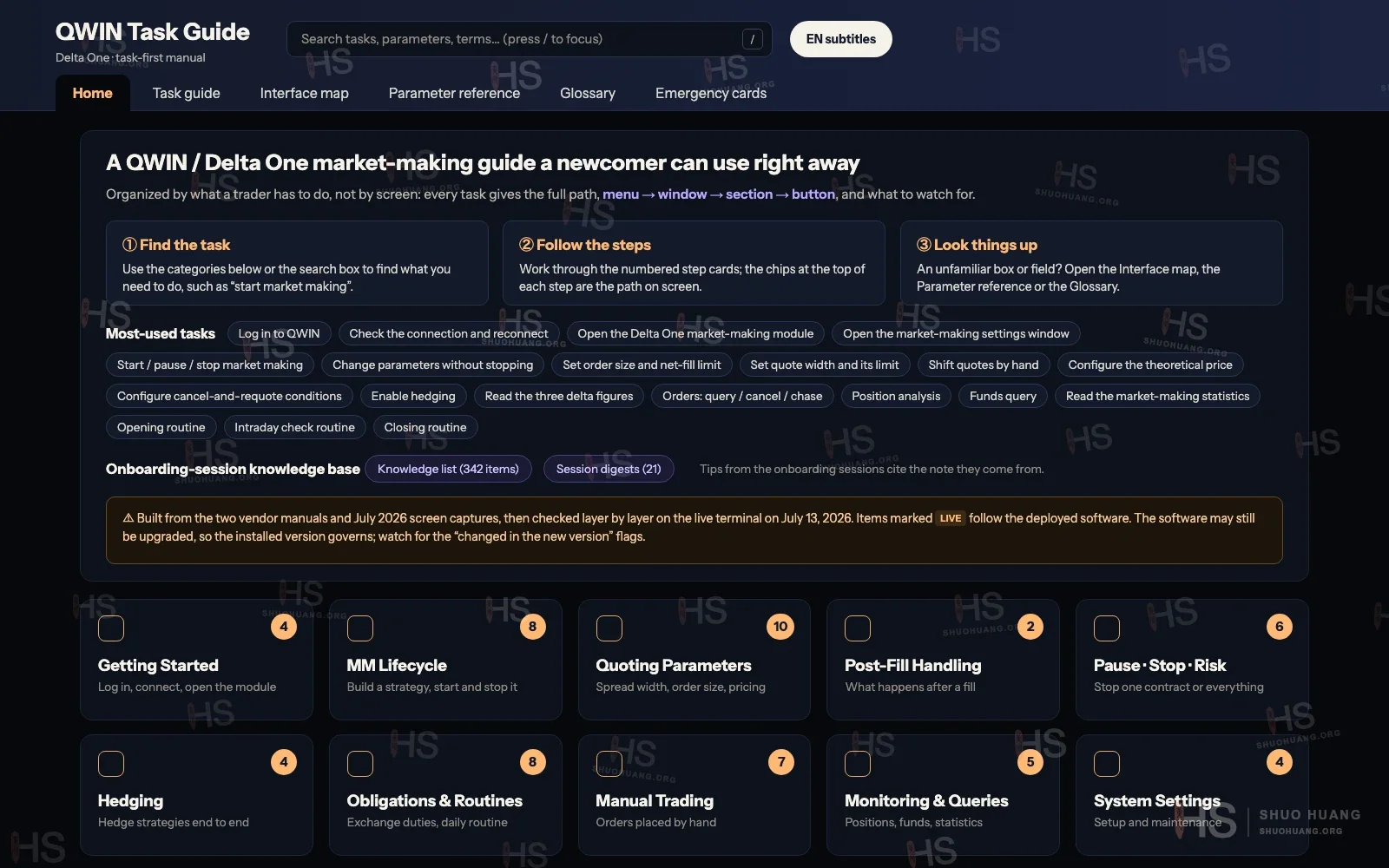
- Marker 1: Search (top): one box searches tasks, settings-window sections, parameters and glossary terms.
- Marker 2: Six views (tabs): Home, Task guide, Interface map, Parameter reference, Glossary, Emergency cards.
- Marker 3: How to use it (three boxes): find the task, follow the numbered steps, look up any unfamiliar box or field.
- Marker 4: Most-used tasks (chips): one click to log in, open the market-making module, start, pause or stop quoting, change parameters without stopping, run the opening and closing routines.
- Marker 5: Onboarding-session knowledge base: a 342-item knowledge list and 21 session digests.
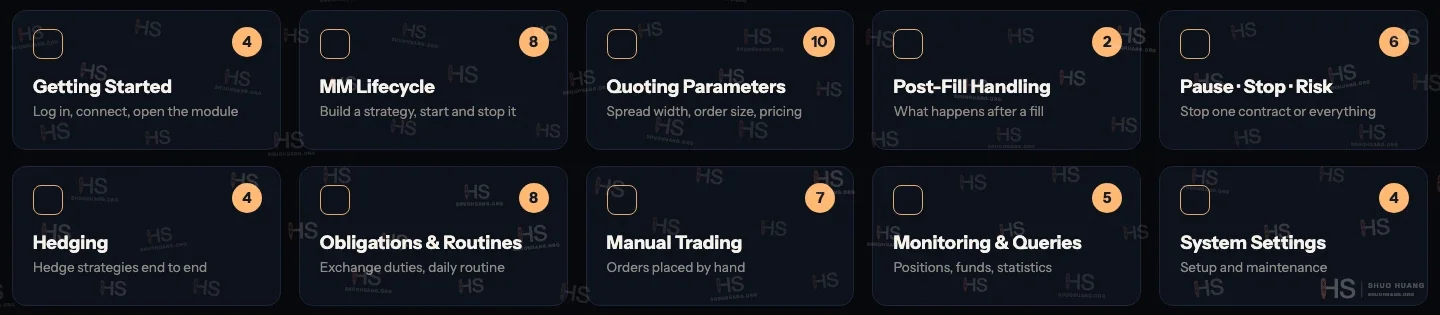
- Marker 6: Ten categories (tiles): each tile shows its task count; the ten add up to 58.
 Enlarge
B
Follow it, window by window
Every step names the window that is open, the section inside it and the control to press.
- The first breadcrumb chip is always the title printed on the open window, so a newcomer can anchor on what the screen says
- Each step leads with its purpose in bold, then what to do, what to type, tips and risk warnings
- Tasks whose items are alternatives, not a sequence, render as unnumbered cards with a banner that says so
C
Look up any box on the screen
A clickable map of the settings window answers what a field is, and which tasks touch it.
- Interface map: all 23 sections of the strategy-settings window; click one for its purpose, its controls and the tasks that use it
- Parameter reference: 130 entries with unit, meaning and beginner advice, filterable by section or keyword
- Glossary: 52 terms, including the desk’s own slang next to the standard name
D
Act fast when it goes wrong
Twelve emergency cards give the shortest path for the moments when there is no time to read.
- Stop all market making now; stop one contract; back the quotes off quickly
- Quotes stopped by themselves, orders not going out, a disconnection, an auto-stop pop-up
- Calendar traps: a new contract’s listing day, the day an exchange limit changes, an unhedged position found at the close
E
Trust it, because it shows its sources
Every task and tip carries a badge saying where it came from: a manual page, a screen capture, a live check or a session note.
LIVEmarks what was confirmed on the live terminal; differences from the vendor manual are flagged in place- 45 session tips across 22 tasks cite their source note; the 342-item knowledge list behind them also cites the passage, 860 citations in all1
- A note on the home page states the sources, the date of the live check and that the software may change
 Enlarge
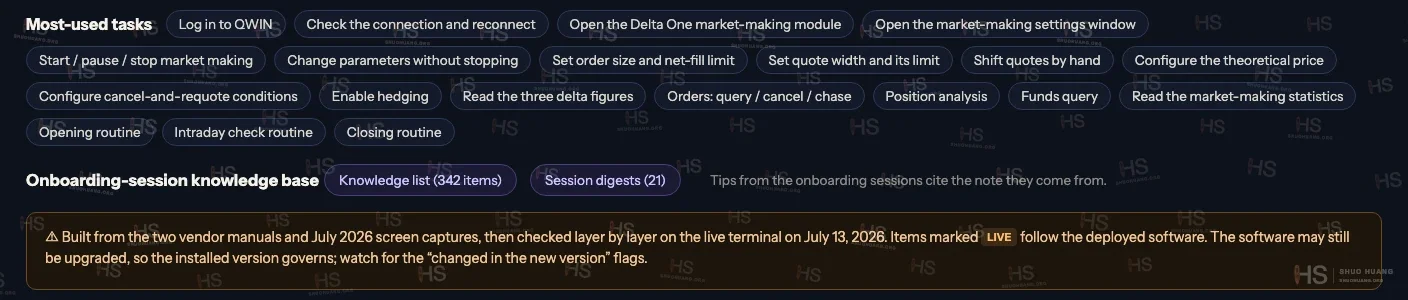
- Marker 1: Most-used tasks: the 20 jobs a trader does most, one click each.
- Marker 2: Knowledge base: compiled from the onboarding-session notes.
- Marker 3: Knowledge list: 342 items, each citing its source note.
- Marker 4: Session digests: 21, one per note.
- Marker 5: Citation key: tips from the onboarding sessions cite the note they come from.
- Marker 6: Source note (amber box): built from the two vendor manuals and July 2026 screen captures, checked layer by layer on the live terminal on July 13, 2026; items marked
LIVEfollow the deployed software.
05Under the hood
The pipeline, the data model and the rules, for the technical reader.
Under the hoodAutomated summarization with citations, a review gate, the data model, a read-only survey and the obligation rules in general form
Three engineering problems sit under a simple-looking manual: turning informal session notes into knowledge that can be trusted, reconciling out-of-date documentation with deployed software without touching a live trading system, and shipping to machines where nothing extra is installed. This layer documents each one: the pipeline and its counts, an illustrative audit trail from the guide back to the source note, the data model, and the obligation rules in general form.
Notes-to-knowledge pipeline
Input. Shuo’s notes from desk onboarding sessions, 21 in all: informal, full of desk slang, with numbers mentioned in passing.4
Stage 1, structured digests. An automated summarization pass, run in parallel across the 21 notes, wrote one digest per note (2,394 lines in total). Two constraints were built into the pass: every extracted point keeps a pointer to the passage it came from, and every digest ends with its own list of doubtful items, because informal notes are noisy.
Stage 2, merge. The digests were merged into one knowledge list: 342 items in 11 themes (daily routines, exchange obligations, settings and what they do, hedging, risk limits, lessons from past incidents, strategy and pricing, per-product traits, tools outside the terminal, slang against standard terms, and contradictions), carrying 860 citations back to the notes, 2.5 per item. A lesson that appears in several notes is one item that lists every place it appears.
Stage 3, human gate. Before anything entered the guide, Shuo decided, in a written proposal, what would go in and what would stay out. The gate is one rule: a number flagged as unverified is never written into the guide. Thirty contradictions were ranked by cost of error (wrong means losing money or breaking a rule) and withheld.2
Elapsed. Notes in at 10:31, version 1.3 released at 15:00 the same day.
# Stage 1: one structured digest per note, run in parallel
def digest(note):
    points = summarize(note, keep="pointer to the source passage")
    doubts = [p for p in points if p.is_unclear or p.conflicts_within_note]
    return points, doubts                      # doubts are listed, never smoothed over
digests = parallel_map(digest, session_notes)

# Stage 2: merge into one knowledge list; a lesson keeps every citation
knowledge = {}
for point in all_points(digests):
    item = knowledge.setdefault(point.lesson, new_item(point.theme))
    item.citations.append((point.note, point.passage))

# Stage 3: the human gate
for item in knowledge.values():
    if item.has_unverified_number:
        withhold(item)                         # ranked by cost of error, kept out
    elif approved_in_written_proposal(item):
write_into_guide(item, badge=source_notes(item))| Stage | Output | Scale |
|---|---|---|
| Session notes | Notes from desk onboarding sessions | 21 notes |
| Automated summarization (parallel) | Structured digests with doubt lists | 21 digests · 2,394 lines |
| Merge | Knowledge list in 11 themes | 342 items · 860 citations · 2.5 per item |
| Human gate | Items withheld as contradictory | 30 |
| Integration (v1.3) | New category, tips, cards, terms | 8 tasks · 45 tips on 22 tasks · 4 emergency cards · 10 terms |
Traceability instead of a score: one claim, audited to its source note
No reference summaries existed, so no accuracy score could be computed, and a domain this specialized has no benchmark.8 The control is structural instead: every layer points back to the one before it, so any claim in the guide can be audited down to the note it came from.
- Note → digest: every extracted point keeps a pointer to its passage; doubts are listed, not smoothed over.
- Digest → knowledge list: every item cites its note and passage.
- Knowledge list → guide: every session tip carries a badge naming its notes.
The table follows one rule, the counted-levels rule set out under “The obligation rules, in general form” below, through all four layers, and shows the gate at work on the passage that comes right after it. The pointers in it are illustrative.
The knowledge list was tested once in production. A desk note later contradicted one of its entries. Shuo put the question to the trading engine’s developer; the reply confirmed the entry, and it was marked confirmed with its date, its citation still pointing to the session note it came from.
Alternatives rejected.
- Publishing every extracted number: more complete, but a wrong obligation figure costs money or breaks a rule.
- A single merged summary without per-item citations: shorter, and impossible to audit.
- Trusting the summarizer to resolve contradictions: it would pick one of two conflicting figures with no evidence. Contradictions are listed side by side and left for a human.
- A screen-by-screen manual like the vendor’s: it answers what a button is, never how to do the job.
| Layer | What it holds for this rule | Pointer back |
|---|---|---|
| Session note 08 | The source passage: 16 sentences on which price levels count toward the required size | Passage 32: the place every later layer points to |
| Digest, note 08 | One line: only size in the counted levels counts; both sides must reach the requirement; in the illustration, 4 + 4 + 4 passes and 3 + 3 + 3 + 3 fails | note 08, passage 32 |
| Knowledge list, exchange obligations | The same rule as one item among 342 | (note 08, passage 32) |
| Guide, obligations task | Step titled “only the counted levels on each side count” | Session-note badge naming notes 04 08 19 20 |
| Gate, the next passage | A requirement mentioned in passing as a bare number, with no unit | Sent to the digest’s doubt list at note 08, passage 33; not in the guide |
Data model: content as data, one renderer
The whole guide is two data files and one page. The tasks file holds 10 categories, 58 tasks and 12 emergency scenarios; the reference file holds 23 map regions, 130 parameters and 52 glossary terms. A task is a plain object: goal, frequency, difficulty, steps, tips, warnings, session tips, sources and related tasks. A step is a breadcrumb, a purpose, the action, and optional input, note, warning and map region.
The authoring conventions live in the header of the data file, and two of them came straight from field use. After his first hours using the guide at the desk, Shuo found that breadcrumbs starting with an internal area name meant nothing to a newcomer, and that lists of alternatives looked like sequences. Version 1.2, released the same afternoon, rewrote all 191 steps then in the guide: the first chip is always the title printed on the open window, every step leads with its purpose, and a flag on the task renders independent options as unnumbered cards.
# Authoring conventions (since v1.2):
#   - a step's path starts with the title printed on the open window,
#     then the section inside it; the control comes last
#   - a step leads with its purpose (shown large and bold), then what to do
#   - a task flagged as alternatives draws its items as unnumbered cards
task = {
    "id":           "obligations-overview",
    "category":     "obligations and routines",
    "title":        {"zh": "...", "en": "How quoting obligations are counted"},
    "frequency":    2,          # how often a trader needs it
    "difficulty":   2,
    "alternatives": True,       # independent items, not a sequence
    "goal":         {"zh": "...", "en": "What counts, and what does not."},
    "steps": [
        {"path":    ["window title", "section"],
         "purpose": "Only the counted levels on each side count",
         "do":      {"zh": "...", "en": "Keep the required size near the best price."}},
        # ... more items
    ],
    "sources": ["session notes <numbers>"],  # or a manual page, a screen capture, LIVE
    "related": ["<other task ids>"],
}| Release | Tasks | Steps | Parameters | Terms | Emergency cards |
|---|---|---|---|---|---|
| v1.0 · vendor manuals + screen captures | 49 | — | 121 | 41 | 8 |
| v1.1 · live read-only survey | 50 | — | 130 | 42 | 8 |
| v1.2 · step-card redesign | 50 | 191 | 130 | 42 | 8 |
| v1.3 · onboarding-session notes integrated | 58 | 232 | 130 | 52 | 12 |
Rendering: a hash router and string templates
The page is the shell: a hash router serving the six views, a search index built at load from all four content types (tasks, map regions, parameters, terms), template functions that turn data objects into HTML, and print styles. There is no framework, no build step, no network request and no dependency, so the page behaves identically from a local disk or a shared drive.
Release checks. Every release is frozen in its own folder; a count script verifies that every step has a purpose title (232 of 232 in version 1.3), and each view was checked in headless-browser screenshots before freezing.
function breadcrumb(path):
    if path is empty: return nothing
    chips = [chip(escape(part)) for part in path]
    mark the first chip as the window title
    return chips joined by an arrow

function render():
    route = the part of the address after "#/", split on "/"
    view  = route[0], or "home" when it is empty
    page  = one of:
        home                -> home view
        tasks, task/<id>    -> category list, or one task's step cards
        map/<region>        -> the settings-window map, one region open
        parameters          -> the parameter reference
        glossary            -> the glossary
        emergency           -> the emergency cards
        anything else       -> home view
    replace the main area with page
    highlight the matching tab
    scroll to the top

run render() whenever the address hash changesRead-only survey of a live trading terminal
The vendor manuals had to be reconciled with the deployed build, and the deployed build was a live market-making terminal. The survey ran under written rules: open menus and dialogs and capture a screenshot of each; never press a confirm, save, start, stop, quote, order or cancel control; never edit a field; leave every dialog by its cancel or close button; capture an unclear control instead of clicking it. Anything that could only be reached by changing state was left unverified and labeled as such inside the task. The walk covered every menu, the market-making main window, every strategy-settings dialog and the trading, analysis and system windows, in three passes within one afternoon.
| Finding | Vendor manual | Live terminal | What the guide does |
|---|---|---|---|
| Order-count monitor | Not described | A window counting orders and cancels, overall and per contract | New task |
| Multi-order dialog | Old layout | Redesigned: per-order sizes, re-queue modes | Steps rewritten |
| Reconnect-account button | Described | Does not exist; only log in again or close | Disconnection task and emergency card corrected |
| Group-settings button | Described | Exists, in a different window than a newcomer would open | Path re-anchored to the right window |
| Field and button names | Older wording | Several renamed | Live wording used; old name noted |
| Dialog reachable only by changing a dropdown | Described | Not opened, by rule | Marked not live-verified |
The obligation rules, in general form
Exchanges score market makers on size near the best prices, spread width, time in the market and open interest. The obligations category turns that into rules precise enough to compute. A quote is valid only when the cumulative resting size in the price levels that count, the first on each side, reaches the required size on both sides. The spread is then judged where each side’s cumulative size reaches , so where the size sits decides the score, not only whether the count is met.5
Why size and spread are scored separately
Each interval of valid quoting earns a spread score that falls as the quoted spread widens, over quoting time ; time quoted wider than the permitted maximum earns nothing.
Size and spread are scored by different terms. The size that counts toward validity is capped at the requirement, so adding lots beyond the requirement cannot narrow , and tightening the spread adds no size. The guide teaches a newcomer to read the two separately: first whether the quote counts at all, then how much each second of it is worth.5
The same structure is the reason an automated sizing system cannot simply move all its size away from the best price: the trading engine keeps the required size resting near the best prices, which is why CHRONOS never sizes a quote to zero.
| Rule family | What the guide teaches | Why a newcomer needs it |
|---|---|---|
| Which resting orders count | Only size in the levels the exchange counts; deeper size is invisible to the score | A full-looking ladder can still fail |
| Quoting time | Quotes must be live for a minimum share of trading time | Every pause has a cost that adds up over the period |
| Open interest | Positions held at the close are what is assessed | An intraday spike counts for nothing |
| Assigned contracts | Trading outside the assigned list is limited relative to trading in it | Volume in the wrong contract does not help |
| Orders that never count | Immediate-or-cancel orders (FAK, FOK) never rest, so they add no quoting time | Crossing the spread is not quoting |
Failure modes engineered out
- A stale manual sends a trader to a button that is gone. Every path was re-anchored to the live build, and differences are flagged where they occur.
- A newcomer cannot find where a step starts. The first breadcrumb chip is the title printed on the open window.
- Options read as a sequence. Parallel tasks render without numbers, under a banner that says the items are independent.
- A wrong note becomes a rule. Doubt lists in every digest, 30 contradictions withheld, and a citation on every item that survives.
- Documentation work disturbs live trading. The survey could open and look, and nothing else.
- The tool needs something the machine does not have. No install, no dependency, no network: three files and a browser.
Built with
- Automated summarization with citations
- Knowledge-extraction pipeline
- Human-in-the-loop review gate
- Data provenance
- Knowledge base design
- JavaScript
- HTML / CSS
- Zero-dependency static app
- Offline deployment
- Read-only survey of a live system
- Headless-browser verification
- Market-making obligations (DCE, SHFE)
06Releases
Shipped in versions, like a product.
- 1.0Cross-referenced with both vendor manuals, with page citations, plus July 2026 screen captures of the new settings window: 49 tasks in 9 categories, a 23-section map, 121 parameters, 41 terms, 8 emergency cards.
- 1.1Read-only survey of the live terminal. Confirmed content gets the
LIVEbadge; mismatches re-anchored to the deployed build; a new order-count task; 130 parameters. - 1.2Step cards redesigned from field feedback: window-title breadcrumbs, a purpose line on every step, unnumbered cards for alternatives. All 191 steps rewritten.
- 1.3Onboarding-session notes integrated in one working day: a new obligations and daily-routines category (8 tasks), session tips on 20 existing tasks, 4 new emergency cards, 10 new terms. 58 tasks, 232 steps.
07Related
Programs that work with this one.
- Desk Reference Cards A change-tracked daily brief for a live market-making desk: 32 instruction versions diffed, 19 editions, every change flagged for the session ahead.
-
 CHRONOS
Self-retraining machine-learning controller that sizes and safeguards the desk’s live-hog market making, wired straight into the trading engine. Its central finding changed how the desk sizes.
- Smart Queue Review Audited a new quoting strategy, traced its first live day order by order, designed the guard now in production.
-
 Position Atlas
A market-making obligation tracker built by one trader: 2,410 of 2,410 contract-days matched the exchanges’ own obligation reports.
- 1Each of the 342 items in the knowledge list cites its source note and the passage within it (860 citations in total, counted in the file). Inside the guide, session tips cite the note number; the passage is in the linked knowledge list and digests.
- 2Thirty figures on which the notes contradicted themselves or each other were kept out of the guide pending a re-check. One related item was later settled directly with the trading engine’s developer; the rest remain withheld.
- 3Version 1.3, counted by loading the guide’s data files: 58 tasks, 10 categories, 232 steps, 12 emergency cards, 23 map regions, 130 parameters, 52 glossary terms.
- 4Shuo’s notes from desk onboarding sessions, 21 in all. From notes in to a released update took one working day, July 14, 2026.
- 5Obligation rules are described in general terms. Lot counts and level counts in examples are illustrative; each exchange’s published rules and its current market-maker notice govern.
- 6Versions 1.0, 1.1 and 1.2 were frozen on July 13, 2026 and version 1.3 on July 14, 2026, about 25 hours from first release to last. When work on version 1.0 began is not recorded. Shuo joined the desk in July 2026.
- 7Built for Shuo’s own onboarding and written so that later new traders can learn the terminal from it. Later use is documented for his daily reference cards and for a later trading review of his own; no usage count is claimed.
- 8No summary-accuracy score was measured; no reference summaries exist for this material. Reliability rests on per-item citations and on withholding contradictory figures.
- 9The audit-trail table on this page is illustrative; the chart and counts measure Shuo’s own guide and pipeline. Methods and outcomes are described as they happened; the desk’s own figures are confidential and do not appear here.