

Software · Desk tool
Self-Hedge Calculator 自对冲计算器
Ten minutes before the close, it gives the exact number for the exchange’s end-of-day offset filing: to the lot, checked against inventory, report written.
01System architecture
The trader types five columns. One file does the rest.
The calculator has no programmatic access to the trading terminal, and the office PC is a standard-user machine. So Shuo designed the calculator as a single offline page fed by hand: typing takes seconds, every result updates on the keystroke, and nothing can leave it but text on the clipboard.
Trading terminal PC
Trading terminal
The position-analysis window: contract, long, short, today’s buys and sells. Read by eye and typed in.
14:50, ten minutes to the close
Trader
Copies each column top to bottom; Enter walks down the column.
Office PC · offline
Self-Hedge Calculator
One static HTML file. Recomputes pairs, caps, headroom and status on every keystroke; splits the filing in one click.
Clipboard only
Report message
The exact text the desk sends: one line per contract, pairs to offset.
Office PC
 The One
Shuo’s hub window; shows the calculator as a tab.
Optional · loopback only
Desktop host
A small Python host that serves the same file as a desktop app window. The page also opens straight from disk.
After the 15:00 close
Desk contact → exchange
The contact passes the request on for filing; after the close the exchange offsets the filed long and short positions.
The calculator computes and formats; it never files anything. People carry the number across both gaps on purpose.
Why typed by hand?
Every number arrives by hand, so the design minimizes the typing: the columns sit in the terminal’s own order, Enter moves down a column, the sell volume mirrors the buy volume until it is typed, and pasted commas or full-width digits are cleaned.
Why one file?
Nothing needs installing. A single HTML file with zero dependencies opens anywhere, cannot break on an update, and can be audited end to end. The desktop host is a convenience on top, never a requirement.
Why no send button?
A wrong figure in an exchange filing costs fees or inventory. The tool stops at the clipboard: the trader reads the message, pastes it, and people stay in charge of what is filed.1
02The story
One number, ten minutes before the close, exact to the lot.
An exchange asks a market maker, a firm that must keep quoting prices to buy and to sell, to quote particular contracts, and its market-maker fee schedule depends on how each day’s volume divides between those designated contracts and the rest. Each afternoon, before the close, the desk may file an end-of-day position offset with the exchange, and the size of that filing had to be worked out by mental arithmetic in the last hectic minutes of the session. In his fourth week on the desk, on his own initiative, Shuo replaced that arithmetic with a live calculator that gives the exact number, checks it against what the desk actually holds, splits it across contracts and writes the report.
01
The problem
Exchanges designate the delivery months they ask market makers to quote, and they reduce fees on market-making volume within limits.2 One of those limits ties the volume a market maker trades outside the designated contracts to the volume it trades in them. Every lot above the line pays the full exchange fee, which can exceed a market maker’s thin margin per lot, so the line matters.
The exchange also gives its market makers an end-of-day procedure. Before the 15:00 close the desk may file offset pairs: after the close the exchange closes one of the desk’s long positions against one of its short positions in the same designated contract.3 The size of that filing has to fit the day’s volumes on one side and the desk’s inventory on the other.
Think of topping up a prepaid card just before the shop closes. Too little, and the last purchases are charged at the full rate; too much, and you have tied up money you need tomorrow. The question every afternoon is: how much?
- Too few and the day ends outside the fee schedule’s limit.
- Too many and the desk spends the two-way inventory it must keep to meet its open-interest obligation, and that tomorrow’s pairs are drawn from.
- No time. The number was worked out by mental arithmetic in the last ten minutes of the session, with a cushion chosen by feel, then split across contracts by hand. A cushion chosen by feel can add tens of percent.4
02
What he built
Shuo conceived, designed and built a pre-close calculator for the desk from scratch, on his own initiative, less than three weeks after seeing the sum done by mental arithmetic at the close.5 No tool existed before it. The trader types a handful of numbers from the terminal and reads the answer as they type:
- Pairs required, with the arithmetic shown on one line, and a suggested filing: the requirement plus a 2% margin, rounded up to the next 10.6
- What the inventory can bear. Each contract can offset at most the smaller of its long and short positions. A rail shows demand against total capacity and turns yellow, orange and red as it fills; one line states how much more the main contract can still trade.
- One-click allocation across contracts, nearest month first, holding back a reserve. Any cell can be locked at a chosen amount, and the tool fills only the remainder.
- The roll, handled. When two main contracts trade side by side while the market moves from one delivery month to the next, both are counted.
- The report, written. One click copies the exact message the desk sends and files a copy in the history.
03
What changed
A gut call became an exact figure. The first release reproduced three cases Shuo had calculated by hand, to the lot, the afternoon it was specified.7 Those three cases are now permanent regression tests: every later release has reproduced them with zero drift.
A cushion chosen by feel became an explicit 2%. It keeps the day inside the fee schedule without spending inventory the desk needs.6 The warning Shuo designed in from the first version, “how much more can I trade”, is on screen before every close instead of being discovered after it.
It kept shipping. Six releases in fifteen days as daily use at the close asked for more: a desktop window, a verified exchange calendar, two-main-contract support for the roll, allocation locks.8 A full quality audit of the tool also caught bugs in two of Shuo’s sibling desk tools, a missing exchange holiday in Position Atlas and a crash path in The One, both fixed the same day. It became one of the four tools Shuo built into The One, and it was still running on the desk in November 2026.9
3 / 3
hand-calculated test cases reproduced to the lot on release day, now permanent regression tests7
2%
explicit safety margin, where a cushion chosen by feel can add tens of percent4
≈450
automated checks written for it: about 300 assertions in a suite that runs the page’s own functions, and a desktop release gate of about 150
<1hour
from written specification to a verified first release10
6
releases in the first 15 days, as daily use at the close kept asking for more8
0
network calls: the report goes to the clipboard and nothing is ever sent1
03Evidence
Two percent, where a cushion chosen by feel adds tens of percent
Every pair filed beyond the requirement closes a long and a short the desk needs for its open-interest obligation and for tomorrow’s pairs. On this page’s worked example the requirement is 1,400 pairs. The calculator files 1,430. A cushion chosen by feel files 1,600 (14% over), and raising it again “to be safe” files 2,000 (43% over), more than the 1,800 pairs the example’s inventory can offset.
Pairs filed above the requirement, worked example
The calculator files 2% above the requirement; a cushion chosen by feel files 14%, then 43% above the same requirement.
| Category | Filed above the requirement (%) |
|---|---|
| Calculator | 2% |
| Cushion by feel | 14% |
| Cushion, “to be safe” | 43% |
04Functions
Everything it does, in the order a user meets it.
A
Enter
One card per product, laid out in the same column order as the trading terminal, so a column is copied top to bottom without looking away. Built for a trader with ten minutes and no attention to spare.
- Enter walks down a column; ↑ and ↓ step by 1, with Shift by 10
- Positions carry over from day to day; volumes clear themselves on the first open of each confirmed trading day
- Pasted thousands separators and full-width digits are cleaned automatically
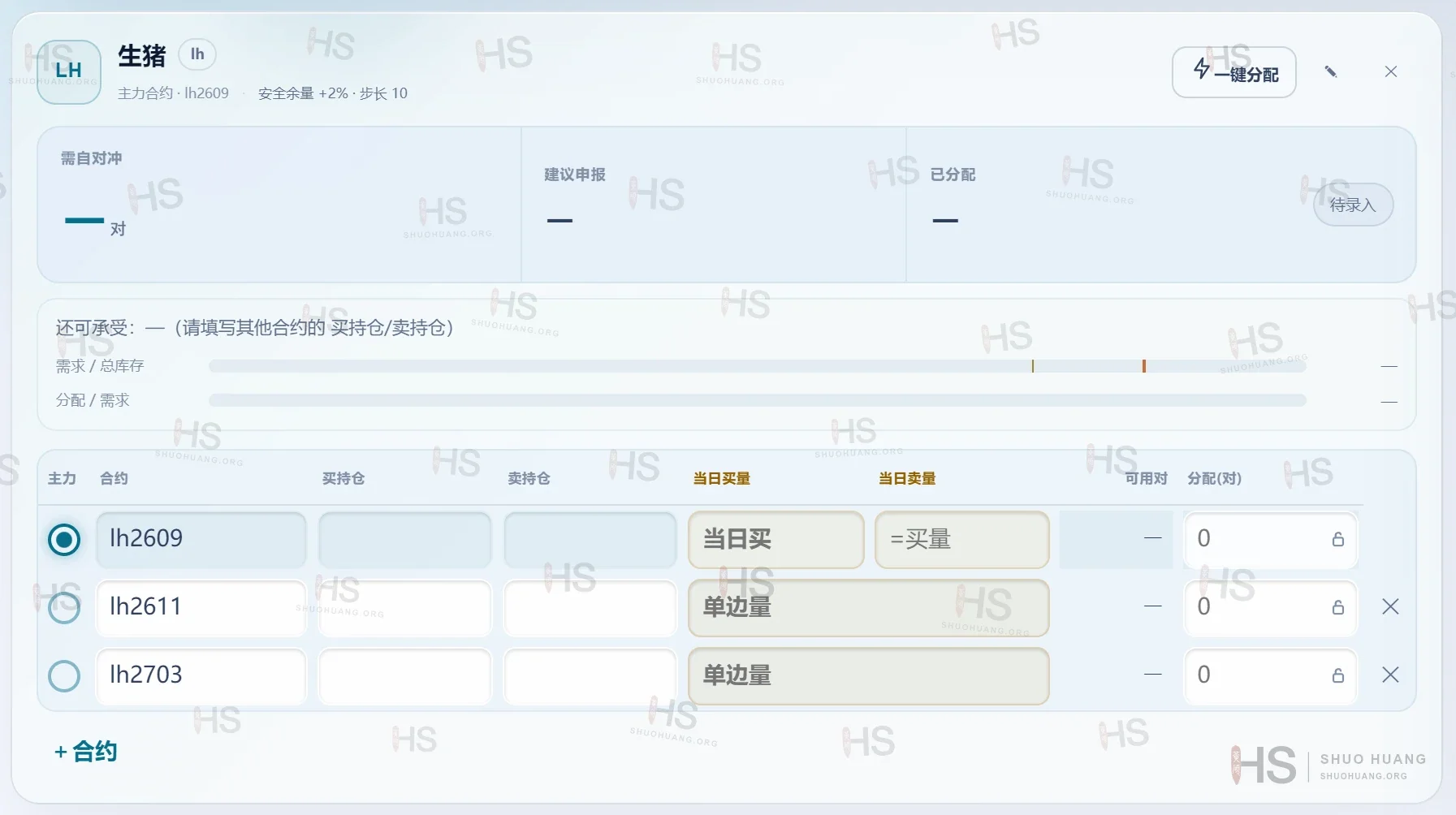 Enlarge
- Marker 1: Main tick (left of each contract): marks the contract whose buy and sell volume counts against the day’s allowance. One or two rows may be ticked.
- Marker 2: Long and short positions per contract: the smaller of the two is the most pairs that contract can offset.
- Marker 3: Today’s volume (amber fields): buy and sell for a main contract, one-side volume for the others. The sell field mirrors the buy until typed.
- Marker 4: Pairs required (top left of the card), then the suggested filing with its safety margin, the amount allocated so far, and a status badge.
- Marker 5: Capacity rails: demand against total inventory, and allocation against demand. The first line states how much more the main contract can trade.
- Marker 6: Allocation (right column): pairs assigned to this contract, with a padlock that fixes the cell against one-click allocation.
 Enlarge
B
Read the answer
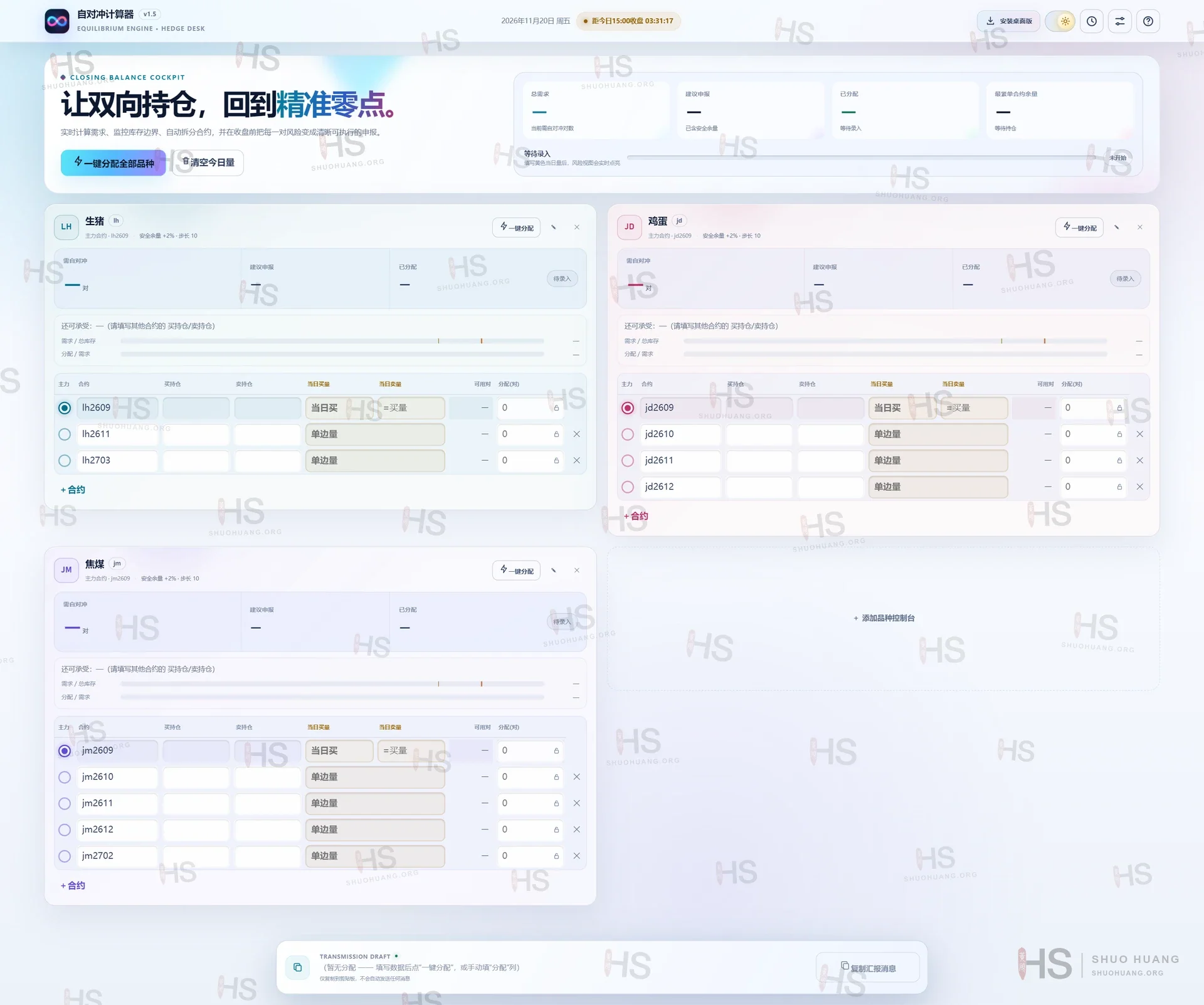
A cockpit across the top adds every product together and answers the two questions a trader with no time has: is the day covered, and where is it tightest.
- Capacity colors: normal below 75% of inventory, yellow from 75%, orange from a threshold the trader sets, red above 100%
- A countdown to 15:00 Shanghai time turns red in the last ten minutes, on confirmed trading days only
- Statuses read at a glance: waiting, none needed, to allocate, short, covered, over inventory
 Enlarge
- Marker 1: Countdown to the 15:00 close, pinned to Shanghai time and to a verified 2026 exchange calendar.
- Marker 2: Total pairs required across all products, followed by the suggested filing and the amount already allocated.
- Marker 3: Single-contract headroom: the pairs that would be left if the largest contract took the whole requirement alone, shown for the tightest product.
- Marker 4: Coverage rail: how much of the total requirement is already allocated, under a one-line verdict such as short by N pairs, covered but near capacity, or all covered.
- Marker 5: Allocate all products in one click; the button beside it clears today’s volumes and allocations.
C
Allocate
One click splits the filing across the designated contracts within what each can actually offset; locks let the trader follow the day’s instructions and leave the rest to the tool.
- Nearest month first, holding back a reserve of each contract’s inventory, in whole steps
- A locked cell is never changed and its amount is deducted from the target; a locked empty cell excludes that contract
- If the inventory cannot hold the requirement, the card turns red as short instead of silently dropping the rest
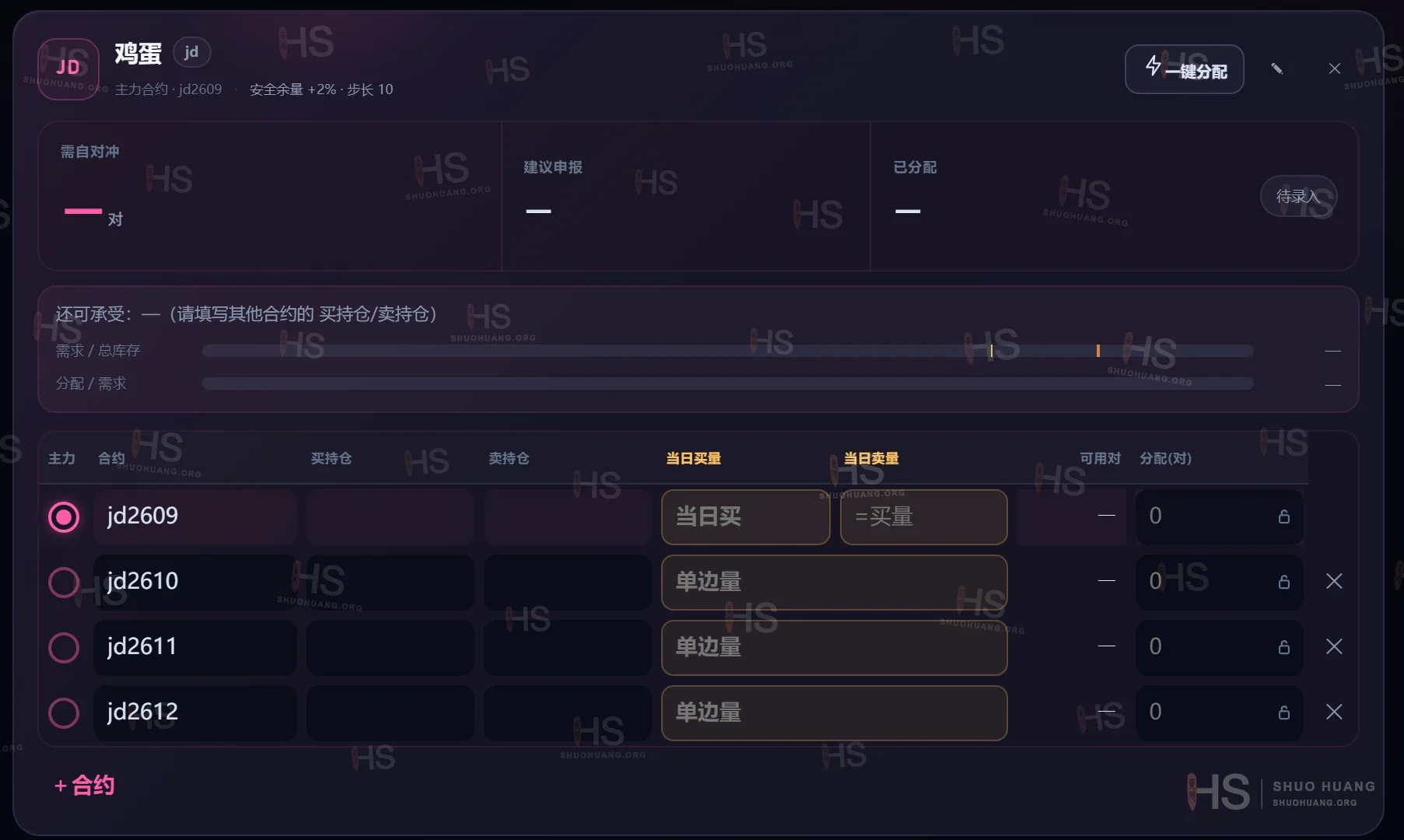 Enlarge
- Marker 1: One-click allocation for this product: splits the filing across the unlocked cells, nearest month first.
- Marker 2: Pairs available: the smaller of the long and short position, computed per contract.
- Marker 3: Padlock inside each allocation cell: fix an amount by hand and the tool tops up only the remainder.
- Marker 4: A second main tick during a contract roll counts the next main contract’s buy and sell volume too.
- Marker 5: Add a contract when a new month is listed; codes are edited in place.
D
Report
The dock at the bottom always holds the message as it would be sent, in the desk’s own format, so the last step of the day is one click and one paste.
- One click copies it and archives a time-stamped copy in the history drawer
- Clipboard only: the tool has no send path of any kind
 Enlarge
- Marker 1: Draft message: a title line, then one line per contract with the pairs to offset.
- Marker 2: Copy report message: writes the text to the clipboard and files it in the history.
E
Tune
Four numbers govern the tool’s judgment. Every one is visible, editable and explained on screen; nothing is buried in the code.
- Global: the inventory reserve held back by one-click allocation, and the orange warning threshold
- Per product: the safety margin and the rounding step
- Backup and import with a read-back check, so a failed import can never damage the live state
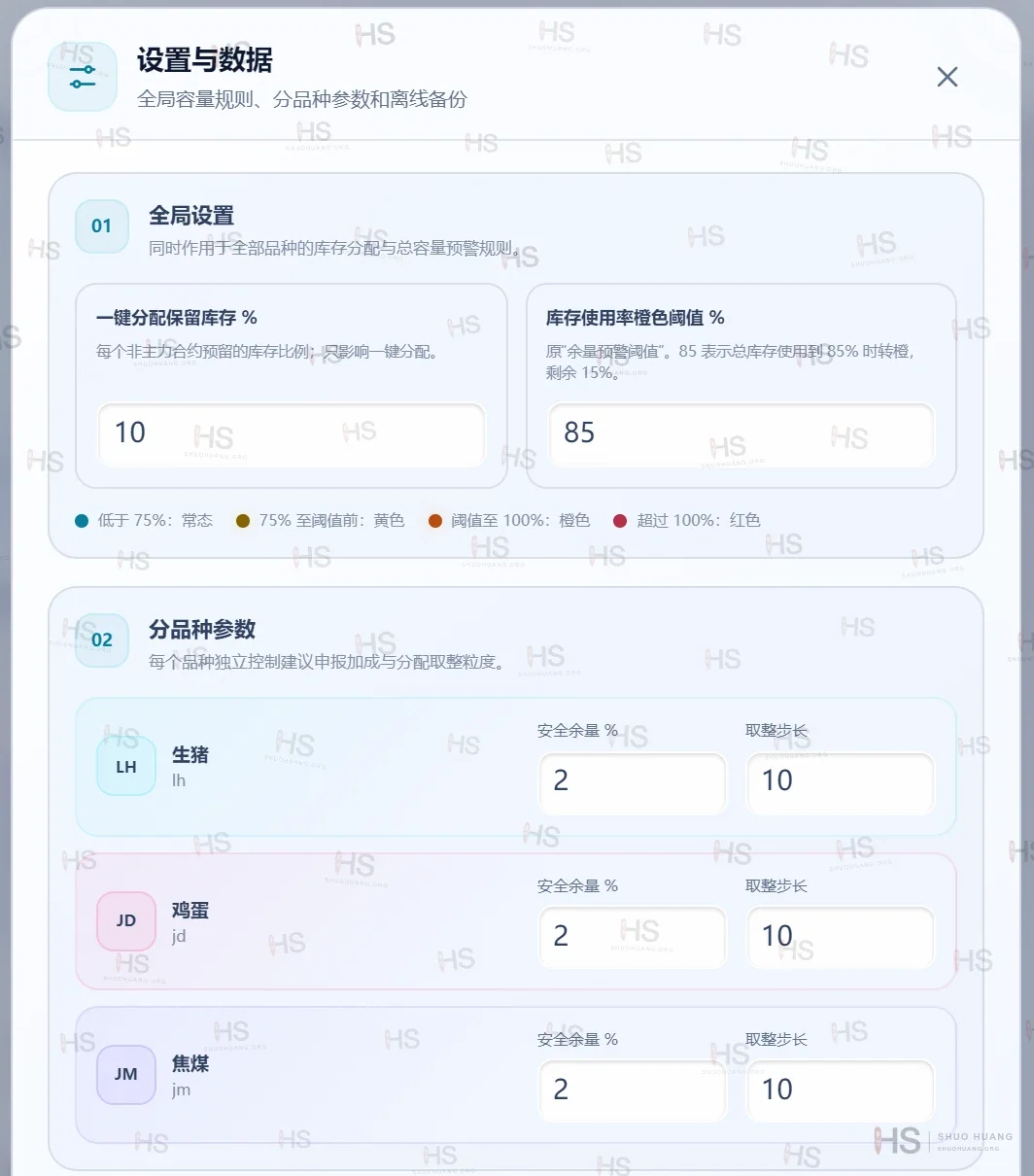 Enlarge
- Marker 1: Reserve: the share of each contract’s inventory one-click allocation leaves untouched.
- Marker 2: Warning threshold: the share of total inventory at which a card turns orange.
- Marker 3: Color legend: normal, yellow from 75%, orange from the threshold, red above 100%.
- Marker 4: Safety margin per product, added to the pairs required.
- Marker 5: Rounding step per product, used for the filing and the allocation.
05All screens
Six views of the program.
06Under the hood
For the technical reader: the model, the math and the code.
Under the hoodThe fee-schedule constraint as an inequality, the allocation algorithm in pseudo-code, the test design and why not the alternatives
A small tool with a precise core. The value is in the constraint it encodes (a linear limit from the exchange’s market-maker fee schedule), in the inventory constraint it respects, and in an interface engineered for a ten-minute window. Shuo derived the formula from the desk’s manual method, built it to catch the failure modes he had named, and verified it against his own hand calculations. The formulas are as built; the code is pseudo-code written for this page.
Specification at a glance
| Item | Shipped |
|---|---|
| Problem class | A linear fee-schedule constraint and a per-contract inventory cap, solved in closed form on every keystroke; the split is a one-click greedy allocation |
| Inputs | Per contract: long and short position, today’s buy and sell volume (main contracts) or one-side volume (designated contracts); typed by hand |
| Outputs | Pairs required, suggested filing, capacity per contract, utilization, headroom, allocation, status, and the report text |
| Parameters | Safety margin and rounding step per product; inventory reserve and warning threshold globally. All four editable |
| Code | One HTML file of 3,330 lines (JavaScript, HTML, CSS; no framework, no dependency) and a 527-line Python desktop host on the standard library |
| Tests | About 3,100 lines of automated checks: two script suites that execute the page’s own functions (about 300 assertions in the later, v1.3 suite) and a Python release gate (about 150 checks) |
| Ground truth | Three hand-calculated cases, matched to the lot and frozen as regression vectors |
| State | Browser local storage under a versioned schema; transactional import; no server-side state, no database, no network |
The constraint, derived
Count in lots, per product, per day. Let be the day’s volume outside the designated contracts: in practice the main, most active contract’s buys plus sells, in months when the exchange has not designated it. Let be designated volume before any offset; because a market maker’s buys and sells in a contract are nearly equal, , twice the one-side volumes. Each filed offset pair counts as one buy and one sell in its contract, so pairs add lots to . Write for the schedule’s allowance ratio.2 The day stays inside the schedule while non-designated volume is at most times designated volume:
The formula as built
The calculator evaluates the bound above and adds an explicit margin. is the per-product safety margin (default 2%) and the rounding step (default 10 pairs). The sum over main contracts has one or two terms: during a contract roll the outgoing and incoming main contracts can both be non-designated, so both count against the allowance.
The tool does not carry the exchange’s monthly list of designated contracts. The main tick is the trader’s declaration: a ticked row counts against the allowance, every other row adds to it. That keeps the tool valid when the list changes, at the cost of one tick the trader must get right.12
def pairs_for_product(rows, ratio, margin, step):
    # During a contract roll, one or two rows are ticked as main.
    main   = [r for r in rows if r.ticked_main]
    others = [r for r in rows if not r.ticked_main]

    # A main row counts buys plus sells; the sell side mirrors the buy until typed.
    used = sum(r.buys + (r.sells if r.sells_typed else r.buys) for r in main)
    # Every other row counts its one-side volume.
    earned = sum(r.one_side_volume for r in others)

    required = used / (2 * ratio) - earned      # negative: no pairs needed
    need = max(0, required)
    filing = round_up(need * (1 + margin), step) if need > 0 else 0

    # A contract can offset at most the smaller of its long and short.
    capacity = sum(min(r.long, r.short) for r in others if r.positions_known)
    utilization = need / capacity if capacity > 0 else None
return required, filing, capacity, utilizationInventory is the second constraint
A pair closes one long and one short, so a contract with long position and short position can offer at most the smaller of the two. Demand against total capacity gives a utilization that drives the card’s color; the headroom is the spare pairs the inventory can still absorb; each pair adds two lots of designated volume, so the spare pairs make room for × headroom more lots of main-contract volume, the “how much more can I trade” line on the card. A second, informational check compares the requirement with the largest single contract’s capacity, for days when every pair must go to one contract; it is reported separately and never colors the card.
| Utilization u | Card state | What it means for the trader |
|---|---|---|
| Below 75% | Normal | File the suggested amount |
| 75% up to the threshold | Yellow | Watch the main contract’s remaining volume |
| Threshold (default 85%) to 100% | Orange, with an inset ring | Little room left for more main-contract volume |
| Above 100%, including demand against zero known inventory | Red | The inventory cannot cover the requirement: the excess main-contract volume falls outside the allowance |
Allocation: greedy by maturity, with reserve and locks
One-click allocation walks the designated contracts in card order, nearest month first. Each may give up to its capacity less a reserve (default 10%), floored to the step; it takes the smaller of that and the remaining need, rounded up to the step. Locked cells are the trader’s decisions: they are never cleared or overwritten, and their sum is deducted from the target before anything is distributed. If the locked sum already meets the target, the unlocked rows receive nothing; a locked empty cell removes that contract from the split. If the inventory cannot hold the requirement, the shortfall surfaces as a red short-allocation state instead of being dropped.
Greedy by maturity is a deliberate choice over an optimizer: it matches how the desk states its own instructions (a fixed contract, an even split, or a priority order that changes with the day’s memo), and it is predictable under time pressure. The locks express any of those instructions in a few keystrokes.
def allocate(rows, filing, reserve, step):
    # Locked cells are the trader's decisions: never cleared, never overwritten.
    locked = sum(r.allocation for r in rows if r.locked)
    for r in rows:
        if not r.locked and not r.ticked_main:
            r.allocation = 0

    need = filing - locked                      # locked >= filing: nothing to do
    for r in rows:                              # card order: nearest month first
        if r.ticked_main or r.locked or need <= 0:
            continue
        capacity = min(r.long, r.short)
        usable = round_down(capacity * (1 - reserve), step)
        take = min(usable, round_up(need, step), capacity)
        if take > 0:
            r.allocation = take
            need -= take
return need # above zero: shown as short, in red| Illustrative day | Input | Result |
|---|---|---|
| Allowance ratio | illustrative κ = 0.4 | 1 ÷ 2κ = 1.25 |
| Non-designated (main) contract | buys 1,000, sells 1,000 | V = 2,000 |
| Designated, near month | one-side volume 850; long 1,405, short 1,400 | capacity 1,400 |
| Designated, far month | one-side volume 250; long 400, short 410 | capacity 400 |
| Pairs required | 2,000 × 1.25 − (850 + 250) | 1,400 |
| Suggested filing | 1,400 × 1.02 = 1,428, up to the next 10 | 1,430 |
| Utilization | 1,400 ÷ 1,800 | 78%: yellow; headroom 400 pairs, room for 320 more main-contract lots |
| One-click allocation | 10% reserve: near 1,260, far 360 usable | near 1,260, far 170 |
| Far month locked at 400 | need 1,430 − 400 = 1,030 | near 1,030, far 400 kept |
| Near month locked at 1,600 | locked sum exceeds the target | far gets nothing; near flagged over inventory |
Alternatives, and why not
The questions a reviewer asks first, and the answers that shaped the design.
| Alternative | Why not |
|---|---|
| A generous cushion (chosen by feel) | Every surplus pair closes a long and a short in a designated contract: it cuts the open interest the desk must hold for its monthly obligation and spends the inventory tomorrow’s pairs come from. On the synthetic worked example above, a cushion chosen by feel files 14%, then 43% above the requirement; a 2% margin rounded up to the step covers late volume without that cost.4 |
| Filing the exact requirement, no margin | The last minutes of the session still add main-contract volume after the number is sent, and one lot over the line pays the full fee. The margin is small, explicit and editable per product instead of zero or a guess. |
| Reading the terminal automatically | The calculator has no programmatic access to the terminal. The only data path is the trader, so the design effort went into making typing fast and hard to get wrong. |
| Sending the report automatically | A filing error costs fees or inventory. The tool is deliberately incapable of sending; release checks fail if a network or send call appears. |
| Hard-coding the designated-contract list | The exchange publishes the list every month. A trader-set tick stays correct across months and across the roll, when two main contracts are both non-designated. |
| A framework, a required server or a spreadsheet macro | One HTML file in plain JavaScript opens from disk on any machine, needs nothing installed and has no supply chain. |
| Re-rendering the page on every keystroke | It would steal focus mid-entry. Structural changes re-render; keystrokes run a value-only paint pass, so the cursor never moves. |
| An optimizer for the split | The desk’s allocation rule is a human instruction that changes often. A transparent greedy pass plus locks follows any of them and can be checked by eye. |
The desktop host and its guardrails
The same file runs two ways: opened from disk, or served by a small Python 3.10 host (standard library only) as a desktop app window. The host binds to the loopback interface only and is built to be boring:
- an exact route allowlist and strict Host-header validation;
- a shutdown endpoint that demands a custom control header and refuses cross-origin preflight requests, so no other web page can stop it;
- a content security policy that allows framing by exactly one parent, The One, which shows the calculator as a tab on its original origin so both windows share one saved state;
- an installable app manifest and service worker, with the title bar integrated into the window.
State lives in the browser’s local storage under a versioned schema. Import is transactional: a candidate is parsed, validated and normalized, written, read back and only then swapped in, so a failed import leaves the previous state intact. The clock is pinned to Shanghai time regardless of the PC’s time zone, and the built-in 2026 exchange calendar treats any date beyond its verified range as unknown instead of guessing.
Verification
The formula was specified from the desk’s manual method and checked before the first release against three cases Shuo had calculated by hand; those three cases then became permanent regression vectors, reproduced with zero drift by every later release.7 A release gate hashes the formula block itself, so the arithmetic cannot change without a deliberate update to the gate.
| Check | What it proves |
|---|---|
| Three hand-calculated case vectors | Pairs required equal the manual result to the lot; unchanged through all six releases |
| Script suites that execute the page’s own functions (about 300 assertions in the v1.3 suite) | Formula, allocation order, message text, state migrations, the trading calendar and the no-send gates |
| Dual-main vectors | Two ticked contracts each contribute buy plus sell; unticking one moves its volume to the subtracting side |
| Lock vectors | A partial lock tops up the remainder exactly; a lock at or above the target leaves the rest empty; an over-capacity lock turns red |
| Desktop release gate (Python, zero dependencies, about 150 checks) | Asset presence, a SHA-256 hash of the formula block, the route allowlist, Host handling, the app manifest and a clean shutdown |
| Full audit in a clean browser profile | Nine findings: two bugs in Shuo’s sibling tools (a missing exchange holiday, a crash path), fixed the same day, and seven low-severity or latent items in the tool, five fixed the same day |
| Reused in a later study | The formula’s identity (the filed pairs bring counted designated volume exactly to the line) was reused in a later desk study to account for designated volume |
Failure modes engineered out
- Stale numbers from yesterday. Volumes and allocations clear on the first open of each confirmed trading day, and never on a weekend, a holiday or a date outside the verified calendar. Positions persist, because holdings carry over from one day to the next.
- A false alarm on a closed day. The countdown turns urgent only on a confirmed trading day with ten minutes or less to the close.
- Under-filing by rounding. The filing rounds up, the reserve rounds down, and an allocation below the requirement is a red state, not a number that looks plausible.
- Offsetting more than exists. Any cell above its contract’s capacity is flagged over inventory, locked or not.
- Mixed counting conventions. Main rows always take buy and sell; other rows always take one side. The trace line prints the arithmetic so the trader can check the convention at a glance.
- Mistyped input. Thousands separators and full-width digits are normalized; the sell volume mirrors the buy until it is typed, so a main row with equal buys and sells needs one entry instead of two.
- Losing the state. Saves are debounced and flushed on close; backups round-trip through a validated, read-back import.
Built with
- JavaScript (no framework)
- HTML · CSS
- Single-file web app
- Python 3.10 (standard library)
- Loopback HTTP host
- Installable desktop PWA
- Content Security Policy
- Local storage with versioned schema
- Transactional import
- Automated regression tests
- SHA-256 release gate
- Exchange trading calendar
07Releases
Shipped in versions, like a product.
- 1.0First release, the afternoon it was specified: the formula, inventory caps, the “how much more can I trade” warning, one-click allocation, report composer with history, keyboard flow. Verified against three hand-calculated cases.
- 1.1Redesigned interface: dark and light themes, summary cockpit, drawers and dialogs. Formula unchanged.
- 1.2Desktop window on a loopback host, a verified 2026 exchange calendar with a Shanghai-time countdown, terminal column order, capacity colors, and a margin and step per product.
- 1.3One shared state for the standalone window and The One; transactional backup import.
- Quality auditFull audit of the redesigned tool: nine findings, two of them bugs in sibling desk tools; the fixes were applied the same day.
- 1.4Two main contracts during a contract roll, each contributing buy plus sell.
- 1.5Allocation locks: one-click allocation tops up only the remainder.
08Related
Programs that work with this one.
-
 Position Atlas
A market-making obligation tracker built by one trader: 2,410 of 2,410 contract-days matched the exchanges’ own obligation reports.
-
The One
One window, one taskbar icon: four live desk tools as tabs, each upgraded in place.
- Self-Trade Check Exchange self-trade surveillance: every self-trade found, traced to the orders behind it and reported after every session.
- Desk Reference Cards A change-tracked daily brief for a live market-making desk: 32 instruction versions diffed, 19 editions, every change flagged for the session ahead.
- 1The page makes no network requests and has no send function; the report reaches the clipboard and goes no further without the trader. Release checks enforce this.
- 2Exchanges publish their market-maker schemes in general terms; the terms that apply to a market maker are between it and the exchange and are not restated on this page. The allowance ratio is therefore written as a symbol, and the worked example uses an illustrative value. The calculator is needed in months when a product’s main contract is not designated.
- 3The calculator computes the number and writes the report. The desk’s contact passes the request on for filing before the close, and the exchange executes the offsets after it; the tool submits nothing.
- 4Arithmetic on this page’s synthetic worked example, not desk data: a requirement of 1,400 pairs filed as 1,600, a cushion chosen by feel, is 14% over, and raised again to 2,000, to be safe, is 43% over. The calculator’s default is the requirement plus 2%, rounded up to the next 10 (1,430 on the example); it is a floor the trader may raise.
- 5Shuo joined the desk in July 2026. The first release is dated July 24, 2026, in his fourth week.
- 6Defaults: 2% margin, rounded up to a step of 10 pairs, both editable per product. The suggestion is a floor the trader may raise; the tool warns only when an allocation falls below the requirement or above a contract’s inventory.
- 7Checked on the day of the first release, July 24, 2026, against three cases Shuo had calculated by hand: pairs required matched to the lot on all three. All later releases reproduce the same three cases unchanged. The cases’ volumes and positions are not published.
- 8Versions 1.0 to 1.5, July 24 to August 7, 2026.
- 9Used by Shuo at the close through July and August 2026, adding features from daily use. It was running on the desk’s office PC on November 20, 2026, when the screens on this page were captured.
- 10First release on July 24, 2026: from the written specification at 17:09 to a first version verified against the three hand-calculated cases at 17:51 China time.
- 11Screens were captured from the running application on November 20, 2026, with empty inputs. Charts and figure data on this page are synthetic or illustrative. Methods and outcomes are described as they happened; the desk’s own figures are confidential and do not appear here.
- 12A non-designated contract left unticked would be counted on the wrong side. At least one and at most two rows can be ticked, and the trace line on each card shows which contracts were counted where.