
Software · Desk tool
Data Puller 取数助手
One form, one click: market data out of a 9-billion-row database, through queries that cannot write and a password that never touches disk.
01System architecture
A web app with no web: one page, one PowerShell listener, and the database client the machine already had.
The desk’s research database holds about 9 billion rows, and the workstation that queries it is a standard-user machine with nothing installed beyond the standard tools.1 So Data Puller is built entirely from what is already on it: Windows PowerShell, a browser and the database’s own command-line client.
At the desk
Trader
Picks a template, fills in product, contracts and dates, reads the SQL, clicks once.
Edge / Chrome app window
The page
One HTML file: the whole interface and the query catalog. Ten menu entries, live SQL generation, size estimate, read-only check when a query is queued.
Same machine · loopback only
Local listener
PowerShell 5.1 HttpListener. The read-only guard, at queue time and again at run time, the job queue, a per-launch token on every call, the one comprehensive log.
Already installed
Database client
The database’s standard command-line client, found by a discovery ladder. One process per query.
Desk network · read-only account
Research database
About 9 billion rows: five-level ticks, daily snapshots, 5-minute bars and contract specs. A shared database that other systems depend on.
Compiled at start-up
CSV converter
TSV to CSV in compiled C#, on a background task so the window never freezes.
Tool folder, desktop or a folder you choose
Run folder
One timestamped folder per run: CSV, raw TSV, the SQL as run, errors, a combined results file, a run log and a replayable recipe.
Analysis
Excel · research code
CSV opens straight in Excel; the TSV files drop into the loaders the backtesting and research code already had.
Simplified: the launcher, the saved-recipe folder and the log file are left out. Nothing in this diagram is installed; every part is either a plain text file of the tool or software the machine already had.
Why not just write a Python script?
The workstation is a standard-user machine with no Python and nothing installed beyond the standard tools. PowerShell 5.1, a browser and the database client are already there, so they are the entire stack: nothing to install and nothing to keep patched.
Why a browser window at all?
A form needs dropdowns, date pickers, a live SQL preview and a progress view. An HTML page in an --app window gives all of that with zero dependencies, and the same stack already runs Strategy One on the desk.
Where can the password go?
Nowhere but memory. It lives in one PowerShell variable and reaches the database client through that child process’s environment block. It is never in a file, never on a command line, never in the log.2
What if a query is wrong?
Each query runs as its own process with its own files, so one failure never stops the rest of the queue, and its SQL as run and the client’s own error text are waiting in the run folder.
02The story
A 9-billion-row market-data database, opened in one click and read-only at three layers.
The desk’s market-data database holds about 9 billion rows.1 Getting anything out of it meant hand-writing a script and a query without the schema in view, running them on the desk workstation, and learning only afterward whether the query was right. Shuo turned that into a form on the workstation itself: choose what you want, check the query it wrote for you, click once.
01
The problem
Think of a library with closed stacks: you hand in a request slip and wait, and if the slip has one wrong digit you find out only when the wrong book arrives. Pulling data from the desk’s research database worked the same way. It is queried from a standard desk workstation with nothing on it beyond the standard tools: no Python, no development environment.
So each pull, however small, was a full cycle:
- Hand-write a batch file and a SQL file on a development machine, away from the database and its schema
- Run them on the desk workstation
- Read the output, and discover only then whether the query was right
One guessed column name cost the entire cycle. That happened, and it is the reason this tool exists.
02
What he built
Nobody asked for it. Shuo conceived Data Puller himself, designed it to run on exactly what the workstation already has, and built, tested and deployed it in a single day: about 2,500 lines of PowerShell, C#, JavaScript and SQL.3
It is a form that runs on the desk workstation, beside the data. Nine templates cover the pulls the desk’s research keeps needing (daily prices, tick-by-tick order books, 5-minute bars, contract specifications, volume rankings, listed spread quotes, settlement records, and two data-quality checks), and a tenth entry accepts free SQL.4 You fill in a product, contracts and dates; the tool writes the SQL, shows it to you, and tells you roughly how many rows and megabytes you are about to ask for before anything runs.
Queue several queries, save the queue as a one-click recipe, choose where the results go, press the start button. Each run lands in its own timestamped folder with an Excel-ready spreadsheet file, the raw output, the SQL as run and a full log.
03
What changed
A pull can now be written, checked and run in one place, with the schema-verified templates in front of you, in the time it takes to fill in a form. A wrong parameter costs a click, not a cycle. It is in production use: pulls from the desk’s database have run through it.5
It is safe by construction on a shared database that other systems depend on: every query is read-only at three layers (checked when a query is queued, checked again when the run starts, run under a read-only account), every generated query carries a row limit, and the password exists only in memory.2
The output is built to feed research directly. The raw files drop into the loaders behind his backtest studies, with no conversion step.
The engineering outlived the tool’s own screen. Its secure-connection module became the pattern for two later systems, the database snapshot and the one-click volume backfill in Strategy One, and its saved recipe is the standing backup route for the desk’s daily live-hog report pull.6
<6hours
from the start of work to a tested tool passing its environment check on the desk workstation3
9billion
rows of market data within one form’s reach, most of them tick-by-tick order-book snapshots1
100×
faster export after profiling: 250,000 rows to Excel-ready CSV in 0.28 s instead of 28 s7
0
places the database password is ever written: not disk, not a command line, not a log2
13/13
read-only guard tests passed, SQL-injection attempts included8
03Evidence
Measured before shipping: an export about 100 times faster
Turning the database client’s raw output into a spreadsheet file that Excel opens cleanly was the slow step. The first converter, written in PowerShell, was profiled before the tool shipped and replaced with compiled C#.
Seconds to convert 250,000 rows to CSV
The compiled version does in 0.28 seconds what took the first version 28: about 100 times faster.
Show the dataHide the data
| Converter | Seconds for 250,000 rows |
|---|---|
| PowerShell, first version | 28.07 |
| Compiled C#, shipped | 0.28 |
04Functions
Everything it does, in the order a user meets it.
A
Pick a template, fill in the blanks
Ten menu entries turn the pulls a futures desk keeps repeating into forms anyone can fill in, with the cost of each pull shown before it runs.
- Nine templates with every column name checked against the database’s own schema listing, plus guarded free SQL
- A row and size estimate appears as you type, with a warning above 5 million rows
- Products without a 5-minute table are blocked, with a pointer to the tick template instead
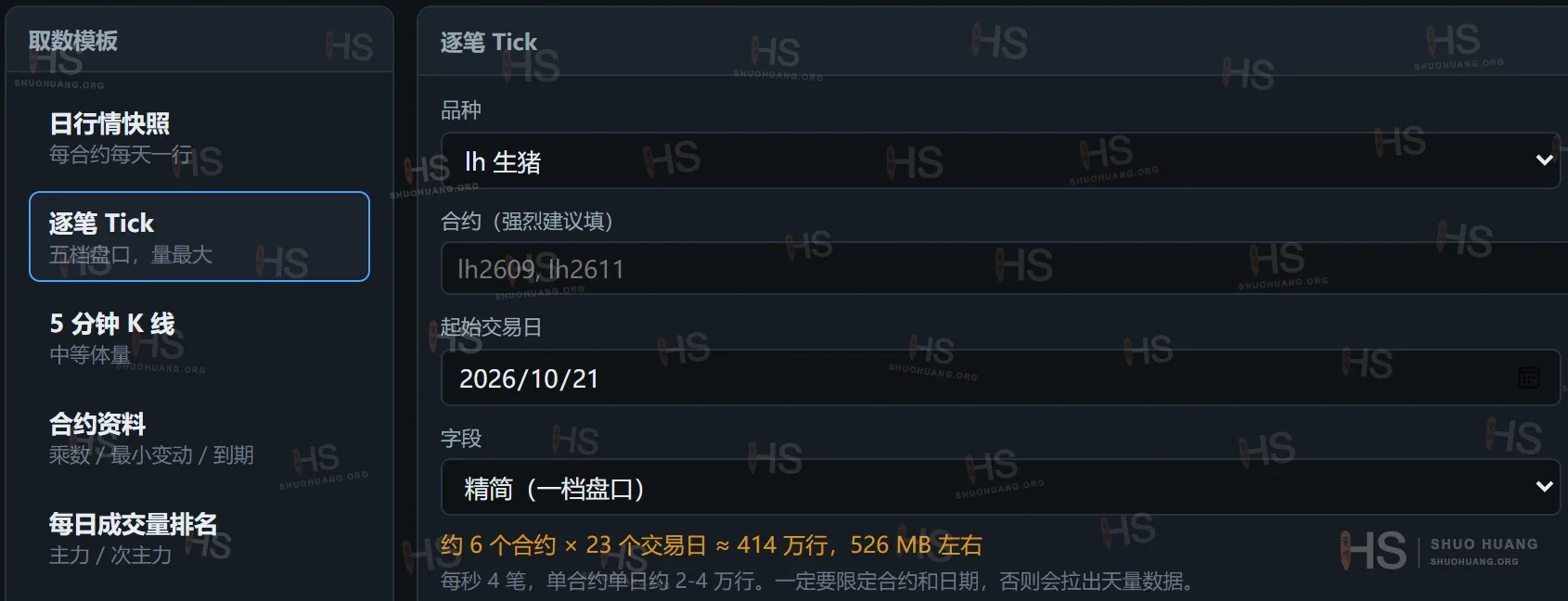 Enlarge
- Marker 1: Template menu (left): the selected entry is 逐笔 Tick, tick-by-tick data with five-level depth. The other entries visible are daily snapshots, 5-minute bars, contract specifications and daily volume ranking.
- Marker 2: Product: lh 生猪, live hog futures on the Dalian Commodity Exchange.
- Marker 3: Contracts: left empty here (the grey codes are a placeholder), so the estimate assumes six; the label reads “strongly recommended”, because one contract-day of ticks is tens of thousands of rows.
- Marker 4: Start date: the first trading day of the pull; the end date sits in the right-hand column.
- Marker 5: Field set: here 精简 (lean), level-1 quotes only; the other choice is the full five-level book.
- Marker 6: Size estimate (amber): “about 6 contracts × 23 trading days ≈ 4.14 million rows, around 526 MB”, computed before anything runs.
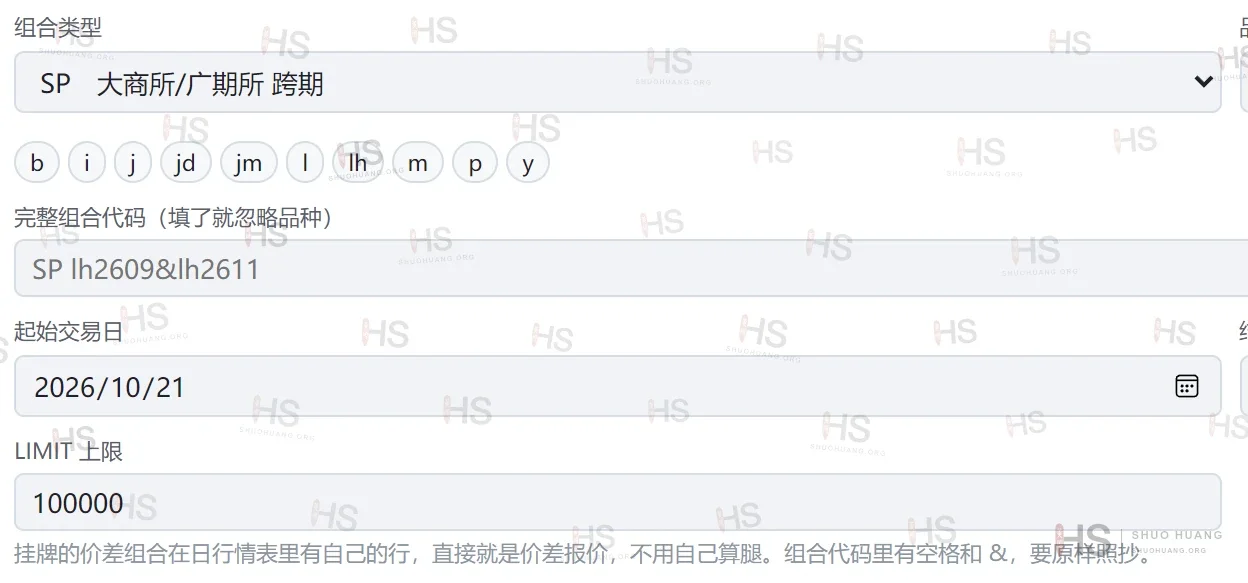 Enlarge
B
Read the SQL before it runs
The form writes the query; you stay in charge of it, and nothing that could change the database gets through.
- The SQL is regenerated live as the form changes, and is editable before it runs
- Only read statements pass:
SELECT,WITH,SHOW,DESCRIBE,EXPLAINand the narrowSET @variable = … - The check is applied when a query is queued and again when the run starts, so an edited or hand-posted query meets the same wall; behind both, the database account itself is read-only
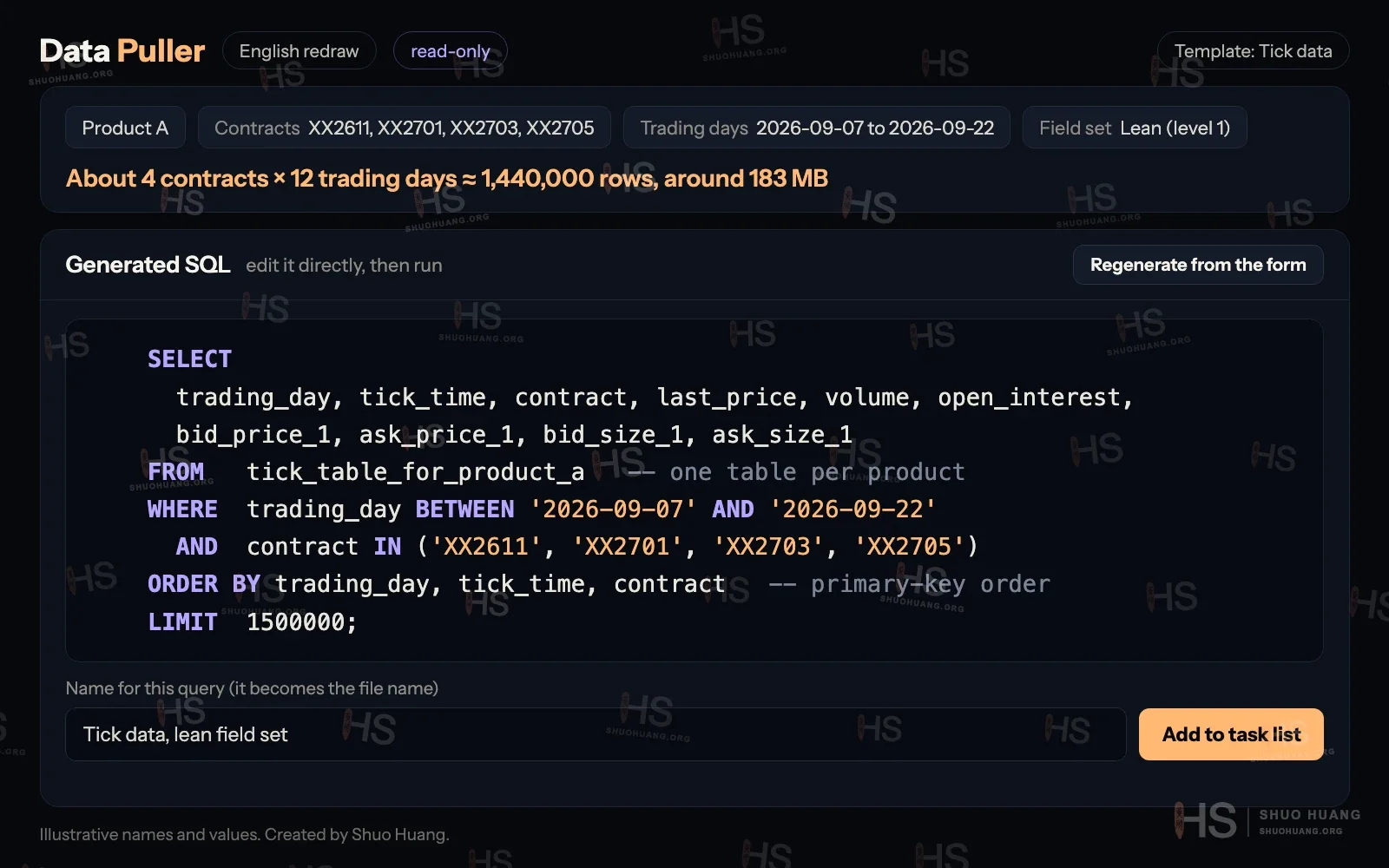 Enlarge
- Marker 1: The generated SQL (“edit it directly, then run”): rewritten live as the form changes.
- Marker 2: FROM: the product’s tick table, one table per product (placeholder name).
- Marker 3: WHERE: the date range and contracts from the form; night-session rows already carry the next trading day’s date.
- Marker 4: ORDER BY trading day, time, contract: the table’s primary-key order, so the server never has to sort.
- Marker 5: LIMIT: every generated query carries a row cap; here 1,500,000.
- Marker 6: Read-only, twice: the statement whitelist is applied when a query is added to the task list and again when the run starts; the database account behind both is read-only too.
C
Queue it, aim it, run it
Several queries become one task, and a task you repeat becomes one click.
- Add any number of queries to the task list and run them in order; one failing query never stops the rest
- Save the queue and form state as a recipe and replay it from the dropdown
- Send results to the tool folder, the desktop or any folder you choose, with free space shown
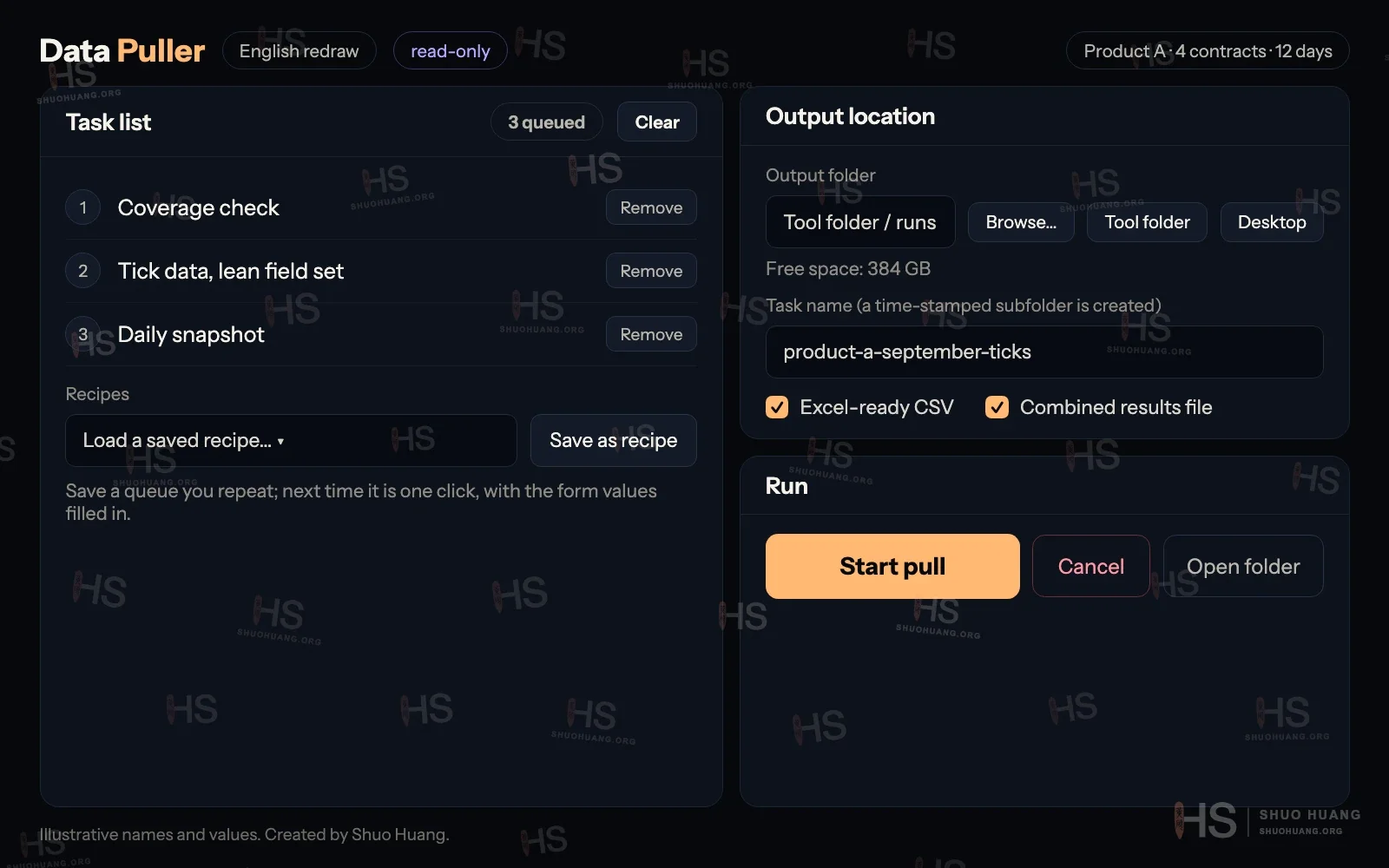 Enlarge
- Marker 1: Task list: the counter shows how many queries are queued; they run in order as one task.
- Marker 2: Queued items: each query keeps its own name and runs as its own process; after a run, each shows its own row count.
- Marker 3: Save as recipe: stores the current queue with its form values, so a repeated pull is one click next time.
- Marker 4: Output location: browse, or jump to the tool folder or the desktop; free space is shown underneath.
- Marker 5: Outputs: tick to write an Excel-ready CSV, and a combined results file in the format the existing research code reads.
- Marker 6: Start pull: runs the whole queue, one process per query; Cancel stops the queue and ends the running query.
D
One run, one self-documenting folder
Every run explains itself months later: what was asked, what came back, and what went wrong if anything did. Reproducible by design.
- Per query: Excel-ready CSV, the raw output, the SQL as run and any error text
- Per run: every query in one re-runnable SQL file, a combined results file, a run log and the recipe
- The old file formats are kept on purpose, so nothing downstream had to change
E
Built to be debugged from a distance
The desk workstation has no development tools and no debugger, so the tool reports on itself.
- A 10-second environment self-check to run before first use: PowerShell version, port, browser, database client, connection file, disk
- One comprehensive log beside the tool: environment, every discovery attempt, every command line, every database error in full
- The log never contains the password, only its length
05All screens
Four views of the program.
06Under the hood
For the technical reader: the model, the math and the code.
Under the hoodConstraints, the read-only guard, the password path, the local server, the profiled export and the test design
Data Puller is a small system, about 2,500 lines across PowerShell, C#, JavaScript and SQL, with an unusually constrained deployment target, and nearly every design decision answers one constraint. This section gives the constraints, the decisions and the alternatives they beat, with pseudo-code sketches of the key routines. All timings are development benchmarks against a stand-in database client.7 No desk data appears on this page.9
Constraints, and the design each one forced
The target is a standard-user Windows workstation with nothing installed beyond the standard tools. The tool had to work there the first time, because that machine has no development environment to iterate in.
| Constraint | Design answer |
|---|---|
| Standard-user machine; nothing installed, no Python | Built only from software already on the machine: a Windows PowerShell 5.1 HttpListener backend, one static HTML page in an Edge/Chrome --app window, and the database client |
| A large export must not freeze the window | A C# converter compiled once at start-up (Add-Type) and run on a background task |
The database client is not on the PATH | A discovery ladder: environment variable, a path file, the client’s usual install folder, a search of the program folders, then PATH; every candidate and its outcome is logged |
| The database is shared with other systems | Read-only account, statement whitelist enforced twice, a LIMIT on every generated query, a size estimate before running |
Passwords may contain % ^ ! ", which break batch files | The password never passes through cmd parsing at all; it travels in the child’s environment block |
| Paths contain Chinese and spaces | Arguments passed as UTF-16 with the whole command double-quoted; verified with an output folder named in Chinese with a space |
| No debugger on the machine | A self-check that writes its own report, and one comprehensive log file beside the tool |
The query catalog
Ten menu entries: nine parameterized templates and a free-SQL entry. Every column name was checked against the schema listing of the database, never recalled from memory. The product lists that gate the tick and 5-minute templates are maintained from the database snapshot.
The tick template is the dangerous one. The tick tables hold exchange snapshots with five price levels at roughly four per second, 20 to 40 thousand rows per contract per day; they make up most of a database of about 9 billion rows.1 So the form estimates the pull before it runs, warns above 5 million rows, and orders by the table’s primary key (trading day, time, contract) so the server never has to sort.
| Menu entry | Returns | Notes |
|---|---|---|
| Daily snapshot | One row per contract per trading day, joined to contract specs | Optional futures-only filter |
| Tick data | Exchange snapshots with five-level depth | Level-1 or full field set; size estimate; primary-key order |
| 5-minute bars | Bars for products that have them | Blocked, with a pointer to ticks, where no bar table exists |
| Contract specifications | Multiplier, tick size, expiry | Per-day specification table |
| Daily volume ranking | Front and second contract by volume | Handles 3-digit (CZCE) and 4-digit contract months |
| Listed spread quotes | Exchange-listed combinations: SP, SPD, SPC, IPS | Full spread code optional |
| Settlement records | End-of-day settlement tables | Several settlement views; date range and contract filter |
| Intraday tick counts | Tick counts per time bucket | Confirms, for example, that a night session exists |
| Coverage check | Which days and contracts have data | Run first, before a large pull |
| Free SQL | Anything the read-only guard accepts | For when no template fits |
Read-only, enforced twice in code and once more by the account
The guard is a statement whitelist, not a blacklist. Comments are stripped first (block, -- and # forms), the text is split on semicolons, and every remaining statement must begin with a read verb. The same guard is applied twice: when the page queues a query, for immediate feedback, and again when the server starts the run, which is the one that counts: a request posted by hand meets the same check.
The one extension is deliberate. A self-dating pull needs to work out its own trading day and front contract, which takes session variables, so SET @name = … is accepted. The @ is required by the pattern, which keeps SET GLOBAL, SET SESSION, SET sql_mode, SET NAMES and SET PASSWORD out. Because the script is split before it is checked, SET @a=1; DROP TABLE t; is rejected on its second statement. The guard passed 13 of 13 unit cases, and the server rejected a DROP end to end even when it sat beside a valid query.8
The guard fails closed. A semicolon inside a string literal splits the statement and the tail is rejected, so it can refuse a harmless query but never admits a second statement. It checks the verb a statement starts with, not everything a statement can do, which is why it is the second line of defense and not the last: the database account itself is read-only.
READ_VERBS = {"select", "with", "show", "describe", "desc", "explain"}

def first_offending_statement(script):
    text = strip_comments(script)            # block, dash-dash and hash comments
    for statement in text.split(";"):        # split BEFORE checking
        s = statement.strip()
        if not s:
            continue
        if first_word(s).lower() in READ_VERBS:
            continue
        if assigns_session_variable(s):      # SET @name = ...; the @ is required,
            continue                         # so SET GLOBAL / SESSION / PASSWORD fail
        return s[:80]                        # the first statement that is not a read
return None # the whole script is read-only| Input | Verdict |
|---|---|
SELECT, WITH, SHOW, DESCRIBE / DESC, EXPLAIN | Accepted |
SET @d = … (session user variable) | Accepted |
SET GLOBAL, SET SESSION, SET sql_mode, SET NAMES, SET PASSWORD | Rejected |
SET @a=1; DROP TABLE t; | Rejected |
A DROP posted to the server beside a valid query | Rejected, nothing runs |
The password path
The usual choices are both wrong here. A password on the command line is visible in the process list and would land in this tool’s own log, which records every command line in full. A password in a config file would sit on disk. So the password is typed once per session, held in one PowerShell variable, and placed in the client’s password environment variable in the child process’s environment block through ProcessStartInfo.EnvironmentVariables. It never enters the parent’s environment, a file or an argument string.
This also removes a known failure of the batch files it replaced: characters such as % ^ ! " are mangled by cmd parsing. The path was verified end to end with a test password containing exactly those characters and a space, with the stand-in client echoing back the length it received, and by searching the run folder and the state folder for the password afterward.2
cmd is still used, but only for what it is good at: the <, > and 2> redirection that the earlier batch workflow relied on.
def start_query(sql_file, out_file, err_file):
    # the shell does only the redirection; the whole command is quoted once
    # more so paths with spaces or non-ASCII characters survive
    command = redirect(client_path, connection_args,
                       stdin=sql_file, stdout=out_file, stderr=err_file)
    child = new_process(shell, command, window=False)
    child.environment[PASSWORD_VARIABLE] = session_password   # this child only
    log("run: " + command)        # safe to log in full: no password in it
return child.start()A local server only its own window can use
A local HTTP listener on a desk workstation is a liability unless it is closed off. This one binds loopback addresses only, so nothing else on the network can reach it. Each launch generates a fresh random token (a GUID), writes it into the page it serves, and requires it on every API call; a stale tab from an earlier run, or any other local program without the token, gets a 403 and a line in the log.
A short range of loopback ports is tried in turn, each failure logged, and a new launch asks the previous instance to quit using the token that instance recorded, so two copies never fight over the queue.
token = new_guid()                  # fresh on every launch, written into the page

for request in loopback_listener:   # bound to loopback addresses only
    if request.is_api_call and request.token != token:
        # usually a page left open from an earlier run, still polling
        log_warning("rejected: token mismatch", request.method, request.path)
        reply(request, status=403, body={"ok": False})
        continue
handle(request)Profiling the export path
The database client emits tab-separated text with its own escapes; Excel wants CSV with a UTF-8 byte-order mark, or Chinese column values turn to mojibake. The first converter was written in PowerShell and measured before shipping: 8,929 lines per second, so 28 seconds for 250,000 rows, and about two minutes for a one-million-row tick pull with the window frozen.
The replacement is a single-pass C# state machine compiled once at start-up and run on a background task. It maps the client’s escapes (\t, \n, \r, \0, \\), turns a field that is exactly \N into an empty cell, and quotes only fields that need it. Its output was checked byte-identical to the reference implementation and round-tripped through Import-Csv.
UNESCAPE = {"t": "\t", "n": "\n", "r": "\r", "0": "\0", "\\": "\\"}

def append_field(row, field):
    if field == "\\N":                  # exactly \N is SQL NULL -> empty cell
        row.append("")
        return
    out, needs_quotes, i = [], False, 0
    while i < len(field):
        ch = field[i]
        if ch == "\\" and i + 1 < len(field):
            i += 1
            ch = UNESCAPE.get(field[i], field[i])
        if ch in ',"\n\r':
            needs_quotes = True
        out.append(ch)
        i += 1
    text = "".join(out)
    if needs_quotes:
        text = '"' + text.replace('"', '""') + '"'
row.append(text)| Measurement | PowerShell converter | Compiled C# converter |
|---|---|---|
| 250,000 rows, TSV to CSV | 28 s | 0.28 s (about 100×) |
| Throughput | 8,929 lines/s | roughly 890,000 lines/s |
| Interface while converting | Frozen | Status endpoint answers in 99 ms or less |
| 250,000 rows, query to finished folder | Not measured | 1.8 s end to end |
One process per query, and files that old code already reads
The queue could have been sent as one script. It is deliberately run as one client process per query instead: each query gets its own row count, its own files and its own error text, and a failure is isolated. The cost is that session variables do not survive between items, so a script that uses SET @… must be a single item; the daily live-hog recipe is exactly that, one item holding the whole multi-section script.
Every run also writes two compatibility artifacts so that nothing downstream had to change.
| File in the run folder | For |
|---|---|
| Per-query CSV (UTF-8 with BOM) | Excel, with Chinese text intact |
| Per-query raw TSV | The raw client output; what the research loaders parse |
| Per-query SQL file and error file | The statement as run and the client’s own error text |
| One SQL file for the whole run | Every query of the run in one file, re-runnable with the earlier batch workflow |
| One combined results file | Combined results in the sectioned format the existing research code already reads |
| Run log and recipe | Audit trail and one-click repeat |
Test design
The tool was developed away from the database, so it was tested against a stand-in client: a script that takes the database client’s place and emits the hard cases on purpose (Chinese text, SQL NULL, escaped tabs, newlines and backslashes, embedded commas and doubled quotes, bulk output). On the desk workstation, the environment self-check passed on the afternoon the tool was built.3
| Verified | Result |
|---|---|
| Read-only guard unit cases | 13 / 13 |
Server-side rejection of DROP beside a valid query | Pass |
| CSV output vs reference implementation | Byte-identical; round-trips through Import-Csv |
| Output paths with Chinese characters and spaces | Pass |
| Per-query files, error isolation, empty-result detection | Pass |
| Cancel | Kills the whole child process tree |
Password with % ^ ! " and a space | Received intact; absent from every file written |
| 250,000 rows end to end | 1.8 s |
| Environment self-check on the desk workstation | All checks passed, 24 Aug 2026 |
Alternatives, and why not
| Alternative | Why not |
|---|---|
| Keep hand-writing a batch + SQL pair per pull | Every pull is a full write-run-check cycle, and one wrong column name wastes it |
| A Python or packaged desktop app | Would need a runtime or an installer; this tool is built only from software already on the machine and stays plain, readable text |
| A full SQL parser for the guard | Not needed: a verb whitelist per statement is a few lines, auditable at a glance, and fails closed; the read-only account covers what a prefix check cannot see |
| Binding the listener to the network, or no token | Any other machine on the network, or any stale tab, could then submit queries; loopback plus a per-launch token admits only the window the tool opened |
| Password on the command line or in a config file | Visible in the process list and the command-line log, or left on disk |
| One big script for the whole queue | No per-query row counts or files, and one error ends the run |
| CSV conversion in PowerShell | Measured at 28 s per 250,000 rows on the listener thread, freezing the window |
| A keyword blacklist for dangerous SQL | A whitelist of read verbs fails closed; a blacklist fails open on the statement nobody thought of |
| CSV only | The raw TSV is what the existing loaders parse; the CSV is for people |
Failure modes engineered out
- A wasted cycle from a guessed column name. Templates are verified against the schema listing once, then reused.
- A runaway scan on a shared database.
LIMITon every generated query, a pre-run size estimate with a warning, and primary-key ordering on the tick template. - A write to the data. Three layers: the whitelist when a query is queued, the whitelist again when the run starts, a read-only account behind both.
- A leaked credential. The password is in memory and one child environment block; the log records only its length.
- A frozen window on a large export. Conversion runs in compiled code off the listener thread.
- A stale second copy holding the port. A short range of loopback ports is tried in turn, a new launch asks the previous instance to quit, and every API call carries a per-launch token.
- A silent failure nobody can diagnose. Every candidate path, command line, exit code and error is in one log file beside the tool.
Built with
- PowerShell 5.1
- C# (compiled at start-up)
- JavaScript · HTML · CSS
- SQL
- Read-only database access
- HttpListener (loopback HTTP)
- Data pipelines
- Self-service data tooling
- Secure credential handling
- SQL statement whitelisting
- Token-authenticated local API
- Windows process internals
- Performance profiling
- Test doubles
- Zero-install deployment
- CSV / TSV, UTF-8 BOM
07Releases
Shipped in versions, like a product.
- 1.0Designed, built and tested end to end against a stand-in database client: nine templates plus free SQL, recipes, the comprehensive log and the environment self-check. Deployed the same day; the self-check passed on the desk workstation that afternoon.
- Guard extension · first shipped recipeThe read-only guard now accepts
SET @variable = …, so a pull can work out its own dates. First shipped recipe: the daily live-hog pull, one item holding the whole seven-section script. Guard unit cases 13 / 13. - Product lists from the schema catalogueTemplate product lists refreshed from the first database snapshot. A three-line change, verified in the browser, with a rollback copy kept.
08Related
Programs that work with this one.
- DB Structure Snapshot One click maps a 9-billion-row production database in under ten minutes, read-only, every probe bounded.
-
 Live-Hog FAK Daily Report
Replays every live order through the desk’s backtest, every trading day, by itself, and shows where the simulator is optimistic.
-
 Strategy One
Fleet command for a live futures desk: every strategy on every exchange-colocated machine, controlled from one screen.
- WinSCP Retriever One click fetches the day’s engine logs and model diagnostics: only what is missing, never half a file, zero passwords in code.
- 1About 9 billion rows, from the database’s own catalog statistics (an estimate, not an exact count), as mapped by his DB Structure Snapshot tool; most of them are exchange tick snapshots. Per-contract figures are from the tool’s user guide.
- 2The password is typed each session, held in one in-memory variable, and passed to the database client only through that child process’s environment block. Verified by searching the run folder and the tool’s state folder after an end-to-end test; the log records the password’s length only.
- 3Work started at 10:14 on August 24, 2026; the tool was built and tested that day against a stand-in database client. The environment self-check, run on the desk workstation at 15:49 the same day, reported that all checks passed. Line count is the shipped source today: backend, page, self-check and two launchers.
- 4Nine parameterized, verified templates plus one free-SQL entry make ten menu entries. Free SQL passes through the same read-only guard as the templates.
- 5Pulls from the desk’s database ran through Data Puller after its release. The build-day tests used a stand-in database client, and every timing on this page is a development benchmark. No pull count is claimed.
- 6The client-discovery ladder, connection-file reader and password-in-child-environment launch were the reference for DB Structure Snapshot (August 28, 2026) and for the one-click volume backfill in Strategy One v6.0.0 (November 12, 2026). The daily live-hog recipe is regenerated from the same SQL file as the primary one-click pull whenever that query changes.
- 7Benchmarks of the tool itself, run during development with a stand-in database client that emits lifelike output, 250,000 rows. PowerShell converter: 8,929 lines per second (28 s). Compiled C# converter: 0.28 s, about 100 times faster. These are not live-database timings.
- 8Thirteen unit cases against the read-only guard after the August 25, 2026 extension, including multi-statement injection attempts. The guard is a statement-prefix whitelist applied after comments are stripped, when a query is queued and again when the run starts; the database account is itself read-only, which makes three layers.
- 9The two English redraws (the SQL panel and the task-list column) show placeholder names and generated values, and are labeled as synthetic. The form screenshots show the tool’s own interface, and the chart and tables measure the tool itself. Methods and outcomes are described as they happened; the desk’s own data and figures are confidential and do not appear here.