
Software · Desk tool
WinSCP Retriever 取文件器
One click brings the trading day’s flight recorder to the analysis desk: only the files that are missing, never half a file, no password anywhere in the code. Conceived and built by one trader, live on the desk within 24 hours.
01System architecture
Two halves of one pipeline: the trading machine pushes, one click pulls.
Files rise to the log server on their own, and one double-click on the desk’s internal workstation fetches only what is missing, verified. Everything runs as a standard user with the tools already on the machines; nothing is installed.
Trading workstation
Trading engine
The desk’s engine. Writes its log until the close.
Log server · run by IT
Engine-log archive
A shared archive of many machines’ daily logs, one dated zip per machine per day. Read-only to the retriever.
Internal workstation
WinSCP Retriever
Lists the server, diffs by name and size inside a day window, fetches only what is missing. One script and a job table.
Destination folders
Verified files
A file gets its final name only after its size matches the server’s.
Analysis
 Daily FAK report
A resident watcher builds the report the moment a complete zip appears.
Trading workstation
 CHRONOS
Packs the whole trading day into one diagnostic bundle and uploads it.
Log server
CHRONOS bundle folder
One zip per trading day: logs, data, model files, checksum manifest.
Analysis
CHRONOS research
The daily effect report and model studies start from the day bundle.
Simplified: the one-click pull also runs the desk’s database export as its second step, and machine, account and folder names are omitted. The log server and its daily archive are run by the desk’s IT team; the retriever only reads from them.
Why fold it into the one-click pull?
The desk’s database export was already one proven double-click, and it ends by waiting for a key press. The fetch runs first, as a soft step whose exit code the launcher ignores, so a file-transfer fault can never block the export, and the reports get both of their inputs from one click.
Why script WinSCP?
Scripting the transfer client leaves sign-in to the client itself, the one route in which the tool never handles a password. A client library or a stand-alone SSH client would each need the password handed to it.
Why does CHRONOS push?
CHRONOS runs on the trading workstation, and getting its logs to the analysis side used to mean a manual copy and two separate exports. Once the retriever existed, anything on the log server was one click from the analysis side, so Shuo made CHRONOS put its own complete record there.
02The story
The trading day’s flight recorder, at the analysis desk in one click, live within 24 hours.
Every afternoon the trading engine’s logs, the raw record of every order the desk sent, sat on a server, and every afternoon someone had to find the right files and copy them by hand before any analysis could start. Nobody asked for a fix. Shuo built one on his own initiative: a small tool that asks the server what it has, works out which days are missing, downloads only those, checks each one, and never lets a half-downloaded file be seen. It went from the start of work to live use in under 24 hours.2 Then he extended CHRONOS, his machine-learning sizing system on the trading machine, to pack and upload its own complete daily record, so the same click fetches that too.
01
The problem
A market-making desk quotes buy and sell prices all day and earns a small margin on each trade, so it improves by studying yesterday’s trades. The raw material is the trading engine’s log. Each afternoon that log lands on a server. Getting it to the analysis side meant opening a file-transfer program, finding the right day’s zip in an archive shared by many machines, copying it by hand, then running the database export.
- One missed or half-copied file and the next report could not be built
- The logs of CHRONOS, the model that sizes the desk’s live-hog quotes, were worse: a manual copy off the trading machine, then two separate exports
- The fix had to fit inside the desk’s existing one-click data pull
02
What he built
Think of a librarian who checks the shelf before going to the archive: Shuo’s retriever lists the server, compares it with what is already on the local shelf by name and size, and brings back only the missing days, including today. Each file arrives under a temporary name and gets its final name only after its size matches the server’s, so the report builder can never open half a zip.
Before writing the tool he confirmed, with read-only checks, that the file-transfer route the desk already used by hand could be scripted, and captured the server’s listing as the test fixture. He then folded the fetch into the desk’s existing one-click data pull, and extended CHRONOS to assemble each trading day into one complete diagnostic bundle (logs, data, the day’s model files and a checksum manifest) and upload it from the trading machine, with the same upload-then-rename-then-verify discipline.
03
What changed
By October 2026, one double-click was fetching the engine logs the reports need and CHRONOS’s full daily record.3 The daily execution report builds itself from what arrives, and every CHRONOS model study starts from a single file per day instead of a scavenger hunt.1
- Self-healing, proven with the deployed files: of ten bundles on the server, one run fetched only the three it lacked, one of them a half-downloaded copy caught by its size, left the other seven alone, and a second run downloaded nothing4
- One line per new source: adding a log source takes one new line in the job table5
- It kept the model’s daily re-fit alive. Building the upload side surfaced a timing race: an end-of-day maintenance step clears the engine’s log folder shortly after the close, before CHRONOS’s daily re-fit was scheduled to read it. Shuo moved the re-fit ahead of that step and gave CHRONOS a mirrored copy of the logs.6
1click
replaces a daily manual search-and-copy of log files3
<24hours
from the start of work to live use on the desk2
132
automated tests behind the current release: 86 unit, 46 end-to-end with fault injection7
0
passwords in code, scripts, command lines or logs, asserted by a test8
7/7
end-to-end upload checks passed before go-live; the test file came back SHA-256 identical9
03Evidence
It fetches only what is missing, and heals a half file
The deployed retriever, run against a mirror of the destination folders with ten daily CHRONOS bundles in the server listing: what it downloaded on a first run, and on a second run straight after.10
Bundles per run, by what the retriever did
Of ten bundles on the server, the first run downloaded only the three it lacked, one of them a half-downloaded copy caught by its size; the second run downloaded nothing.
Show the dataHide the data
| Category | Already home | Missing, fetched | Half file, re-fetched | Total |
|---|---|---|---|---|
| First run | 7 | 2 | 1 | 10 |
| Second run | 10 | 0 | 0 | 10 |
04Functions
Everything it does, in the order a user meets it.
A
Proven first, then built
Before a line of the tool existed, read-only checks confirmed that the file-transfer route the desk already used by hand could be scripted, and the server’s listing became the test fixture.
- Read-only from the first step: one listing under a hard timeout, with nothing downloaded, uploaded or deleted
- The captured listing, single-digit days included, became the fixture the unit tests parse
- The upload half was verified end to end before go-live: 7 of 7 checks, the test file fetched back SHA-256 identical9
B
One click, only what is missing
A job table says where to look; the retriever works out the gap and fills it, today included.
- One line per source: connection, remote folder, file-name prefix and suffix, local folder, day window. A new source is one new line5
- Missing means absent, or present with a different size, so an interrupted download heals itself on the next run
- A 14-day default window stops a daily run from ever starting a multi-gigabyte backfill by accident11
What a first run would download into an empty folder
With the 14-day default, a first run fetches two weeks of zips, 0.44 GB; with no window it would pull the whole 7.07 GB archive.
| Day window | Gigabytes to download |
|---|---|
| 7 days | 0.23 |
| 14 days (default) | 0.44 |
| 30 days | 0.92 |
| 60 days | 1.87 |
| No window | 7.07 |
C
Never half a file
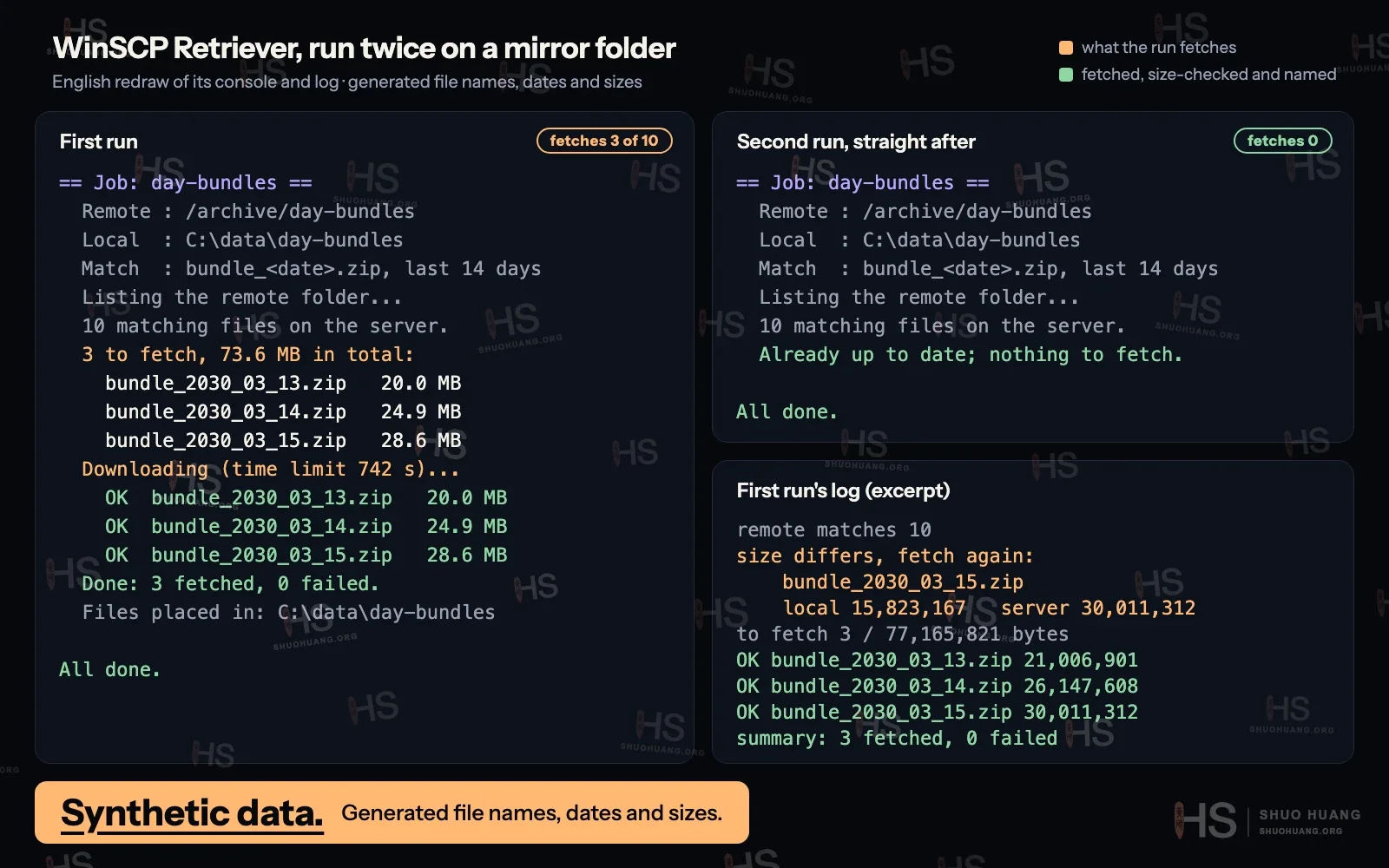
A resident watcher starts building reports the moment a zip appears, so a zip must never appear until it is whole.
- Download to
name.part, compare the size with the server’s, then rename on the same volume: one atomic step - A mismatch keeps the
.part, exits non-zero and never overwrites a good file - Re-running is idempotent: a second run downloads nothing
 Enlarge
- Marker 1: One listing: ten dated bundles on the server, compared with the local folder by name and size.
- Marker 2: Only the gap: the two bundles the folder lacks, and the newest, whose local copy is only part of the file.
- Marker 3: Whole before named: each download lands as a
.partfile and takes its final name only once its size matches the server’s. - Marker 4: Caught by its size: the log shows why the newest bundle was fetched again: its local copy was smaller than the server’s.
- Marker 5: Second run, straight after: nothing is missing, so nothing is fetched.
D
Quiet when it should be, loud when it must be
A weekend with no files is not a failure; a wrong account is. The tool tells them apart with proof, not by guessing from an exit code.
- Nothing yet (weekend, holiday, a folder that does not exist on day one): a quiet note and a clean exit
- Login failed: red, non-zero
- Logged in but permission denied on the folder: red, non-zero, with the server’s own words
E
No secrets in the code
No password in code, scripts, command lines or logs: sign-in is left to the transfer client, and the optional password path hands the password over only through the child process’s environment.
- By default the retriever never handles a password at all: the transfer client signs in by itself
- On the optional password path the generated script names an environment variable, never the value, and a test asserts the password appears in no script file, console or log8
- That path works only for the same user and host the job names; the tool never half-connects as someone else
F
CHRONOS ships its own flight recorder
On the trading machine, CHRONOS packs each trading day into one diagnostic bundle and uploads it, so the same click fetches it too.
- One zip per day: logs, every day-stamped data file, the minute-by-minute record of what the model recommended, both model files with the day’s backups, a redacted configuration, a checksum manifest and a summary of what ran and what is missing
- The build aborts if any member contains a secret; anything expected but absent is listed, never silently dropped
- Local bundles are kept three days and deleted only once the server confirms it has them
 Enlarge
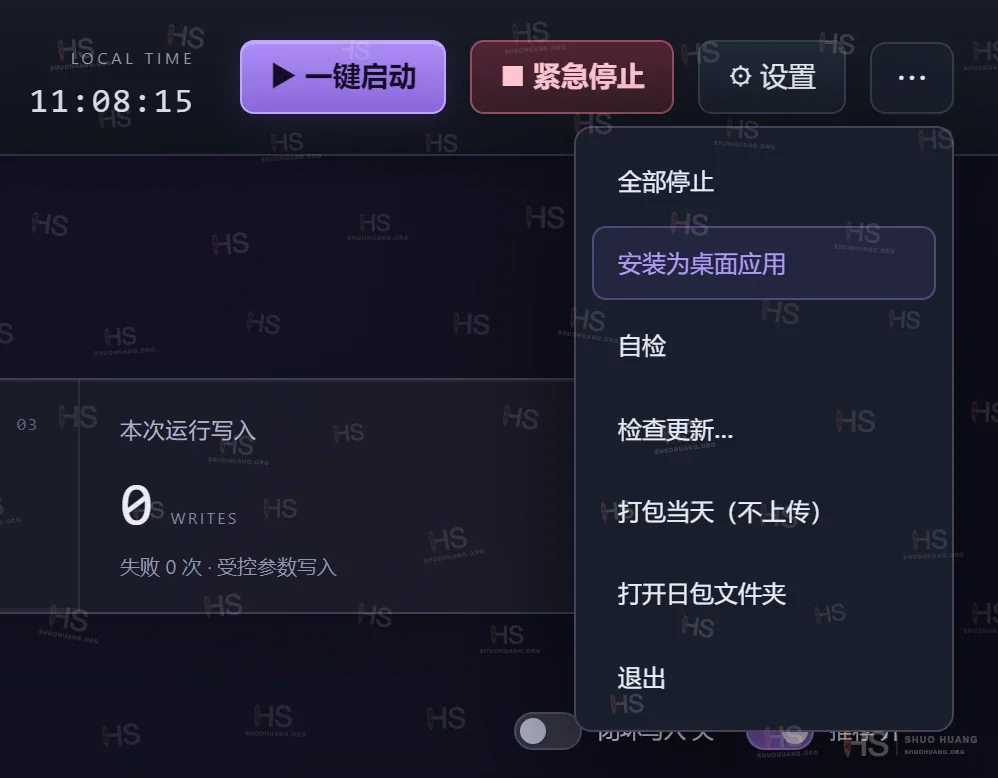
- Marker 1: More menu (⋯, top right): the less frequent actions, including the two bundle commands below.
- Marker 2: Pack today, no upload: builds the day’s bundle locally, for a look before anything leaves the machine.
- Marker 3: Open the bundle folder: the local copies, kept three days and removed only after the server has them.
05Under the hood
For the technical reader: the model, the math and the code.
Under the hoodModels, math and code for the technical reader
A small tool, engineered like a large one: PowerShell 5.1 on the pull side, Python on the push side, 132 automated tests. The interesting parts are the correctness rules: what counts as missing, how a file becomes visible, how three different kinds of ‘nothing came back’ are told apart on a machine whose client speaks Chinese, how sign-in works with no password in code, command lines or logs, and how all of it is tested without a server.
The diff: what counts as missing
One WinSCP run lists the remote folder. A parser reads the long-format listing with a regular expression whose file-name prefix is escaped and anchored, and takes the date from the middle of the name. A remote file is fetched when it falls inside the day window and the local copy is absent or has a different size.
Name and size, not a checksum, is a deliberate choice: the server is reached over SCP, read-only, on a shared folder, so a listing gives name and size for free, while a checksum would need remote command execution or a full download. Size catches the failure that actually happens, a truncated transfer. There is no minimum size, because holiday and half-day zips are genuinely tiny. The push side, which controls both ends, was verified with SHA-256.
def missing_files(remote_listing, local_folder, window_days):
    cutoff = today() - days(window_days) if window_days > 0 else None
    to_fetch, skipped_old = [], 0
    for f in remote_listing:              # name, size, and the date inside the name
        if cutoff and f.date and f.date < cutoff:
            skipped_old += 1              # outside the day window
            continue
        here = local_folder / f.name
        if here.exists() and here.size == f.size:
            continue                      # already home, same size
        to_fetch.append(f)                # absent, or a different size: fetch again
return to_fetch, skipped_oldVisibility: a file exists only when it is whole
The consumer is a resident watcher on the analysis side that starts a report pipeline as soon as a zip with the right name appears. So the name is the commit. Every download goes to <name>.part; after the transfer the script compares the local length with the size from the listing, and only then renames on the same volume, which is atomic. A mismatch leaves the .part in place and sets a non-zero exit; a good file is never overwritten by a bad one. The uploader in CHRONOS mirrors the rule in the other direction: put as .part, rename on the server, list, and require the remote size to equal the local size before recording success.
fetched = failures = 0
for f in sorted(to_fetch, key=lambda f: f.name):
    part = local_folder / (f.name + ".part")
    download(f, to=part)
    if size_of(part) != f.size:
        failures += 1                     # keep the .part: half a zip never gets the final name
        continue
    rename(part, local_folder / f.name)   # same volume: one atomic step
    fetched += 1
exit_code = 1 if failures else 0Three kinds of nothing
CHRONOS produces no bundle on weekends and holidays, and on its first day its folder did not exist. Treating every non-zero exit as failure would turn the daily launcher red every weekend; treating every empty result as fine would hide a wrong account. The listing script therefore runs pwd before ls under option batch continue. pwd prints one absolute path if and only if the login succeeded, and an absolute path looks the same in every interface language, which matters because the client’s messages are Chinese on these machines.
def list_remote(connection, remote_folder):
    script = [
        "option batch continue",      # a failed ls must not stop the script
        f"open {connection}",
        "pwd",                        # one absolute path, printed only after a good login
        f'ls "{remote_folder}"',
        "exit",
    ]
    result = run_client(script, timeout=LISTING_TIMEOUT)
    logged_in = any(is_absolute_path(line) for line in result.lines)

    if result.timed_out:
        return FAIL, "listing timed out"            # network or server problem
    if result.exit_code == 0:
        return OK, result.files                     # may be empty: nothing produced yet
    if not logged_in:
        return FAIL, "could not connect or log in"
    if permission_denied(result.lines):
        return FAIL, server_message(result.lines)   # wrong account: quote the server
return OK, [] # logged in; the folder is not there yet| What the run shows | Meaning | Result |
|---|---|---|
| Exit 0, no matching files | Folder is there, nothing produced yet | Quiet note, exit 0 |
pwd path printed, ls failed, no permission error | Folder does not exist yet | Quiet note, exit 0 |
pwd path printed, ls says permission denied | Wrong account for this folder | Red, non-zero, server’s words quoted |
No pwd path | Could not connect or log in | Red, non-zero |
| Listing timed out (120 s) | Network or server problem | Red, non-zero |
Sign-in: no password in the code
Connection resolution is strict: each job names its connection, and an unknown name is refused up front with the list of valid ones, a rule learned on the first run, where a shortened name was taken for a host name. Sign-in itself is left to the transfer client. The optional password path is used only for the same user and host the job names, never for a different account, and a job with no usable route is refused with instructions.
On that path the generated script names an environment variable where the password would go; the password itself is placed only in the child process’s environment block, and the client expands it. Even the parameter’s name was a trap: it cannot be called $pwd, because PowerShell names are case-insensitive and $PWD is an automatic variable. The CHRONOS uploader uses the same pattern, the bundle builder scans every member for a secret and aborts if it finds one, and the release build stops rather than ship a filled-in password, judged by content, not file name.
def start_client(client_path, script_file, password=None):
    env = copy_of_current_environment()
    if password:                                  # optional password path only
        env["TRANSFER_PASSWORD"] = password       # lives only in the child's environment block
    # The generated script names the variable, never the value:
    #     open scp://<user>@<host>/ -password="%TRANSFER_PASSWORD%"
    return start_process(client_path, ["/script=" + script_file],
env=env, capture_output=True, show_window=False)The push side, and a race with the end-of-day cleanup
Before go-live, CHRONOS’s own bundle builder and uploader were run end to end against the server: 7 of 7 checks passed. A test bundle went up under a temporary name, was renamed and size-checked in 2.4 seconds, came back with an identical SHA-256, and left no temporary file behind.9
The uploader retries the oldest pending bundle first, with a linear backoff capped at an hour. Building it surfaced a timing race: an end-of-day maintenance step clears the engine’s log folder shortly after the close, and the engine keeps writing right up to that step, so no ‘wait until the log goes quiet’ rule can fire before the files are gone. CHRONOS now copies each log chunk as it reads it, and re-fits its model right after the close, with the mirror as fallback.6
Testing without a server
Two suites run on the development PC. The unit suite samples a captured server listing, including single-digit days and a look-alike prefix that differs from the target’s by one character in the same shared folder. The end-to-end suite drives the shipped script, job table and launcher against a stand-in client with five fault knobs: folder missing, permission denied, login refused, transfer truncated, file skipped. It asserts that a truncated transfer never gets the final name, that re-runs are idempotent, and that the password never appears in the script text, console or log. Run against the pre-v1.2 script, the same suite fails six checks.7
Once v1.2 passed, the deployed files were run against a mirror of the destination folders: of ten bundles, only the three missing or incomplete ones were fetched (one a half-downloaded copy, re-fetched because its size was wrong), the other seven were left alone, and a second run downloaded nothing.4
After every change the deployed files are hash-checked against the source. That rule has a story too: one job-table edit sat undeployed for two days and changed nothing, so the rule since is that a change is not done until the deployed files hash-match the source.
Automated checks per release
The suite nearly doubled in ten days, from 67 checks to 132, as each defect found in use became a test.
Show the dataHide the data
| Category | Unit checks | End-to-end checks | Total |
|---|---|---|---|
| v1.0, Sep 14 | 45 | 22 | 67 |
| v1.1, Sep 15 | 69 | 37 | 106 |
| v1.2, Sep 24 | 86 | 46 | 132 |
| Measure | Value |
|---|---|
| Deployed-file run, Sep 24, 2026 | 10 bundles listed; 3 fetched (2 absent, 1 half-downloaded and re-fetched by size); 7 left alone; second run: 0 downloads |
| Start of work to live use | Under 24 hours (Sep 14 to 15, 2026) |
| Default day window | 14 days |
| End-to-end upload test before go-live | 7 / 7 checks; test bundle uploaded, renamed and size-checked in 2.4 s; fetched back SHA-256 identical |
| Local bundle retention | 3 days, and only after the server has the file |
Design choices, and why not the alternatives
Every choice below answers a constraint of the desk’s setup.
| Question | Chosen | Rejected, and why |
|---|---|---|
| How to log in | The client’s own scripting engine, which signs in by itself | A client library or a stand-alone SSH client: each would need the password handed to it. |
| How to detect a missing or broken file | Name and size from one listing | A checksum: needs remote command execution or a full download over read-only SCP. Size catches the failure that actually occurs, a truncated transfer. |
| How a file becomes visible | .part, size check, same-volume rename | Writing straight to the final name: a resident watcher would start a report on half a zip. |
| How to classify an empty result | pwd before ls, then the server’s own error text | Exit code alone: it turns every weekend red, or hides a wrong account. Parsing the client’s messages: they are localized. |
| How much to fetch | A day window per job, 14 by default | Everything missing: one machine’s history alone ran to several gigabytes, so a first run would start an unintended multi-gigabyte backfill. |
| Where the fetch sits in the one-click pull | First, with its exit code ignored | After the database export: that step ends by waiting for a key press, and a file-transfer fault must never block the proven export. |
| When CHRONOS re-fits its model | Right after the close, with a mirrored copy of the logs as fallback | Waiting for the log to go quiet: the engine writes right up to the end-of-day cleanup, so a quiet-log rule can never fire in time. |
Failure modes engineered out
- Half files.
.partthen size check then atomic rename, on both the download and the upload side. - Accidental backfill. A day window on every job; the unbounded mode prints count and total size first.
- The wrong machine’s logs. Prefixes stay fully qualified and anchored; a test covers the one-character look-alike.
- False alarms on quiet days. A missing folder or an empty one is ‘nothing yet’, proven by
pwd. - Silent wrong-account runs. Permission denied after a good login is a failure; the optional password path never stands in for a different user.
- A fetch that blocks the data pull. The fetch runs first and its exit code is ignored by the launcher, so a file-transfer problem never stops the proven database export.
- PowerShell traps, found by the tests. A local
$allcolliding with a-Allswitch (it broke only the branch production uses); a password parameter that would have collided with the automatic$PWD; an empty array that becomes$nullwhen returned from a function. A UTF-8 byte-order mark thatTrim()does not remove was hardened before it could bite. - Stale files in a daily zip. A daily zip can carry a leftover file from an earlier day, so readers take only members named with the day’s date.
Built with
- PowerShell 5.1
- Python
- WinSCP scripting
- SCP / SSH
- Data pipelines
- Automation
- Idempotent sync
- Atomic file writes
- Secrets handling
- SHA-256 verification
- Regex parsing
- Fault-injection testing
- End-to-end tests
- Production deployment
- Windows batch
06Releases
Shipped in versions, like a product.
- v1.0The general retriever with its job table, built against a captured server listing and folded into the one-click data pull as a soft first step. 67 tests.
- v1.1 · liveOptional password sign-in with the password only in the child environment; an empty or missing folder is not an error; CHRONOS day bundles added as a second job after an end-to-end upload test passed 7 of 7 checks. First bundle retrieved through the one-click pull the same afternoon. 106 tests.
- CHRONOS bundle on demandCHRONOS gains a header button that builds and uploads the comprehensive bundle at any moment, and its uploads move to a new server folder.
- v1.2Password sign-in honored only for the same user and host the job names; permission denied after login is a failure; the end-to-end suite cleans up after itself. 132 tests.
07Related
Programs that work with this one.
-
Live-Hog FAK Daily Report
Replays every live order through the desk’s backtest, every trading day, by itself, and shows where the simulator is optimistic.
-
CHRONOS
Self-retraining machine-learning controller that sizes and safeguards the desk’s live-hog market making, wired straight into the trading engine. Its central finding changed how the desk sizes.
- Data Puller One-click, read-only pulls from a 9-billion-row market-data database, with nothing to install.
- DB Structure Snapshot One click maps a 9-billion-row production database in under ten minutes, read-only, every probe bounded.
- 1In use from September 15, 2026, as step one of the desk’s one-click data pull. The daily report it feeds was still being built from its files in November 2026.
- 2Work began in the late afternoon of September 14, 2026; release v1.0 was built that evening and deployed the next morning, and the first CHRONOS day bundle was retrieved through the one-click pull on the afternoon of September 15, 2026.
- 3The one click is the desk’s one-click data pull on the internal workstation: step one is the retriever, step two the database export.
- 4Run of the deployed files on September 24, 2026, against a mirror of the destination folders, using the test suite’s stand-in file-transfer client.
- 5The job table feeds the daily execution reports and CHRONOS research; each source is one line.
- 6The log server and its daily archive are run by the desk’s IT team and are unchanged. The re-fit timing and the log mirror are part of CHRONOS.
- 7Release v1.2, September 24, 2026: 86 unit checks and 46 end-to-end checks. The end-to-end suite runs the shipped script against a stand-in file-transfer client with fault injection; in daily use the retriever runs against the desk’s log server.
- 8The retriever’s code, generated scripts, command lines and logs contain no password. Sign-in is left to the file-transfer client; on the optional password path, the password is passed only through the child process’s environment.
- 9End-to-end test before go-live, September 2026: CHRONOS’s own bundle builder and uploader sent a test bundle up under a temporary name, renamed it, checked its size, fetched it back and compared SHA-256 hashes; 7 of 7 checks passed.
- 10The day-window chart and the redrawn console (its file names, dates and sizes) show synthetic data, generated to show the effect; the mirror-run and test charts and the tables measure the tool itself, and the CHRONOS screenshot shows its interface only, with no desk data. Methods and outcomes are described as they happened; the desk’s own figures are confidential and do not appear here.
- 11The window counts calendar days back from the run day, which is included: a 14-day window covers the last two working weeks plus the run day. A window of 0 fetches everything, after printing the count and total size first.