

Software · Desk tool
WeCom Scheduler 企微定时消息
Nobody presses send. Every trading session’s reports post themselves to the desk’s team chat: recipient proven first, never sent twice.
01System architecture
It drives the messenger like a careful person, and proves every step on screen.
It runs on a standard-user desk PC with nothing installed, and it works through the WeCom desktop client the desk already uses, the way a person does. Everything in this design exists to make that safe: paced like a person, the recipient proven on screen, never a double send.
Trading terminal
Session exports
Order and fill CSVs after each session; night data is uploaded by a colleague at any hour.
Office PC
 Spread Calculator
Shuo’s report engine: renders the daily spread report and the per-session surveillance charts.
Network share
Report folders
PDF, Excel and chart images, named by date and session.
At the desk
The trader
Keeps working. A touch of keyboard or mouse aborts a send in progress; it retries 20 s later.
Installed app window
Web console
Task cards, safety rehearsal, test send, live activity feed.
Office PC · resident
 WeCom Scheduler
5-second scheduler, file watcher, send pipeline. One Python file, standard library only.
Same PC
WeCom desktop client
Tencent’s enterprise messenger, operated through Win32 window messages.
User data folder
Sent-state and log
Once-per-day marks, file-set signatures, every step of every send.
WeCom
Department group chat
Or one named contact. The pop-out window’s title must equal this name exactly.
Simplified: the taskbar icon thread, the holiday calendar and the upgrade hand-over between versions are not drawn.
What is WeCom?
WeCom (企业微信, “enterprise WeChat”) is Tencent’s workplace messenger: the Slack or Microsoft Teams of Chinese companies. On this desk it is the main channel: the department’s group chat is where reports are read.
Paced like a person
The program shares one keyboard, one mouse and one WeCom window with the trader, so it works at a person’s speed. It starts only when the trader’s hands are off the keyboard and mouse, pauses between steps, and checks for a human touch after every pause. A touch before the send key cancels the attempt, clears the draft and tries again 20 seconds later.
The point of no return
Every check happens before the send key, where an attempt can be abandoned and retried safely. After the send key the program never acts again: anything unexpected raises an alert for a person to look, and the item is locked. A missed post is cheap and visible; a duplicate in a chat with management in it is neither.1
Why a pop-out window?
In WeCom’s main window the open conversation can change under an automation when the user clicks. A pop-out chat window belongs to one conversation, and its title is that conversation’s name. Requiring the title to equal the configured recipient gives a recipient check with no screen reading and no OCR.
02The story
Reports that post themselves: recipient proven first, never sent twice.
WeCom is the Slack of Chinese offices, and on this desk it is where every report has to land. Shuo conceived and built, on his own initiative, a program that operates the WeCom app the way a careful person would: it waits until nobody is touching the keyboard, opens the chat in its own window, checks the name on that window, pastes the files, and presses send once, never twice.
It started as one afternoon reminder. It is now the delivery layer of the desk’s reporting: the daily spread report and the per-session surveillance reports go out after every trading session, including night sessions uploaded at two in the morning, with nobody at the keyboard.
01
The problem
Every afternoon Shuo needed two data exports from a colleague, so every afternoon he had to remember to ask. Then the stakes rose. His Spread Calculator began producing the desk’s daily spread report, and his Self-Trade Check a surveillance report after every trading session, on self-trades: unintended matches between a spread order’s exchange-derived legs and the desk’s own quotes. Someone had to post each set to the department chat right after the session, including night-session data that arrives at 11 pm, after 2:30 am, or on a Saturday morning.
- It had to run on a standard-user desk PC, with nothing installed, through the same WeCom app a person uses.
- A message in the wrong chat, or the same report posted twice, lands in front of the whole department and cannot be reliably undone.
02
What he built
Shuo conceived, designed and built it from scratch, on his own initiative: a resident Windows program that operates the WeCom desktop client like a careful person. For timed messages it knows weekdays and exchange holidays. For reports it watches the folders where the files are written and sends only when every expected file is present and has stopped changing for 12 seconds, so a half-copied PDF never goes out.
The safety rules are Shuo’s own design. A send starts only when keyboard and mouse are idle, and aborts the instant a person touches either. The chat is opened as a separate window whose title must match the recipient exactly. After the send key is pressed there is no retry: anything unexpected is flagged for a person to check. Think of a courier who reads the name on the door before knocking, and who never delivers the same parcel twice.
03
What changed
Seven recurring sends now run every trading day with nobody at the keyboard: the daily spread report, the per-session surveillance reports and a private reminder.2 A complete report set goes from “files detected” to “posted in the group” in 18 seconds,3 and a whole market close, four report sets and the reminder, goes out in 74.4 Night-session reports are tracked by the identity of the file set, Shuo’s idea, so each night’s set goes out once whenever it is uploaded.
It also knows when not to send: when an upstream fault left a report set incomplete, it held the set back and nothing partial reached the chat.5
It has delivered daily since August 4, 2026, across a move to a new PC.6 The per-session reports it carries show traders the effect of a change to their spread orders or quotes the same day.
7
recurring sends every trading day, from the daily spread report to the per-session reports2
18s
from a complete report set to posted in the team chat3
0
retries after the send key: a double post has no code path1
74s
for a full market close to go out: four report sets and a reminder, every recipient window verified4
3.5months
of unattended daily delivery, across a PC replacement6
60
offline test cases behind the scheduler and send logic7
03Evidence
Eight seconds to prove the recipient, before anything is pasted
Two production sends from the program’s own activity log, timed stage by stage: one reminder image to Shuo’s own chat at a market close, and three night-session report images to the team chat.
Seconds per stage of one send
On both sends, the first 8 seconds went to finding the chat and proving its name; pressing send and confirming took the last 4.
Show the dataHide the data
| Category | Open chat, check name | Paste, check files | Send, confirm | Total |
|---|---|---|---|---|
| 1 image | 8 | 4 | 4 | 16 |
| 3 images | 8 | 6 | 4 | 18 |
04Functions
Everything it does, in the order a user meets it.
Six parts: the board, a report delivery, the night-session rule, the safety design, timed messages, and the taskbar.
A
One board, with the evidence beside it
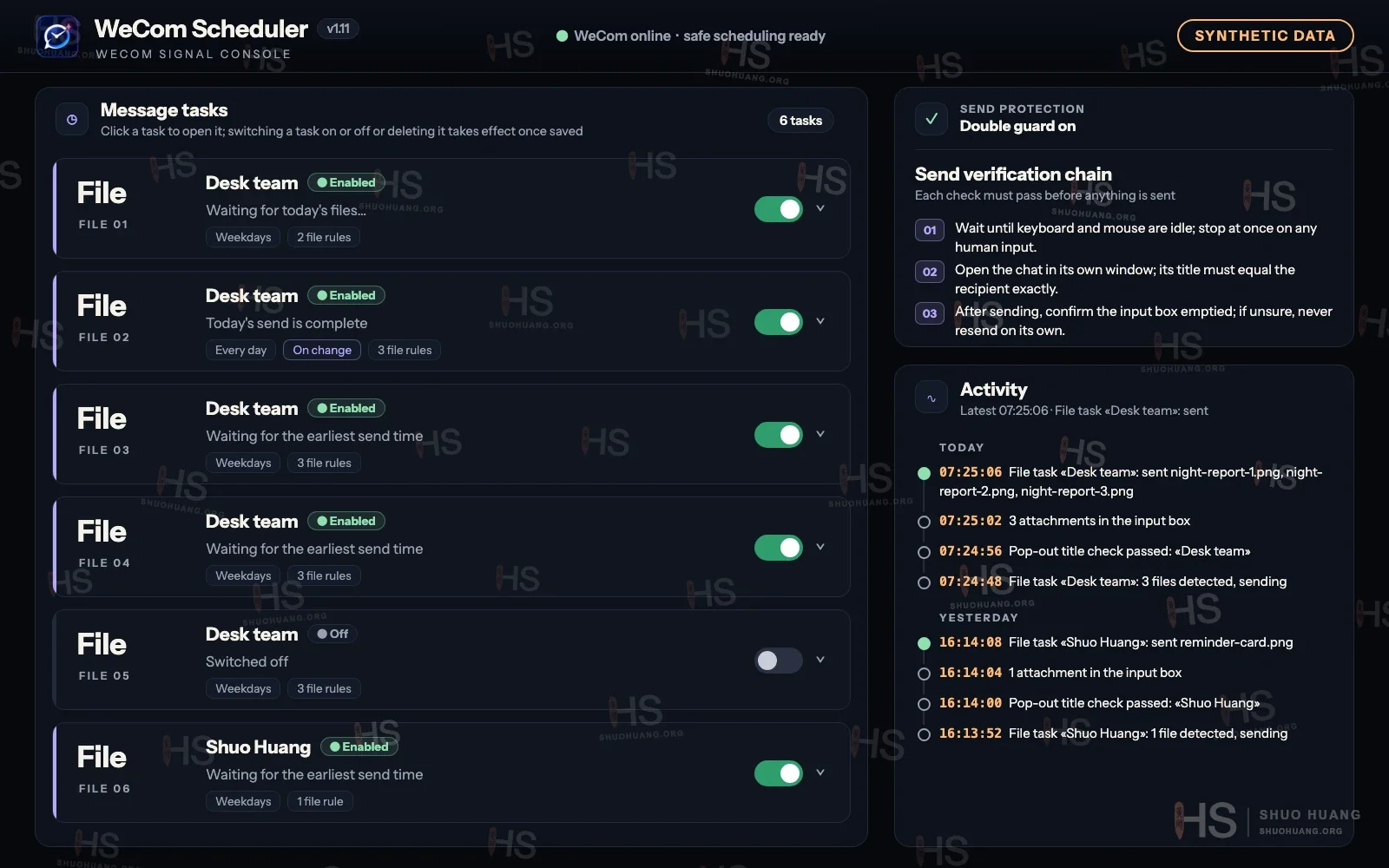
Every task, its state today, and a live record of each step the program took to prove a send.
- Task cards show waiting, sent today, or switched off at a glance
- The send verification chain is spelled out on the page
- The activity feed logs detection, title check, attachment check and completion
 Enlarge
- Marker 1: A file task (top card): addressed to the team chat, switched on, status “waiting for today’s files”.
- Marker 2: Sent. This task’s status reads “today’s send is complete”; in on-change mode it fires again only for a new file set.
- Marker 3: Switched off. A retired task stays on the board, disabled, with its rules intact.
- Marker 4: Send verification chain: 01 wait for idle keyboard and mouse, abort on human input; 02 open a pop-out chat whose title must equal the recipient; 03 confirm the input box emptied, and never resend when unsure.
- Marker 5: Activity feed, newest first: three files detected, the pop-out title check passed 8 s later, three attachments in the input box 6 s after that, send complete 4 s later.
- Marker 6: Private reminder (bottom card): one task addressed to Shuo himself, not the group.
B
Deliver a report when its files land
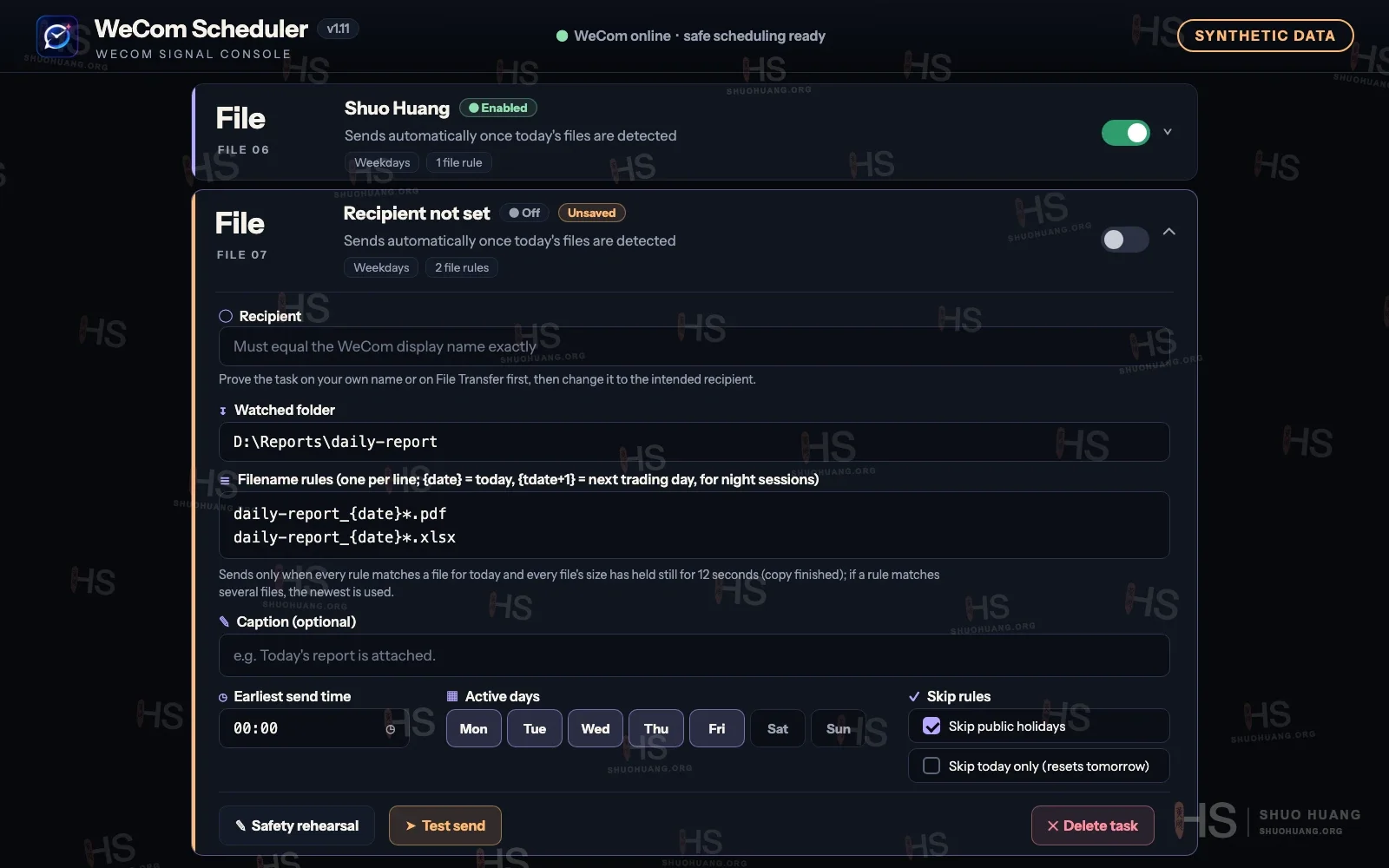
Point a task at a folder, describe the files, and the report sends itself once the whole set is complete.
- One filename rule per line, with a date placeholder; the newest match wins, so re-exports work
- Fires only when every rule has a match and no file has changed for 12 seconds
- An unreachable network drive counts as “not there yet”, never as an error
 Enlarge
- Marker 1: Recipient: must equal the WeCom display name exactly; the hint says to prove the task on your own chat first.
- Marker 2: Watched folder: where the report generator writes its output.
- Marker 3: Filename rules, one per line: here a PDF and an Excel workbook, each with a
{date}placeholder for today. - Marker 4: The trigger: every rule must match a file for today, and sizes must hold still for 12 seconds (copy finished) before anything is sent.
- Marker 5: Calendar guards: earliest send time, active weekdays, skip public holidays, and “skip today only”, which clears itself after midnight.
- Marker 6: Safety rehearsal and Test send: the rehearsal runs the whole flow except the send key and leaves the draft in the verified window.
C
Night sessions, at any hour
In Chinese futures the night session belongs to the next trading day, and its data may arrive at 11 pm, after 2:30 am or on a Saturday morning. A calendar cannot count that correctly, so this task counts file sets instead.
- “On change” mode: one send per distinct file set, identified by names, sizes and modification times
- Two different nights can never be confused; an unchanged set is never sent again
- A corrected regeneration of the same night is a new set and goes out
D
Send only to the proven recipient, and only once
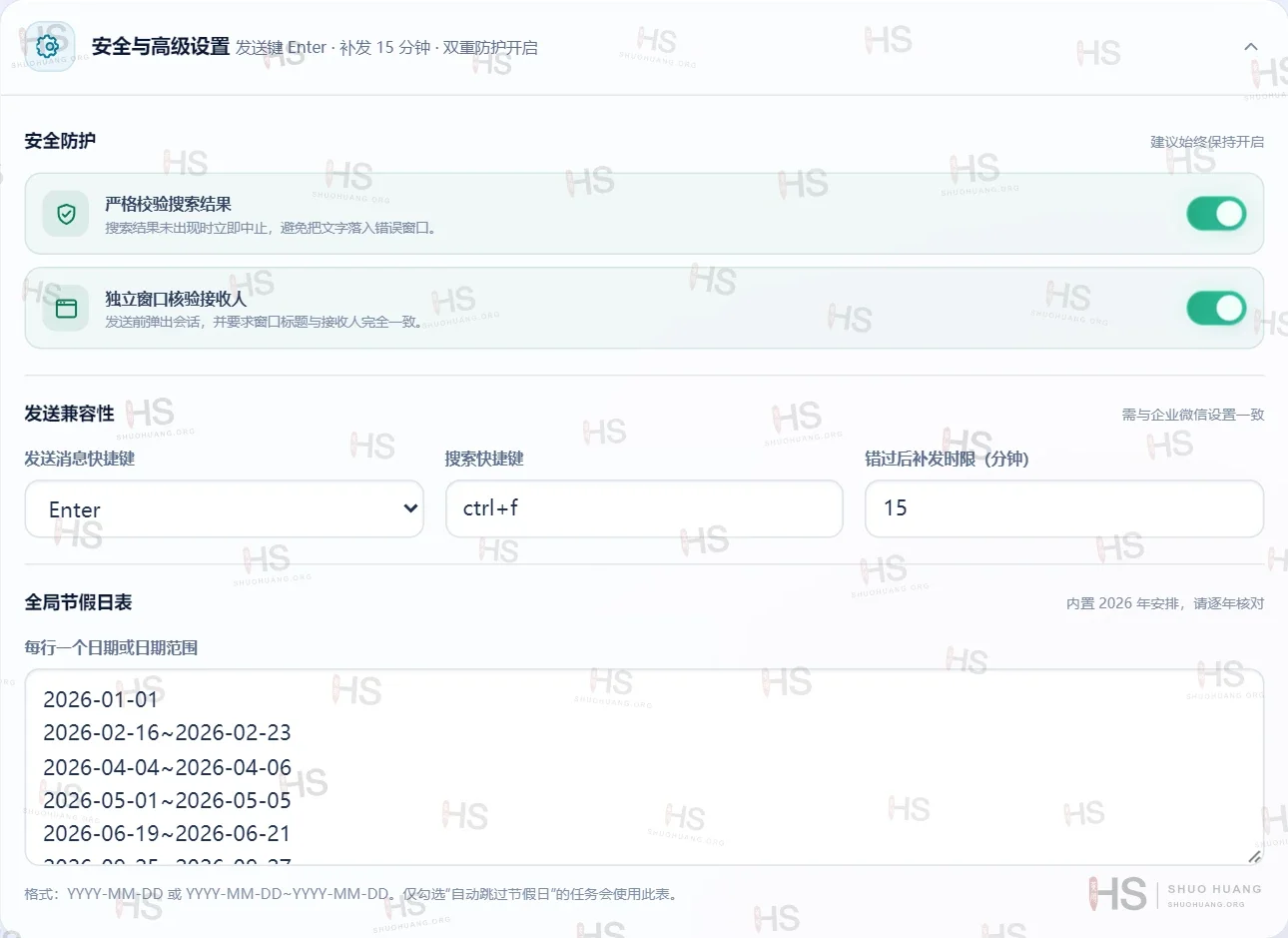
The safety design is the product: three rules Shuo specified, enforced on every send.
- Starts only after 1.8 s of idle keyboard and mouse; any human input before the send key aborts and retries 20 s later
- The chat opens as a pop-out window whose title must equal the recipient, or the attempt is abandoned
- After the send key: no retry. Uncertain results raise a topmost alert for a person to check
 Enlarge
- Marker 1: Strict search verification: if WeCom’s search results do not appear, stop at once rather than type into the wrong window.
- Marker 2: Pop-out recipient check: open the conversation as its own window and require the window title to equal the recipient exactly.
- Marker 3: Send key: matched to the user’s own WeCom setting (Enter or Ctrl+Enter), because the other one means “new line”.
- Marker 4: Catch-up window: if the PC was locked or the program started late, a missed send is still made within 15 minutes, then abandoned with an alert.
- Marker 5: Holiday table: the 2026 public-holiday calendar, one date or date range per line, editable.
E
Timed messages that know the calendar
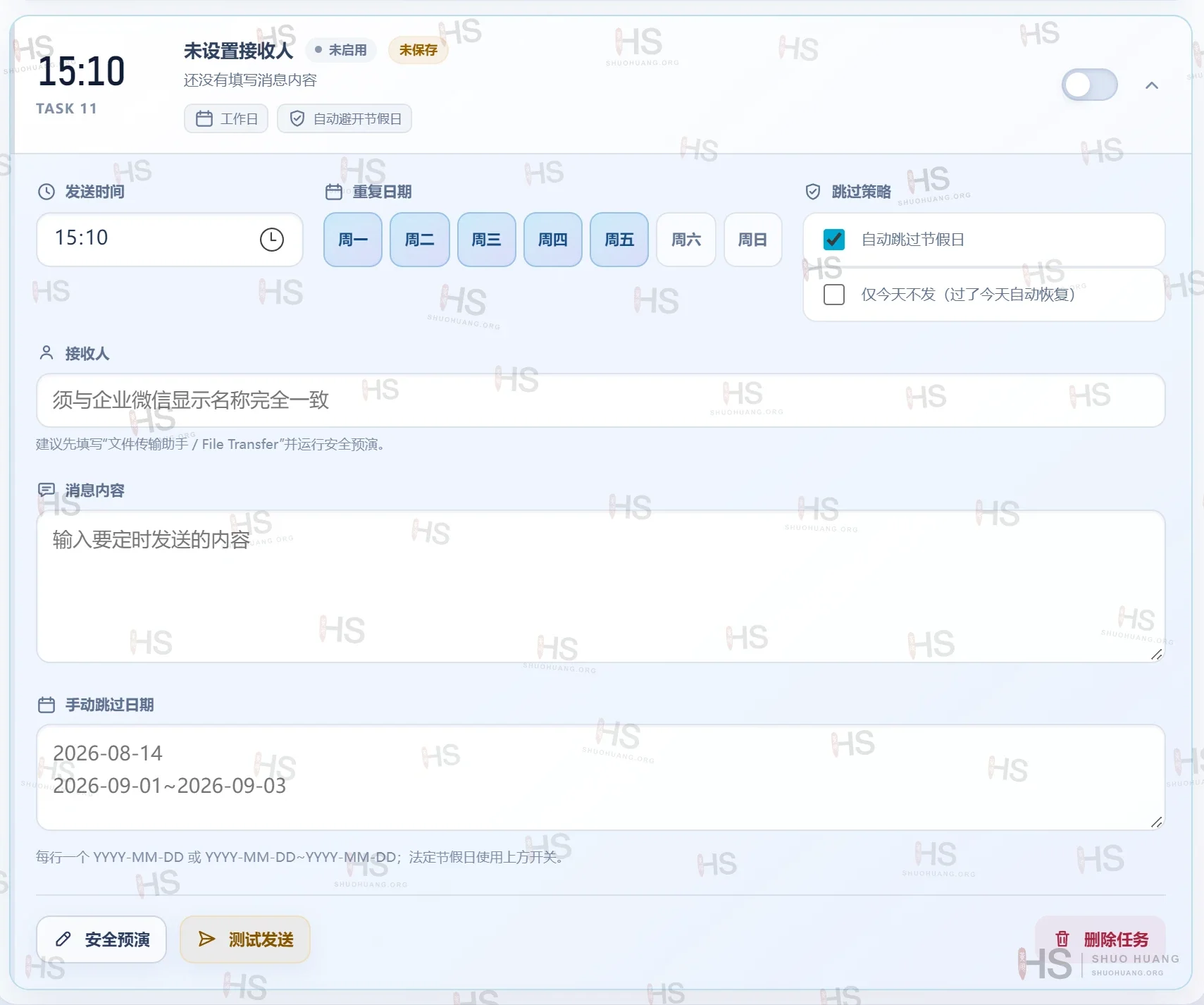
The original feature: a text message to one contact at a set time, on the days it should go and no others.
- Weekday mask, public-holiday skip, manual skip dates and ranges
- Editing a task to a time already past means tomorrow, never an immediate catch-up
- “Skip today only” for the day the answer has already arrived
 Enlarge
- Marker 1: Send time, here 15:10.
- Marker 2: Repeat days: Monday to Friday selected.
- Marker 3: Skip rules: skip public holidays (ticked) and “skip today only”.
- Marker 4: Recipient: must equal the WeCom display name exactly.
- Marker 5: Manual skip dates: single days or ranges, one per line.
F
Status without opening anything
The taskbar icon carries the day’s state: a badge while messages are still pending, green once everything has been sent.
- Starts at logon; nothing to install
- A newer copy asks the running one to finish its send and hand over; tasks and history carry across
- Fifteen minutes of failing file sends raise an alert instead of failing silently
05All screens
Four views of the program.
06Under the hood
For the technical reader: the model, the math and the code.
Under the hoodAt-most-once delivery, Win32 techniques, the readiness predicate, validation and pseudo-code
For the engineer: this is robotic process automation (RPA) held to distributed-systems standards. The transport (a GUI client) gives no acknowledgment, the automation shares the input devices with a human, and the two failure modes are asymmetric. The design answers three questions precisely: when is a send allowed to start, what proves the recipient, and what happens when the outcome is unknown.
Delivery semantics: at-most-once, by construction
A missed post is visible and cheap: an alert appears and a person sends it by hand. A duplicated or misrouted post lands in a group with management in it and cannot be reliably undone. So the pipeline is split at the send key into a retryable phase and a terminal phase, with two exception types carrying that distinction through every caller.
- Before the send key: nothing has left the machine. A human-input abort retries after 20 s; any other failure retries every 60 s inside the catch-up window. On abort the draft is cleared and the pop-out is closed.
- After the send key: any anomaly, including an exception inside the verification code itself, becomes an uncertain outcome. The scheduler marks the item as handled (the calendar day, or the file-set signature), raises a topmost alert, and never retries.
This is at-most-once delivery with operator escalation, chosen over at-least-once because the channel has no idempotency key and no recall.
| Stage | Evidence required | On failure |
|---|---|---|
| 1 · Idle gate | GetLastInputInfo idle ≥ 1.8 s (waits up to 20 s) | Retry in 20 s |
| 2 · Search | Recipient pasted into search; WeCom’s results pop-up window must appear | Abort, retry |
| 3 · Pop-out | Selected row found by its selection color in a PrintWindow capture; double-click; new window’s title = recipient, exactly | Abort, close the wrong window, retry |
| 4 · Compose | Text caret moved (GetGUIThreadInfo); for files, attachment cards present by pixel count in the input band | Clear draft, retry |
| 5 · Send key | No human input since the last injected event | Abort before the key, retry |
| 6 · Confirm | Bottom input strip back to its own pre-paste baseline and caret back at its origin | Uncertain outcome: lock, alert, never retry |
Telling a human from the automation
The automation and the trader share one keyboard, one mouse and one WeCom. A click by the trader mid-flow can move WeCom to another conversation, and a foreground-window check cannot see that. The guard uses a property of Win32 input accounting: GetLastInputInfo advances for hardware input and for SendInput, but not for messages delivered with PostMessage. The program time-stamps every event it injects, so a system last-input tick more than 120 ms past its own last injection can only be a person. A cursor-position sentinel (2-pixel tolerance) catches mouse movement. The check runs before every step, after that step’s paced pause.
GetLastInputInfo); tinj: when the program injected its own last event; c: the cursor position, c0 where it stood when the step began. The test runs before every step, after that step’s paced pause.class HumanTouch(Exception): # before the send key: nothing has left, retry in 20 s
pass
class UncertainOutcome(Exception): # after the send key: mark handled, alert a person, never retry
pass
def person_touched(step_cursor):
# Win32 counts hardware input and SendInput in its last-input time, but not
# messages delivered with PostMessage. Every event the program injects is
# time-stamped, so a last-input time clearly after its own last injection
# can only be a person.
if last_input_time() > last_injection_time() + 120 ms:
return True
return max_axis_distance(cursor(), step_cursor) > 2 px # a moved mouse is a person
def guard(step, step_cursor):
paced_pause() # a person-scale beat; the check comes after it
require_wecom_in_front(step) # otherwise abort before anything is sent
if person_touched(step_cursor):
raise HumanTouch(step) # caller clears the draft, closes the pop-out, retriesDriving a desktop client dependably
Each technique below replaced a simpler one that failed against the WeCom client.
- Typing with posted window messages. After a click, WeCom hands keyboard focus to a hidden helper window, so ordinary simulated keystrokes vanish. Text is posted to the chat window as
WM_CHAR, one UTF-16 code unit at a time, which reaches the input box regardless of focus. In this clientWM_CHAR 0x0Ameans send, so line breaks are issued as the non-send key combination for the user’s setting. - Attachments as an Explorer file drop. Files are placed on the clipboard as
CF_HDROP(aDROPFILESstructure, as if copied in Explorer) and pasted into the verified pop-out. - Seeing without a screen. Window contents come from
PrintWindowinto a DIB, so capture works with the monitors off. Attachment cards are detected by counting non-background sample points in the input band: no OCR, no image matching. - A narrower band after sending. Just-sent image bubbles appear in the chat area and once fell inside the verification band, producing a false “uncertain” alarm on a send that had succeeded. The post-send check now reads only the collapsed input strip at the bottom and requires the caret to be home as a second, independent proof.
- Paced like a person. Every step waits a person-scale beat before the next, and the human-input check runs after each pause, so a hand on the mouse is caught between any two steps.
When is a report ready? The file-set predicate
A file task holds n filename rules. For today’s date each rule resolves to its newest match, giving a candidate set F. Its signature is the tuple of base name, size and modification time of every file. The task fires when the set is complete, the signature has been stable for 12 seconds, and (in on-change mode) the signature differs from the last one sent. In daily mode the third condition is “nothing has been sent for this task today”.
def file_task_state(task, now):
    """off / not today / sent / early / waiting / staging / ready"""
    if not task.enabled:
        return "off"
    if not active_today(task, now.date):        # weekdays, holidays, skip dates
        return "not today"
    if task.mode == "daily" and sent_today(task):
        return "sent"
    if now.time < task.earliest_send_time:
        return "early"
    files = [newest_match(rule, now.date) for rule in task.rules]
    if None in files:                           # a rule has no file for today yet
        return "waiting"
    sig = signature(files)                      # (name, size, mtime) of every file
    if task.mode == "on change" and sig == last_sent_signature(task):
        return "sent"
    if sig != first_seen[task].sig:             # anything changed: restart the clock
        first_seen[task] = (sig, now)
        return "staging"
    if now - first_seen[task].time < 12 s:
        return "staging"
return "ready"Why a signature, and what it buys
Calendar accounting (“once per day, today’s date in the filename”) breaks for the night session. That session belongs to the next trading day, and its data is uploaded by someone else at an unpredictable hour: the same evening, after the silver session closes in the small hours, or on Saturday morning for a Friday night. Two different nights can fall on one calendar day, and one night can straddle two. Shuo’s idea was to key the send on the identity of the session rather than the wall clock. The implemented invariant is the file-set signature: it needs no knowledge of the report’s contents inside the messenger, it cannot confuse two nights, and a corrected regeneration of the same night changes size or modification time and is therefore delivered as a new set.
| Alternative considered | Why it was rejected |
|---|---|
| Third-party automation libraries | Not needed: the standard library and ctypes reach every Win32 call used, so nothing is installed |
| Retry until confirmed (at-least-once) | The channel has no acknowledgment and no idempotency key; one ambiguous confirm would become a duplicate in the department chat |
| Send in WeCom’s main window | The open conversation can change under the automation when the user clicks; a pop-out’s title pins the recipient |
Simulated keystrokes (SendInput) for text | WeCom moves focus to a hidden helper window after clicks and the keystrokes are lost |
| OCR to read the recipient | Slower and fallible; the pop-out window title is an exact string from the window manager |
| Once per calendar day for night data | One set sent late, another swallowed, whenever uploads cross midnight |
| Parsing the trading day out of the report | Couples the messenger to a report format; the signature gives the same guarantee and also re-sends corrections |
| Send as soon as a file appears | Large exports copy slowly over the network share; a partial set means the generator failed midway |
Scheduler
One loop, a 5-second tick, configuration reloaded live.
- Edited-gate. Saving a schedule change stamps the task; today’s slot is catch-up-eligible only if it is later than that edit. Moving a task to a time already past therefore means the next occurrence, not an immediate send.
- Catch-up window. If the PC was locked or the program started late, a timed send is still made within 15 minutes. A locked session makes the sender wait rather than fail.
- Ordering. Tasks are evaluated in list order within a tick under one send lock, which is how each session’s report always goes out before the full-day report.
- Network share. Folder scans are cached for 5 seconds and bound to the date, so the scheduler, the status API and the taskbar thread share one scan, and a scan made just before midnight is never reused after it.
- Single instance. The local HTTP server refuses address reuse (on Windows two processes could otherwise bind one port); a newer version asks the running one to quit after any send in flight and takes over, and a foreign process on the port is never touched.
One market close
Five sends went out one after another in 74 seconds, in the order the tasks are listed.
Show the dataHide the data
| Send, in list order | Seconds after the first send |
|---|---|
| Report 1 | 0 |
| Report 2 | 18 |
| Report 3 | 35 |
| Report 4 | 58 |
| Reminder | 74 |
Validation: three rings before the group sees a change
No change reached the department chat without passing three rings, in order.
- Offline suite. The scheduler and file-watching logic run against a disposable fixture with no WeCom involved: 60 cases by v1.7, plus 8 for on-change accounting. They cover filename matching, a missing file, a wrong date, newest re-export wins, the stability gate, a change restarting the 12-second clock, every calendar gate, an unreachable folder, the midnight cache, the edited-gate, and date roll with no re-fire.
- Safety rehearsal. The full send pipeline against the WeCom client itself, stopping one keystroke short: the draft is left in the verified window for inspection.
- Test send to Shuo’s own chat. The complete chain, send key included, with the day’s report files, before a task is ever pointed at the group.7
The group tasks were then made by cloning the proven task, so the recipient string was inherited byte for byte and never retyped. A pre-save check caught the trap in that: clones kept the template’s id, and once-per-day state is keyed by id, so the tasks would have locked each other out.
Offline test cases, version by version
The offline suite tripled in eight days, and the biggest jump, 20 new cases, came with file tasks in v1.6.
| Version, July 21 to 29, 2026 | Offline test cases |
|---|---|
| v1.0 | 19 |
| v1.2 | 28 |
| v1.5 | 35 |
| v1.6 | 55 |
| v1.7 | 60 |
| Check | Observed |
|---|---|
| On-change accounting, end to end (Aug 5, 2026) | Sent 9 s after detection, recipient title verified on the way; the unchanged set was not resent, and a modified set went out again as a new set |
| Post-send check after the narrow-band fix (v1.8) | Image sends confirmed in about 2 s with zero false “uncertain” alerts |
| Incomplete report sets in production | When an upstream render stopped partway, the tasks stayed at “waiting” and nothing partial was sent5 |
| Upgrade hand-over | A newer version replaced the running one in about 1 s, tasks and history intact |
Failure modes engineered out
| Failure | How it is prevented or contained |
|---|---|
| Message typed into the wrong conversation | Pop-out window title must equal the recipient; search-results gate; abort on any human input |
| The same report posted twice | No retry after the send key; once-per-day mark or file-set signature written even when the result is uncertain |
| Half-copied file sent | Every file’s size and timestamp unchanged for 12 s |
| Partial report set sent | Every rule must match; an incomplete set stays at “waiting” |
| Keystrokes landing in another application | Foreground window verified as WeCom before every key; text is posted to the chat window’s handle, not typed globally |
| False “uncertain” alarm on image sends | Narrow input-strip pixel baseline plus caret-home, two independent proofs |
| Night sets confused across midnight | On-change accounting by file-set signature |
| Send fired by editing a task | Edited-gate; skip-today flag that expires at midnight |
| Silent failure | Topmost alert on final failure and after 15 minutes of failing file sends; full step log |
| Report on an exchange holiday | Per-task holiday skip against an editable calendar |
Evidence and limits
What “verified” means here, stated precisely: before sending, the pop-out’s title equals the configured recipient and, for files, the attachment cards are present; after sending, the input area is empty again. There is no read receipt, and the content is not inspected: the scheduler delivers what the report generator wrote.1 Unattended operation needs WeCom logged in and the Windows session unlocked; the monitors may be off.
| Measure | Value |
|---|---|
| Core program | 2,756 lines of Python, standard library and ctypes only |
| Web console | 3,908 lines, one self-contained HTML file |
| Offline test cases | 19 → 28 → 35 → 55 → 60, plus 8 for on-change accounting |
| Versions shipped | 12 (v1.0 on Jul 21 to v1.11 on Sep 8, 2026) |
| Recurring sends in production | 7 of 10 configured tasks (November 2026) |
| Detection to sent, logged | 18 s (three report images, in production); 9 s in the on-change rehearsal |
| A full market close, logged | Four report sets and the reminder, all title-verified, completed within a 74 s span |
| In daily production | Since Aug 4, 2026, still running in November 2026, across a PC replacement |
Built with
- Python (standard library only)
- ctypes · Win32 API
- Robotic process automation (RPA)
- Windows UI automation
- PostMessage · SendInput
- PrintWindow pixel verification
- Clipboard CF_HDROP
- At-most-once delivery
- Human-in-the-loop safeguards
- Finite-state machine
- File watching · signature deduplication
- Local HTTP JSON API
- Single-page web UI (HTML · CSS · JavaScript)
- Installable desktop web app
- Windows taskbar integration
- Offline test suites
07Releases
Shipped in versions, like a product.
- v1.0Built from scratch in one file: Win32 keyboard automation, 5-second scheduler, web console, once-per-day guard, 15-minute catch-up, screen-lock wait.
- v1.1First end-to-end sends. Text typed with posted window messages; caret tracking proves each step; single-instance port guard.
- v1.2The safety design: idle wait, abort on human input with retry, pop-out window with exact title check, no retry after the send key, safety rehearsal. Per-task holiday skip.
- v1.3 – v1.4Redesigned console as an installable app window with light and dark themes; version-aware upgrade hand-over; own taskbar identity with pending and done icons.
- v1.5Edited-gate: a task moved to a past time waits for its next occurrence. “Skip today only”.
- v1.6File tasks: watch a folder, wait for the complete and settled set, paste as attachments into the verified window. First target: the daily spread report.
- v1.7One shared user-data folder for every copy; midnight scan-cache fix; alert after 15 minutes of failing file sends.
- ProductionFirst title-verified delivery to the department group chat; per-session report tasks followed the next day.
- v1.8Post-send check narrowed to the input strip plus caret position: no more false alarms on image sends.
- v1.9 – v1.10Next-trading-day placeholder; on-change accounting by file-set signature, so night-session charts uploaded at any hour go out once.
- v1.11Configurable pacing: every step of a send now runs at a person’s speed.
08Related
Programs that work with this one.
-
Spread Calculator
The desk’s spread-trading P&L, rebuilt from raw exchange fills and published by itself after every close.
- Self-Trade Check Exchange self-trade surveillance: every self-trade found, traced to the orders behind it and reported after every session.
-
 The One
One window, one taskbar icon: four live desk tools as tabs, each upgraded in place.
- 1At-most-once sending: every retry is confined to the steps before the send key. After it, an unconfirmed result is flagged for a manual check and is not retried. The program verifies the recipient window before sending and that the message left the input box afterward; WeCom provides no read receipt, and the program does not inspect report content.
- 2As of November 2026: ten tasks configured, seven sending: the daily spread report (PDF and Excel), the per-session surveillance reports and a private reminder to Shuo that fires only when its trigger file exists. Report sets are sent on trading days when their files are produced.
- 3From the program’s activity log, three night-session report images: recipient window verified 8 s after the files were detected, attachments confirmed 6 s later, send complete 4 s after that. The program writes its “detected” log line once the set is complete and has passed the 12-second stability check, so the 18 seconds measure the send itself; rendering the files and the stability wait come before it.
- 4From the program’s log of one market close in November 2026: after the first report set completed, the next three completed 18, 35 and 58 s later and the private reminder at 74 s. The 74 seconds run from the first completed send to the last; each send passed the recipient-window title check.
- 5In production, when the report generator stopped partway and wrote only part of a set, that task’s rules never all matched: it stayed at “waiting” and nothing partial was sent. The program checks recipient and completeness, not report content.
- 6First title-verified delivery to the department group chat on August 4, 2026; still running in late November 2026, when the latest activity log was reviewed. Unattended operation requires WeCom to be logged in and the Windows session unlocked.
- 7The offline suite grew 19, 28, 35, 55, 60 cases across versions 1.0 to 1.7; eight further cases cover on-change accounting. Live behavior was verified separately by rehearsals and test sends to Shuo’s own chat.
- 8Two screens on this page are English redraws on generated inputs, marked synthetic; the other two are captures of the program’s own settings panel and timed-task editor, with no desk data in them. The charts and tables measure the program itself, from its own logs, release notes and source. Methods and outcomes are described as they happened; the desk’s own figures are confidential and do not appear here.