

Software · Desk tool
The One 统一工作台
Four live desk tools behind one taskbar icon. Each upgrades to its newest version in one click while the others keep working.
01System architecture
One window in front. Four independent programs behind it.
The desk tools do unattended work all day, so they could not be merged into one program whose life depends on a window. The One leaves each tool its own process and its own version, and puts a hub in front that knows how to find, start, frame, upgrade and stop each one safely.
What the trader sees
The One window
Home page plus one tab per opened tool. One taskbar icon. Each tab frames the tool’s own page.
Beside the hub
Registry
One JSON file. Adding a tool is one entry: how to start it, how to recognize it, how it may be stopped.
On disk
Release folders vX.Y
Every tool ships frozen, versioned folders. A new folder is a new version waiting.
Loopback only · Python standard library
The One hub
Health checks, release discovery, attach or start, in-place update, verified stop. Fails closed on anything it cannot identify.
Own process · own version
 Spread Calculator
Watches trade exports and builds the daily spread reports, window or no window.
Own process · own version
 Position Atlas
Tracks the desk’s open-interest obligations.
Own process · never restarted mid-send
 WeCom Scheduler
Sends the desk’s scheduled messages. The tool the hub is most careful with.
Own process · own origin
 Self-Hedge Calculator
Pre-close offset filing. Framed from its own address so its saved state stays single.
Simplified: every tool gets the same four operations (attach, start, upgrade, stop); each wire is labeled with the rule that matters most for that tool. Tabs load each tool’s page straight from the tool, not through the hub.
Why not merge the four tools into one program?
Two of them work unattended all day: one watches for trade exports, one sends scheduled messages. Merged, their uptime would hang on a window, and every change to any tool would force a new release of everything. Kept separate, a crash in one cannot take down the others, and each tool keeps shipping on its own schedule.
What does an upgrade actually replace?
One tool’s background process and its tab. The hub, the window and the other three tools keep running. Asking to update a tool that is already current does nothing at all, because restarting a live message scheduler has risk and no benefit.
What happens when the window closes?
Nothing stops. Closing a tab or the whole window leaves every tool running, so the evening’s scheduled messages still go out.
Why refuse instead of guessing?
If something the hub cannot identify is listening where a tool should be, starting a second copy could arm two schedulers with the same messages, and killing the listener could kill the live one. Refusing and saying why is the only action that cannot send a wrong or duplicate message.
02The story
Four live desk tools behind one taskbar icon, from concept to v1.0 in 2 h 14 min.
A trader who builds his own tools ends up with a taskbar full of them. Shuo conceived, designed and built The One on his own initiative to put the four he uses every trading day behind a single icon: a home page shows which are running, each opens as a tab, and a new version of any tool is swapped in with one click while everything else carries on. Think of a browser whose tabs are separate programs that keep working after you close the browser.
01
The problem
Four weeks into the job, Shuo had already built four tools he used every trading day: one that totals the profit and loss on spread trades, one that tracks the positions the exchange requires a market maker to hold, one that sends the desk’s scheduled reports to its group chat, and one that sizes the exchange’s end-of-day position-offset filing before the close. Each had its own launcher, its own window and its own taskbar button, and the list was growing.
- Every new tool meant one more icon to hunt for in the middle of a trading session
- Two of the tools work unattended in the background all day, so they cannot simply be closed and reopened at will
- A new version of any tool meant finding and restarting the right program by hand
02
What he built
Shuo wrote down the whole concept first: the name, a home page listing the tools, each opened tool becoming a tab with a permanent home button, and one firm requirement, that a tool’s new version must arrive without relaunching anything else. The first release was running the same afternoon.1
The One is a hub in front of four independent programs. Open a tool and the hub checks whether it is already running; if so it connects, if not it starts the tool’s newest release in the background, with no window of its own, and shows it in a tab. When a newer release of a tool appears on disk, its card and its tab light up and one click swaps it in.
One rule governs everything: the hub must never put the live message scheduler at risk. A scheduler restarted at the wrong moment can drop a report or send it twice to the whole department. So the hub will not restart it mid-send, will not start a second copy, and will not touch anything it cannot positively identify.
03
What changed
The first frozen release was running 2 h 14 min after the concept was written, and five more followed within 28 hours.1,2 Then the design did its job: the release that went live on July 30, 2026 was still the running one 113 days later, while the four tools behind it shipped 43 new versions, all without a single change to the hub.3
It also proved itself outside the test suite. When the office PC was replaced in September 2026, The One came back on the new machine, restarted from its newest release the tool that had stopped in the move, and recognized the message scheduler that was already running instead of starting a second one.4 One icon, pinned to the taskbar, now stands for the four tools he opens every trading day.
2 h 14min
from the written concept to a frozen, running v1.01
6
releases in the first 28 hours, v1.0 to v1.5, the test suite growing from 31 cases to 602
113days
on one hub release, through 43 new tool versions and a PC replacement3
0
hub restarts to move a tool to a new version; the other three never notice5
60/60
hermetic tests passing, and a meta-test that fails the build if any test could reach a live tool6
03Evidence
43 tool versions, one unchanged hub
How many new versions each hosted tool shipped between July 30 and November 20, 2026. For the same 113 days The One itself stayed on the release that went live on July 30.
New versions per program, July 30 to November 20, 2026
The four tools behind The One shipped 43 new versions between them while the hub stayed on a single release.
Show the dataHide the data
| Program | New versions shipped |
|---|---|
| Spread Calculator | 22 |
| Position Atlas | 15 |
| WeCom Scheduler | 4 |
| Self-Hedge Calculator | 2 |
| The One (hub) | 0 |
04Functions
Everything it does, in the order a user meets it.
A
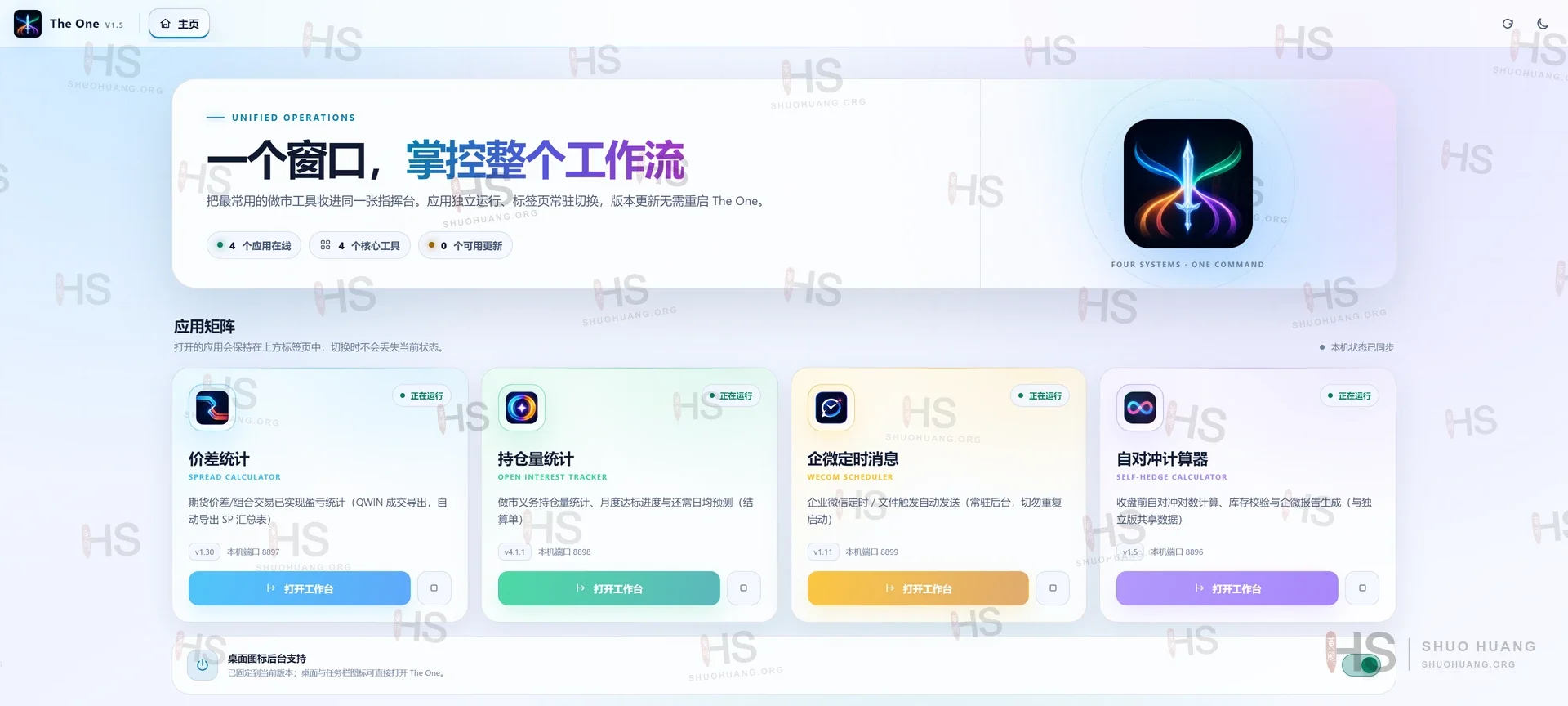
Home: every tool, live
The first screen answers the only questions that matter mid-session: what is running, at which version, and how to get to it.
- One card per tool with a live health check, running version and local port
- Summary pills: tools online, tools registered, updates available
- Light and dark themes
 Enlarge
- Marker 1: Home tab (top left): always present. Every tool you open appears as another tab to its right.
- Marker 2: Summary pills: 4 tools online, 4 registered, 0 updates available. The third pill counts new releases found on disk.
- Marker 3: Running badge: the result of a live health check that the tool must answer with the right identity fields.
- Marker 4: Version and port: the version the tool itself reports, here v1.30, and the local port it listens on.
- Marker 5: Open workspace: connects to the running tool, or starts its newest release in the background, then opens it as a tab.
- Marker 6: Stop (small square): asks for confirmation and states the consequence first, for example that scheduled messages will no longer be sent.
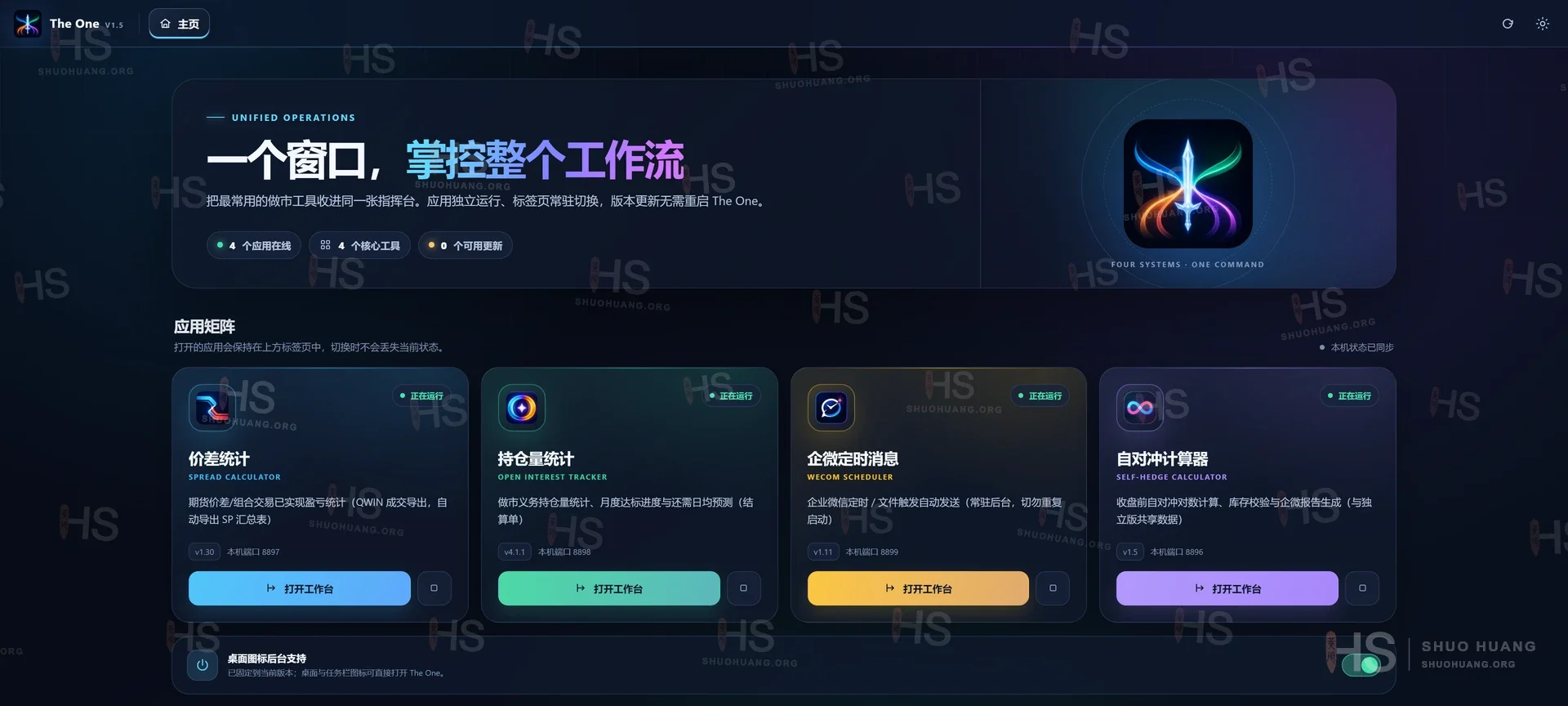 Enlarge
B
Tabs: each tool in its own tab
An opened tool becomes a tab that keeps its state while you work elsewhere, and closing the tab never stops the tool.
- Keyboard switching: Ctrl+Tab, Ctrl+W, Alt+Home
- Each tab loads the tool’s own page from the tool’s own process
- Tabs carry the tool’s color, so the bar reads at a glance
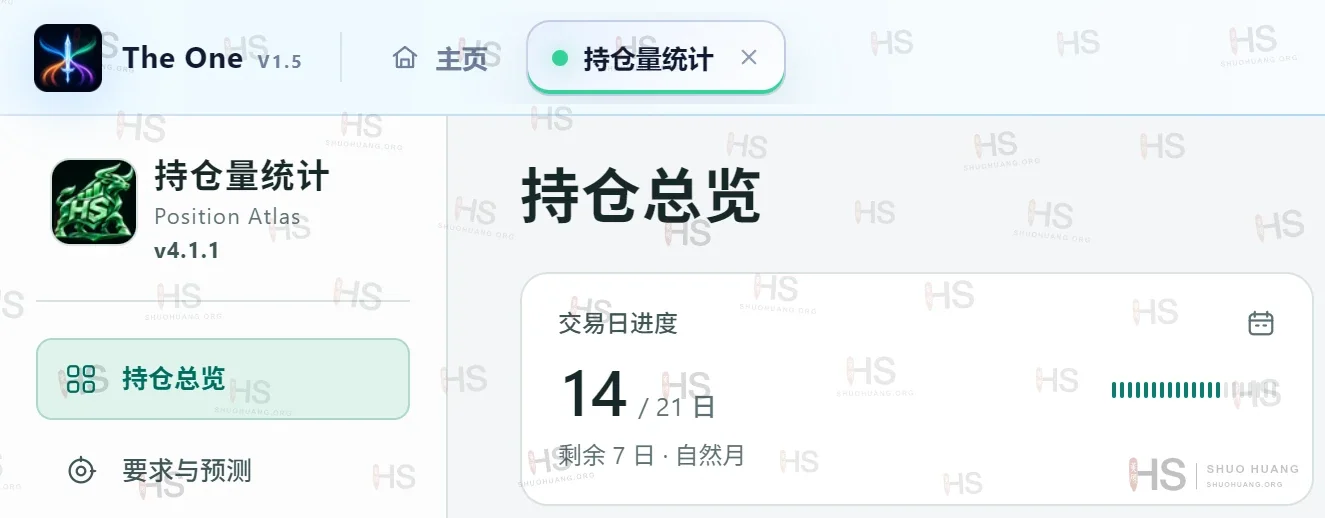 Enlarge
- Marker 1: The One v1.5: the shell. Its version has nothing to do with the versions of the tools it hosts.
- Marker 2: Home tab: one click back to the list of tools.
- Marker 3: Tool tab with a status dot and a close button. Closing it leaves the tool running in the background.
- Marker 4: The tool’s own identity: Position Atlas v4.1.1, drawn by the tool itself inside the frame.
- Marker 5: The tool’s own page: its overview, here the month’s trading-day progress, drawn just as in its standalone window.
C
Open: attach or start
One click, three possible outcomes, and the hub always says which one happened. It never guesses.
- Already running and healthy: attach to it, no restart
- Not running and its port is free: start the newest frozen release, headless
- Something unidentified on its port: refuse, and say why
D
Upgrade in place
A new release of a tool is detected on disk and offered where you are already looking; one click swaps that tool and nothing else.
- Badge on the tool’s card, an amber ring on its tab and an update button in the top bar
- Only that tool’s process and tab are replaced; the hub and the other tools keep running
- Refused while the scheduler is sending; a no-op when the tool is already current
E
Stop, safely
Stopping a background tool is deliberate: the confirmation states the consequence, and the hub will not kill what it cannot prove it owns.
- Graceful quit through the tool’s own quit route wherever the tool declares one
- Force-stop only after a four-part identity check, repeated immediately before the kill
- The scheduler and the calculator can never be force-stopped
F
A full desktop app, with nothing installed
It looks and behaves like installed software on a standard-user PC.
- Its own taskbar icon and identity, pinnable; the interface extends under the native window buttons
- Optional start with Windows, and an offline recovery page if the shortcut opens before the hub is up
- Zero install: Python standard library only, on an official signed Python runtime
05All screens
Three views of the program.
06Under the hood
The supervisor, its lifecycle rules and its safeguards, for the technical reader.
The design and the alternatives it beat, the lifecycle rule as a formula, the in-place update, the failure modes engineered out, the control-plane security, the registry and the release discipline, with pseudo-code for each key step.
Under the hoodProcess supervision, health checks and release discovery, fail-closed lifecycle rules, zero-downtime upgrades, control-plane security, pseudo-code
The One is a process supervisor with one hard constraint: it controls programs that do unattended work on a live trading desk, so every lifecycle action must be safe when the world is not in the state it expects. The pieces are the ones a service orchestrator has, at desktop scale: a declarative registry, health and identity checks, release discovery, per-service upgrade strategies, and a token-protected control plane. The hub in the running release is 1,678 lines of Python using only the standard library (http.server, subprocess, ctypes, secrets, hashlib); the shell is a single 1,479-line HTML, CSS and JavaScript file; 60 hermetic unittest cases cover both. Nothing is installed on the machine.
Design: a hub of independent processes
The design keeps each tool a separate process on its own loopback port with its own release cycle, and makes the hub a supervisor that owns no tool code. The tools already served local web pages, so a tab is a frame pointed at the tool’s own address, and the first version integrated all four without changing a line of any tool.
| Alternative | Why it was rejected |
|---|---|
| Merge the four tools into one program | Every tool change would force a hub release, breaking the core requirement that a new tool version arrives without relaunching the hub. It would also tie the uptime of two unattended services to one process. |
| Native window container (re-parenting each tool’s window) | Re-parenting another program’s window is fragile on Windows, and needless: every tool already speaks HTTP on loopback. A frame costs nothing and keeps each tool’s page byte-for-byte what it is standalone. |
| Hub serves a copy of each tool’s page | Browser storage is scoped to the page’s origin, so a copy served by the hub forks the user’s saved state. This was tried for one tool in v1.0 and replaced in v1.3 by framing the tool from its own origin; a later revision removes the leftover route and makes the registry loader reject any non-server entry. |
| Chosen: registry-driven supervisor of independent processes | Tool upgrades stay independent, a crash is contained to one tool, existing background daemons keep working, and adding a tool is one JSON entry. |
The lifecycle rule
Every action starts from two observations of a registered tool : , whether its health route answers with the required identity fields (and, where declared, exact expected values), and , whether anything at all is listening on its port. is the set of launchable releases on disk: folders named vX.Y or vX.Y.Z that contain both a bundled runtime and the tool’s entry script. Versions compare as integer tuples, so 1.10 is newer than 1.9. The case is the dangerous one, an unknown owner on a known port, and every operation refuses it.
def newest_release(tool, fresh=False):
    """The newest launchable release of a tool, or None."""
    if not fresh and scanned_recently(tool):
        return last_scan(tool)                      # a short cache between scans
    best = None
    for folder in subfolders(tool.project_folder):
        version = parse_version(folder.name)        # "v1.10" -> (1, 10, 0), else None
        if version is None:
            continue
        if not (has_runtime(folder) and has_entry_script(folder, tool)):
            continue                                # an incomplete release never launches
        if best is None or version > best.version:  # integer tuples: 1.10 > 1.9
            best = Release(folder, version)
    remember_scan(tool, best)
return bestUpgrade in place
An update replaces one tool’s process and reloads one tab. The order of the guards is the design: unknown owner first, then the same-version no-op (which protects the live scheduler from pointless restarts), then the busy guard, and only then anything destructive. Tools differ in how the old instance leaves, so the registry declares a mode per tool: in takeover mode the hub starts the new release and the tool’s own takeover logic retires the old one; in stop-then-start mode, for a tool with no takeover of its own, the hub verifies and stops the old owner first. After the start the hub polls until the health route reports the new version, ignoring answers from the old instance while the takeover is in flight.
def update(tool):
    with lock(tool):
        newest = newest_release(tool, fresh=True)
        if newest is None:
            return refuse("no launchable release")
        health = check_health(tool)                 # None unless identity fields answer
        if health is None and port_in_use(tool.port):
            return refuse("unknown owner on the port")
        if health and running_version(tool, health) >= newest.version:
            return done("already current")          # a no-op: nothing restarts
        if health and tool.is_busy(health):
            return refuse("busy, try again later")  # the scheduler while it sends
        if health and tool.mode == STOP_THEN_START:
            if not force_stop(tool):                # the hub retires the old owner
                return refuse("could not stop the old version")
        start_headless(newest)                      # takeover tools retire their old copy
        while not timed_out():
            answer = check_health(tool)
            if answer and version_of(answer, default=newest.version) >= newest.version:
                return done("updated" if health else "started")
            # an older version still answering during the takeover is ignored
return refuse("the new version did not answer in time")| Tool | Identity the hub requires | Update mode | Busy guard | Force-stop |
|---|---|---|---|---|
| Spread Calculator | three named fields, including the version | takeover (the tool retires its old instance) | none | after the four-part check |
| Position Atlas | liveness only; version taken from the hub’s own start record | stop, then start (the hub retires the old owner) | none | after the four-part check |
| WeCom Scheduler | version, data folder and sending flag; longer timeout because its status can touch a network drive | takeover | refuses update and stop while sending | never; graceful quit only |
| Self-Hedge Calculator | four named fields, two of them matched against exact expected values, so a lookalike is rejected | takeover | none | never; graceful quit only |
Failure modes engineered out
The scheduler holds live, enabled jobs and has no dry-run mode: starting it arms them. So the rules below are written for the bad day, not the demo. The force-stop path is the sharpest example: a process is killed only after it has been proven, twice, to be the registered tool and not merely something on the right port.
def force_stop(tool):
    """Stop a tool's process only once it is proven to be that tool."""
    pid = process_on_port(tool.port)
    if pid is None:
        return True                                 # nothing is listening
    if not is_python_process(pid):
        return False                                # refuse: not a Python process
    command = command_line_of(pid)
    if tool.project_folder not in command or tool.entry_script not in command:
        return False                                # refuse: not the registered tool
    if process_on_port(tool.port) != pid:           # check again just before the kill
        return False                                # refuse: the owner changed
    kill(pid)
return wait_until_port_free(tool.port)| Failure | Guard |
|---|---|
| Two schedulers armed with the same jobs | Start only when the port is confirmed free; attach whenever the health check passes; an update to the same or an older version is a no-op. |
| A send interrupted or duplicated by a restart | Update and stop are refused while the scheduler reports it is sending. |
| Killing the wrong process | Force-stop requires all of: a Python image, the registered project path, the registered entry script on its command line, and a second identical PID-on-port check immediately before the kill. |
| A different service squatting on a tool’s port | Health answers must carry the required fields and exact expected values; anything else is treated as unknown and nothing is opened, updated or stopped. |
| An old launcher downgrading the running hub | Only a strictly newer, parseable version may take over the hub’s own port. |
| Tests reaching production | Suites run on OS-assigned ports with mocked lifecycle calls; a meta-test fails the build if any test targets a live tool’s port. |
| Forked user state | Tools are framed from their own origin; the hub never serves a second copy of a tool’s page. |
| Window closed, work lost | Tools are detached processes that outlive the hub and the window. |
Local control-plane security
A loopback HTTP server that can start and stop programs is a target for any web page open in the same browser. From v1.1 no other web page can drive the control API:
- Exact host: every route requires the exact loopback host and port in the
Hostheader, which defeats DNS rebinding. - Per-process token: every state-changing request must carry a 256-bit token (
secrets.token_urlsafe(32)) generated fresh at every start and injected server-side into the hub’s own shell. - Same origin: browser requests are checked on
OriginandSec-Fetch-Site. - Bounded input: request bodies are capped at 64 KiB.
- Hardened responses: Content-Security-Policy,
nosniff, no-referrer, cross-origin resource and opener policies, and a permissions policy. - No port hijack: the listening socket is opened without address reuse, and a foreign process on the hub’s port is never cleared.
The registry: adding a tool is one entry
Everything the hub knows about a tool is data, kept in one JSON registry. The scheduler’s entry, outlined below, says how to start it headless, which fields make a health answer trustworthy, which field means busy, how to ask it to quit, and that it may never be force-stopped.
tool: message scheduler
    start          newest release, headless (no window of its own)
    health check   its status route, with a longer timeout than the default
    trusted if     the answer carries its version, data folder and sending flag
    version        read from the answer
    busy           while the sending flag is set: no update, no stop
    upgrade        takeover: the new release retires the old instance itself
    stop           graceful quit through the tool's own route
    force-stop     never
resident yes: it keeps working in the background, window or no windowDesktop shell on a standard-user PC
The target is a standard-user Windows PC with nothing installed and no system Python. The hub therefore ships as a folder: standard-library code on an official signed Python runtime, pruned to about 32 MB. Windows services and off-the-shelf process supervisors were out by construction: both need administrator rights or an installation.
- Taskbar identity: the window’s shell property store is stamped with its own AppUserModelID and
RelaunchIconResource, and a keeper thread re-appliesWM_SETICON, so the hub pins and groups as its own application. The mechanism is reused from the Spread Calculator, where it was first solved. - Installable app window: a web app manifest with Window Controls Overlay lets the interface extend under the native window buttons; once the browser adds it as an app (a per-user browser feature), later launches open it directly.
- Resident backend: a browser-app shortcut cannot start Python, so the hub stays resident through a user-level startup entry that heals itself to the current release, and a service worker serves an offline page that explains how to recover. The service worker never caches API responses.
- Live logos: home-card logos are read from each tool’s newest release and served by content hash (SHA-256) with immutable caching; a stale address redirects to the current one, so a tool’s rebrand shows after one refresh.
- Hub activation: activating a new hub release replaces only the hub process; all four tools keep running untouched.
Tests and releases
Each release is frozen into its own versioned folder with a zip that is verified byte-for-byte against the folder, and frozen folders are never edited. The test suites are hermetic: throwaway ports assigned by the operating system, mocked process control, and a meta-test that forbids the live tools’ ports as targets, so no test run can start, stop or message anything live. The in-place upgrade was proven end to end through the interface itself, on a throwaway app moved from v0.1 to v0.2, never on a live tool. The suite grew with every release, from 31 cases to 60 in one day.
| Release | Date | What it added | Hermetic tests |
|---|---|---|---|
| v1.0 | 29 Jul 2026 | Hub core, attach or start, in-place update, confirmed stop, taskbar identity, start with Windows | live-tested |
| v1.1 | 29 Jul 2026 | Rebuilt interface with dark and light themes, installable app window, fail-closed lifecycle guards, control-plane security sweep | 31 |
| v1.2 | 30 Jul 2026 | Final icon, locked icon pipeline | 36 |
| v1.3 | 30 Jul 2026 | Calculator framed from its own origin, exact identity check | 40 |
| v1.4 | 30 Jul 2026 | Resident backend, self-healing startup entry, offline recovery page | 56 |
| v1.5 | 30 Jul 2026 | Live, content-addressed tool logos | 60 |
Built with
- Python (standard library only)
- Process supervision ·
subprocess - Health checks · release discovery
- Loopback HTTP control API ·
http.server - 256-bit control token ·
secrets ctypes· Win32 shell identity- PowerShell · CIM process inspection
- JSON registry
- HTML · CSS · JavaScript
- PWA · Window Controls Overlay
- Service worker
- Content-Security-Policy
- SHA-256 content addressing
unittest· 60 hermetic tests- Zero-install signed runtime
07Releases
Shipped in versions, like a product.
- 1.0First frozen release, 2 h 14 min after the concept: home page, tabs, attach or start, in-place upgrades, confirmed stop, its own taskbar identity, start with Windows.
- 1.1Rebuilt interface with dark and light themes, installable app window, identity-verified force-stop and a security sweep of the local control API. 31 tests.
- 1.2The final icon, chosen because it stays legible at taskbar size. 36 tests.
- 1.3The calculator is framed from its own address, so the standalone app and the tab share one saved state. 40 tests.
- 1.4Resident backend, self-healing startup entry and an offline recovery page. 56 tests.
- 1.5Tool logos read live from each tool’s newest release. 60 tests. Still the running release 113 days later.
08Related
Programs that work with this one.
-
Spread Calculator
The desk’s spread-trading P&L, rebuilt from raw exchange fills and published by itself after every close.
-
Position Atlas
A market-making obligation tracker built by one trader: 2,410 of 2,410 contract-days matched the exchanges’ own obligation reports.
-
WeCom Scheduler
Desk reports post themselves to the team chat: recipient proven, never twice.
-
Self-Hedge Calculator
The pre-close calculator for a market maker’s end-of-day offset filing: exact to the lot, checked against inventory, report written.
- 1Concept written at 14:25 and v1.0 frozen and running at 16:39 on July 29, 2026 (local time), delivered in four phases.
- 2v1.0 through v1.5; v1.5 went live at 18:26 on July 30, 2026, about 28 hours after the concept was written.
- 3v1.5 went live at 18:26 on July 30, 2026 and was the running release when the page’s screenshots were captured on November 20, 2026. Over that period the hosted tools moved from v1.8 to v1.30 (Spread Calculator), v1.5 to v4.1.1 (Position Atlas), v1.7 to v1.11 (WeCom Scheduler) and v1.3 to v1.5 (Self-Hedge Calculator): 43 new versions in all, counted from each tool’s versioned release folders and release history. The hub’s own release folders end at v1.5.
- 4Office PC replacement, September 2026. The Spread Calculator was restarted through The One from its newest release; the running WeCom Scheduler was attached, not restarted.
- 5By design: an update replaces one tool’s process and its tab. Proven end to end through the interface itself on a throwaway test app before release.
- 6Full hermetic suite at v1.5. Tests run on operating-system-assigned ports with mocked process control; a meta-test forbids the live tools’ ports as targets.